
Registration & login add-on
Custom user profile fields for WordPress
Add unlimited custom fields to registration, checkout, and edit profile forms, and collect the information that standard WordPress profiles leave out.
- Registration
- Checkout
- Edit profile
- User profiles
Included in Standard, Plus and Agency plans
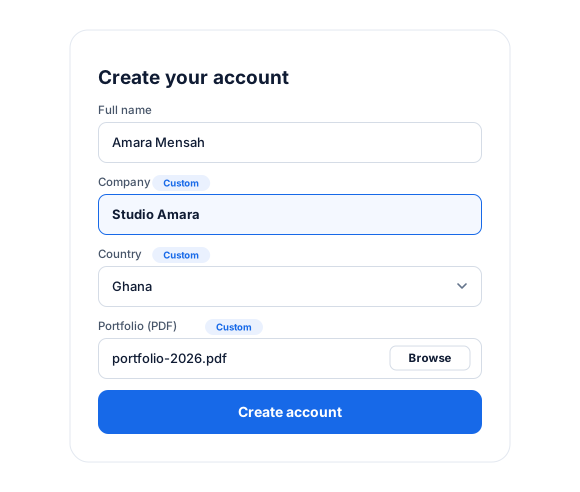
10+ Field Types
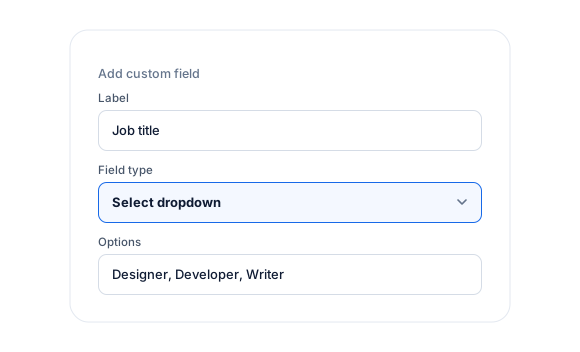
Collect additional profile information from WordPress users using any of our supported field types: Text, Password, Email, Telephone, Hidden Field, Number, Date, Country, Textarea, File Uploader, Select Dropdown, Radio Buttons, Checkbox.
Registration Forms Integration
Collect unlimited data from users when you add custom fields to your WordPress registration forms.
Manage Custom Fields, Data
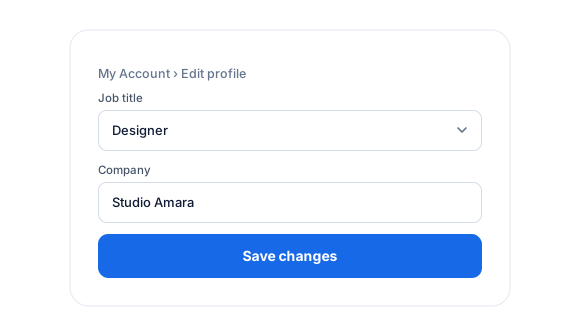
Your users can manage their standard and custom field data from the My Account page or a frontend edit profile form in WordPress.
As an admin, you can edit their profile information from the default user profile page in your WordPress admin dashboard.
Display Fields on User Profiles
All standard and custom field data can be displayed or added to user profiles on the frontend of your website.
Custom Fields add-on
Everything included.
Custom Fields is part of ProfilePress, so there’s no extra plugin to install, configure, or keep updated.
13 field types
Text, password, email, telephone, hidden, number, date, country, textarea, file upload, select, radio, and checkbox.
Registration and checkout
Collect extra information during user registration and at checkout.
Members edit their own data
Members manage standard and custom fields from My Account or a frontend edit profile form.
Admins stay in control
Edit any member’s custom field data from their profile in the WordPress dashboard.
Show fields on profiles
Display standard and custom field data on frontend user profiles.
WooCommerce checkout fields
With the WooCommerce add-on, add custom fields to the WooCommerce checkout registration.
Custom Fields, up close.
01
13 field types
Collect exactly what you need with text, password, email, telephone, hidden, number, date, country, textarea, file upload, select, radio, and checkbox fields.
02
Members manage their own data
Members update standard and custom fields from My Account, or a frontend edit profile form, and admins can edit any profile from the dashboard.
03
Show fields on profiles and checkout
Display custom field data on frontend user profiles, and add fields to the checkout—including WooCommerce checkout with the WooCommerce add-on.

Up and running in minutes.
No code required. Read the full Custom Fields guide.
1
Switch it on
Go to ProfilePress › Add-ons and switch on Custom Fields.
2
Configure
Under Settings › Custom Fields, add a label, key, and field type.
3
Go live
Add the fields to your registration, checkout, or edit profile forms.
Custom Fields FAQ
Still unsure? Talk to our support team.
Is Custom Fields included with ProfilePress?
Yes. Custom Fields is included in every ProfilePress premium plan: Standard, Plus and Agency. Activate it from ProfilePress › Add-ons—there’s no extra plugin to install.
Do I need to know how to code?
No. Everything is configured from the ProfilePress settings in your WordPress dashboard.
Can I try ProfilePress first?
Yes. Explore most features on the live demo, and every plan comes with a 14-day money-back guarantee.
Related add-ons
Registration & login.
Pair add-ons together to build exactly the membership experience you want.
Email Confirmation
Confirmation link · Auto-login
Social Login
Google · Facebook
Passwordless Login
One-time link · Email login
All add-ons
41+ ways to extend ProfilePress
Collect exactly the
member data you need.
Add text, date, country, file upload, and other fields to your registration forms, then show them on profiles and directories.