
Registration & login add-on
Invite codes for invite-only WordPress registration
Want to create an exclusive online community, restrict user registration, or maintain a tight-knit group of members?
- Usage limits
- Expiry dates
- Bulk codes
Included in Standard, Plus, and Agency plans
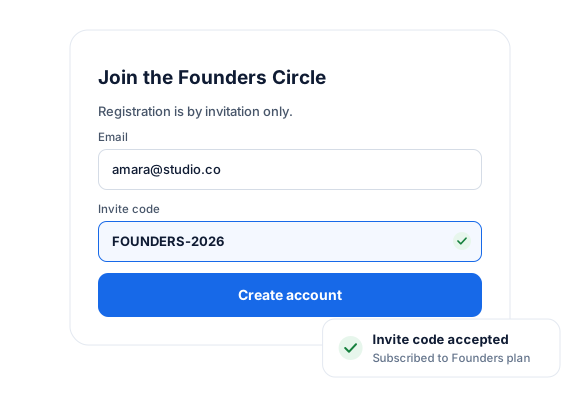
Our WordPress Invite Code addon ensures only users with a valid invite code can join your WordPress site.
Why Invite-Only Registration?
Enhanced Security: Protect your community WordPress site using invite codes to prevent unauthorized access and safeguard your content and discussions.
Boost Engagement: Create a sense of exclusivity to boost community engagement. Members are more likely to participate when they feel part of something special.
Track Invitations: Monitor invite code usage in WordPress to gain insights into your community’s growth.
Key Features
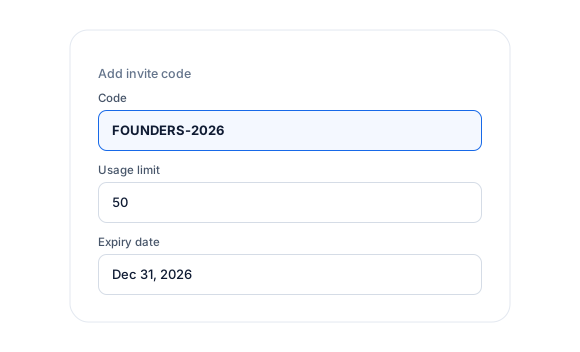
Limit the number of times a code can be used for WordPress registration.
Set an expiration date for invitation codes; they will be invalid after that date.
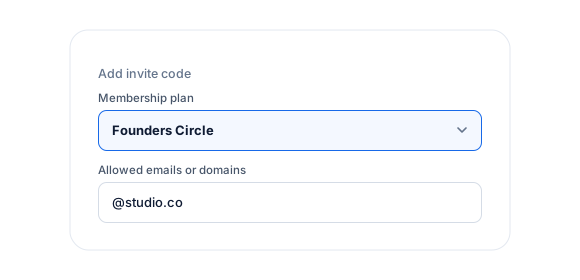
Users can subscribe to specific WordPress membership plans by registering with a unique invite code.
Bulk Code Generator
Need to generate many invite codes at once? Use our bulk code-generation feature to save time.
WordPress Invite Codes Plugin
Everything included.
Invite Codes is part of ProfilePress, so there’s no extra plugin to install, configure, or keep updated.
Invite-only signup
Only users with a valid invitation code can register for your WordPress site.
Usage limits
Limit how many people can register with each code in WordPress
Expiry dates
Invite codes stop working after the date you set.
Codes that unlock plans
Subscribe users to a specific membership plan when they register with an invitation code.
Allowed emails and domains
Limit an invite code to specific email addresses or email domains.
Bulk generation
Auto-generate many codes at once to share with your list.
Invitation codes for WordPress registration.
01
Codes with limits and expiry dates
Set how many people can use each invite code for WordPress registration and when it stops working.
02
Codes that unlock plans
Subscribe users to a specific membership plan when they register with a code, and limit codes to certain emails or domains.
03
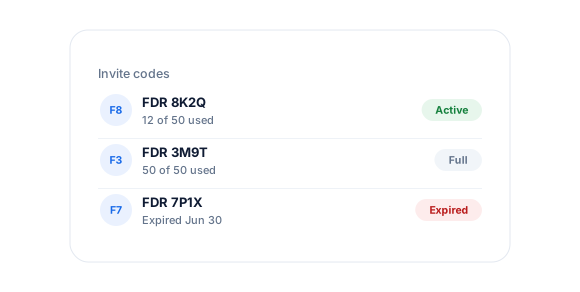
Generate codes in bulk
Auto-generate many codes at once to share with your list, partners, or event attendees.
Up and running in minutes.
No code required. Read the full Invite Codes guide.
1
Switch it on
Go to ProfilePress › Add-ons and switch on Invite Codes.
2
Configure
Under Settings › Invite Codes, add codes or auto-generate them in bulk.
3
Go live
Share the codes and your registration page.
Invite Codes FAQ
Still unsure? Talk to our support team.
Is Invite Codes included with ProfilePress?
Yes. Invite Codes is included in every ProfilePress premium plan: Standard, Plus, and Agency. Activate it from ProfilePress › Add-ons—there’s no extra plugin to install.
Do I need to know how to code?
No. Everything is configured from the ProfilePress settings in your WordPress dashboard.
Can I try ProfilePress first?
Yes. Explore most features on the live demo, and every plan comes with a 14-day money-back guarantee.
Related add-ons
Registration & login.
Pair add-ons together to build exactly the membership experience you want.
Custom Fields
Registration · Checkout
Email Confirmation
Confirmation link · Auto-login
Social Login
Google · Facebook
All add-ons
41+ ways to extend ProfilePress
Keep your community
invite-only.
Create an invite-only WordPress registration form today to ensure only invited users can sign up to your website.