
Online course add-on
Sell Academy LMS courses and auto-enroll students
Sell access to Academy LMS courses and enroll users in specific courses after WordPress registration.
What you can sell
- Courses
- Course bundles

Sell Academy LMS Courses
This addon lets you charge or sell access to your courses in Academy LMS. It works by associating one or multiple courses with a membership plan. If the membership plan is a subscription, access is revoked if the subscription is refunded, expired, or canceled in WordPress.
Selling your courses in Academy LMS with ProfilePress is a far better experience because:
- You can package two or more related courses into a bundle, price it lower than the cost of the individual courses, and watch your sales grow.
- The WordPress checkout page is highly optimized for conversions.
- ProfilePress supports many payment gateways, including Stripe, PayPal, Razorpay, Paddle, Paystack, Direct Bank Transfer, Mollie.
Custom Academy LMS Registration & Login Forms
Are you using the Academy LMS login & registration modal forms but want to replace them with a custom WordPress registration and login page?
This addon creates a unique login and enrollment experience, letting you auto-enroll users in specific courses after registration based on the registration form they use.
Easy to Set Up in WordPress
Get the addon up and running in WordPress in a matter of minutes. No tearing out of hair. It’s a promise.
Academy LMS + ProfilePress
Everything you need to sell your courses.
The Academy LMS add-on connects Academy LMS to ProfilePress memberships and checkout so that you can charge for courses without extra plugins.
Sell course access
Link Academy LMS courses to a membership plan and sell access with one-time or recurring payments.
Auto-enroll after registration
Enroll new users in specific Academy LMS courses the moment they register.
Course bundles
Package related courses into a bundle and price it lower than buying each one separately.
Access that follows payment
If a subscription is refunded, expires, or is canceled, course access is removed automatically.
Every major payment gateway
Take payments through Stripe, PayPal, Razorpay, Paddle, Paystack, Direct Bank Transfer, Mollie.
Checkout built to convert
A fast, focused checkout that creates the student’s account as they pay.
Academy LMS, up close.
01
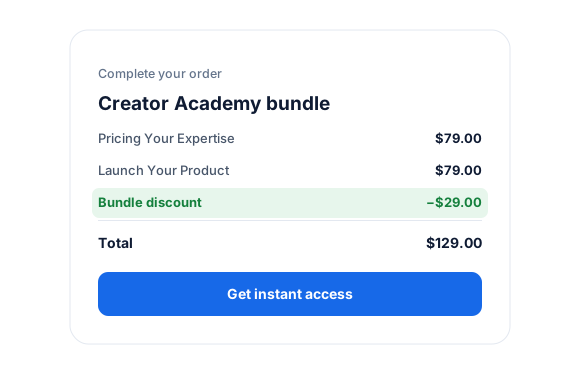
Bundle and grow your sales
Package two or more related courses into a bundle, price it lower than buying each one separately, and sell it through a checkout built to convert.
- One-time or recurring pricing
- Stripe, PayPal, Mollie, Razorpay, Paystack and Paddle
02
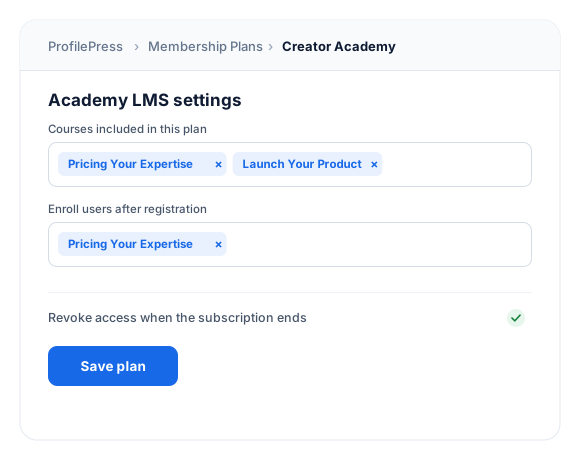
Enrollment and access on autopilot
Buyers are enrolled in the plan’s courses the moment they pay. If a subscription is refunded, expires, or is canceled, access is removed automatically.
- Enroll after payment
- Remove access when a subscription ends
03
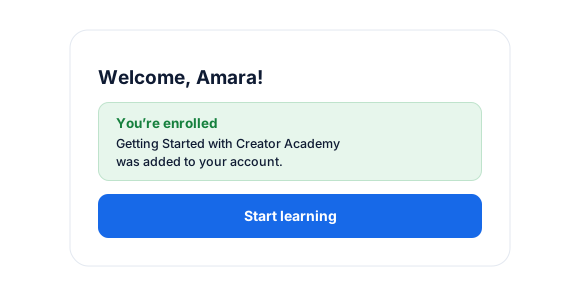
Free enrollment on registration
Choose the courses new users join after they register through a ProfilePress form, so free signups land in exactly the right place.
How it works
From checkout to classroom in seconds.
No manual enrollment and no spreadsheets. ProfilePress gives every buyer the right courses automatically.
You set up
Link courses to a plan
Choose the Academy LMS courses included in a membership plan, or bundle several together.
Customer buys
Pays at checkout
The student pays with their preferred gateway and gets an account automatically.
Instantly
Enrolled automatically
ProfilePress enrolls them in the plan’s courses as soon as payment succeeds.
Subscription ends
Access is removed
If a subscription is refunded, expires, or is canceled, the linked courses lock again.
Connect Academy LMS in minutes.
Activate the add-on, choose the courses each plan unlocks, and you’re ready to sell. No code required.
1
Activate the add-on
Go to ProfilePress › Add-ons and switch on Academy LMS.
2
Link courses to plans
Open a membership plan and pick the Academy LMS courses it should unlock.
3
Share your checkout
Add the plan’s checkout link to your sales page and start enrolling students.
Academy LMS add-on FAQ
Still unsure? Talk to our support team.
Is the Academy LMS add-on included with ProfilePress?
Yes. Academy LMS is included in every ProfilePress premium plan: Standard, Plus and Agency. Activate it from ProfilePress › Add-ons—there’s no extra plugin to install.
Do I need WooCommerce to sell Academy LMS courses?
No. ProfilePress has its own checkout and payment gateways so you can sell courses without WooCommerce.
Can I enroll users for free when they register?
Yes. Choose the courses new users should join after registration—no payment needed.
What happens if a subscription ends?
If a subscription is refunded, expires or is canceled, access to the linked courses is removed automatically.
Which payment gateways can I use?
Supports Stripe, PayPal, Razorpay, Paddle, Paystack, Direct Bank Transfer, Mollie.
More course & community integrations
Bring your favorite learning platform.
ProfilePress works with the most popular WordPress LMS and community plugins.
LearnDash
Sell courses and groups
LifterLMS
Sell courses and memberships
Tutor LMS
Sell courses
Sensei LMS
Sell courses and groups
MasterStudy LMS
Sell courses
FluentCommunity
Sell spaces and courses
BuddyPress & BuddyBoss
Sell groups
All add-ons
41+ ways to extend ProfilePress
Sell your Academy LMS courses
with a better checkout.
Bundle courses into membership plans and enroll students automatically after they register or pay.