
Online course add-on
Sell Sensei LMS courses and groups in WordPress
Sell access to Sensei LMS courses and groups, enroll users after WordPress registration in specific courses and groups, and let users view their enrolled courses from the My Account page.
What you can sell
- Courses
- Groups
- Course bundles
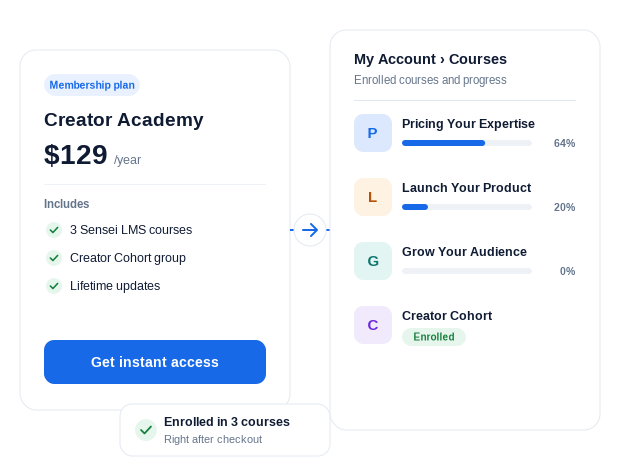
ProfilePress is a better alternative to WooCommerce for selling Sensei courses.
Selling Sensei LMS Courses & Groups
This addon lets you charge for or sell access to your courses and groups in Sensei LMS. It works by associating one or more courses and groups with a membership plan in WordPress. If the membership plan is a subscription, access is revoked if the subscription is refunded, expired, or canceled.
Selling your courses in Sensei LMS with ProfilePress is a far better experience because:
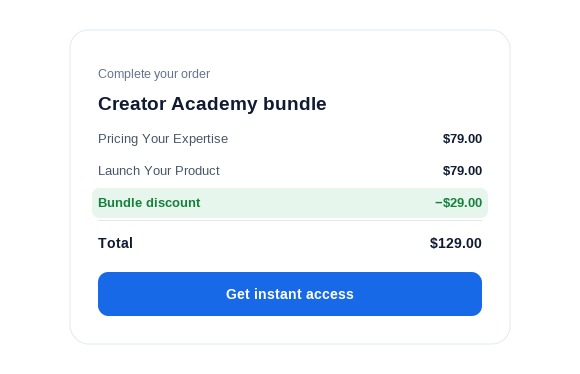
- You can package two or more related courses into a bundle, price it lower than the cost individually, and watch your sales grow.
- The checkout page is highly optimized for conversions.
- ProfilePress supports many payment gateways, including Stripe, PayPal, Razorpay, Paddle, Paystack, Direct Bank Transfer, Mollie.
Show Enrolled Courses on My Account Page
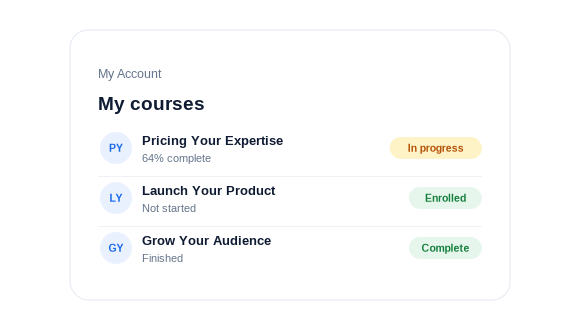
The addon adds a Courses menu to the My Account page, where users can view their enrolled courses, course progress, and other related information on your WordPress website.
Easy to Set Up in WordPress
Get the addon up and running in minutes. No tearing out of hair. It’s a promise.
Sensei LMS + ProfilePress
Everything you need to sell your courses.
The Sensei LMS add-on connects Sensei LMS to ProfilePress memberships and checkout so that you can charge for courses and groups without extra plugins.
Sell courses and groups
Link one or more Sensei LMS courses and groups to a membership plan and sell access.
Course bundles
Package related Sensei LMS courses into a bundle and price it lower than buying each one separately.
Auto-enroll after registration
Students are enrolled in the right courses and groups as soon as they register and pay.
No WooCommerce required
A simpler alternative to selling Sensei courses through Sensei Pro (WC Paid Courses) and WooCommerce.
Courses in My Account
Students see their enrolled courses right from the My Account page.
Access that follows payment
If a subscription is refunded, expires, or is canceled, course access is removed automatically.
Sensei LMS, up close.
01
Bundle and grow your sales
Package two or more related courses and groups into a bundle, price it lower than buying each one separately, and sell it through a checkout built to convert.
- One-time or recurring pricing
- Stripe, PayPal, Razorpay, Paddle, Paystack, Direct Bank Transfer, Mollie
02
Enrollment and access on autopilot
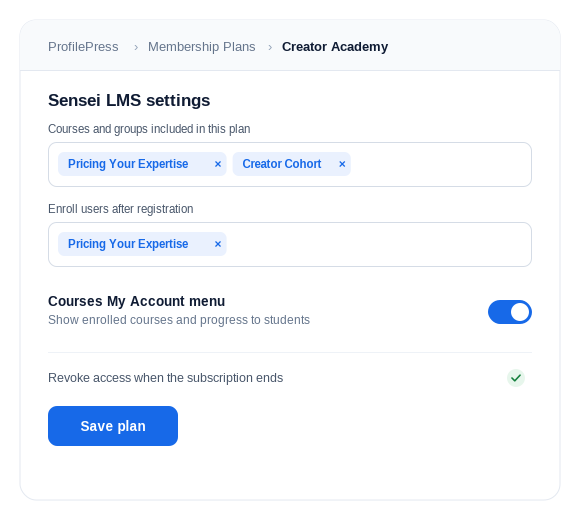
Buyers are enrolled in the plan’s courses and groups as soon as they pay. If a subscription is refunded, expires, or is canceled, access is removed automatically.
- Enroll after payment
- Remove access when a subscription ends
03
Courses in My Account
Turn on the Courses in My Account menu, and students see their enrolled courses and progress right on the My Account page.
How it works
From checkout to classroom in seconds.
No manual enrollment and no spreadsheets. ProfilePress automatically grants every buyer access to the right courses and groups from Sensei LMS.
You set up
Link courses and groups to a plan
Choose the Sensei LMS courses and groups included in a membership plan, or bundle several together.
Customer buys
Pays at checkout
The student pays with their preferred gateway and gets an account automatically.
Instantly
Enrolled automatically
ProfilePress enrolls them in the plan’s courses and groups as soon as payment succeeds.
Subscription ends
Access is removed
If a subscription is refunded, expires, or is canceled, the linked courses and groups lock again.
Connect Sensei LMS in minutes.
Activate the add-on, choose the courses and groups each plan unlocks, and you’re ready to sell. No code required.
1
Activate the add-on
Go to ProfilePress › Add-ons and switch on Sensei LMS.
2
Link courses and groups to plans
Open a membership plan and pick the Sensei LMS courses and groups it should unlock.
3
Share your checkout
Add the plan’s checkout link to your sales page and start enrolling students.
Sensei LMS add-on FAQ
Still unsure? Talk to our support team.
Is the Sensei LMS add-on included with ProfilePress?
Yes. Sensei LMS is included in every ProfilePress premium plan: Standard, Plus and Agency. Activate it from ProfilePress › Add-ons—there’s no extra plugin to install.
Do I need WooCommerce to sell Sensei LMS courses?
No. ProfilePress has its own checkout and payment gateways so that you can sell courses and groups without WooCommerce.
Can I enroll users for free when they register?
Yes. Choose the courses and groups new users should join after registration—no payment needed.
What happens if a subscription ends?
If a subscription is refunded, expires or is canceled, access to the linked courses and groups is removed automatically.
Where do students see their courses?
Turn on the Courses My Account menu and students see their enrolled courses and progress on the My Account page.
Which payment gateways can I use?
Supports Stripe, PayPal, Razorpay, Paddle, Paystack, Direct Bank Transfer, Mollie.
More course & community integrations
Bring your favorite learning platform.
ProfilePress works with the most popular WordPress LMS and community plugins.
LearnDash
Sell courses and groups
LifterLMS
Sell courses and memberships
Tutor LMS
Sell courses
Academy LMS
Sell courses
MasterStudy LMS
Sell courses
FluentCommunity
Sell spaces and courses
BuddyPress & BuddyBoss
Sell groups
All add-ons
41+ ways to extend ProfilePress
Sell your Sensei LMS courses
without WooCommerce.
Bundle courses and groups into membership plans, and show students their enrolled courses on My Account.