
Integration add-on
WooCommerce memberships and account integration
Create powerful WooCommerce membership websites, manage WooCommerce shipping and billing fields, and replace the WooCommerce login, registration, and edit account forms displayed on checkout and My Account pages with ProfilePress forms.
- Memberships
- Member discounts
- Account forms
- Billing & shipping
Included in Plus and Agency plans
Create a Membership Website with WooCommerce
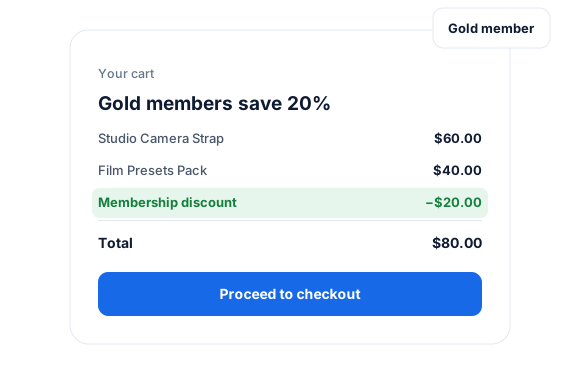
Setting up memberships for your WooCommerce store offers multiple benefits, including exclusive discounts and content that enhance community engagement and add value for your most loyal customers.
ProfilePress lets you create WooCommerce membership websites and automatically discount WooCommerce products for users with active memberships.
Manage Billing & Shipping Fields
Import WooCommerce billing and shipping fields so users can provide their billing and shipping data during account registration and manage the data using our frontend edit profile forms and My Account page.
It also supports custom billing and shipping fields added by the Checkout Field Editor extension.
Replace WooCommerce Login & Registration Forms
WooCommerce has a basic login and registration form on its My Account page. Replacing them with attractive, customizable forms from ProfilePress is only a few clicks away. You can add custom fields, including billing and shipping fields, to the registration form.
Replace Checkout Login Form
The addon also lets you replace the default login form on the WooCommerce checkout page with a custom one from ProfilePress.
Add Checkout Registration Fields
Add extra fields to the registration or create account section of WooCommerce checkout.
Replace My Account Edit Profile Form
You can also replace the account details form on the WooCommerce My Account page.
View Orders
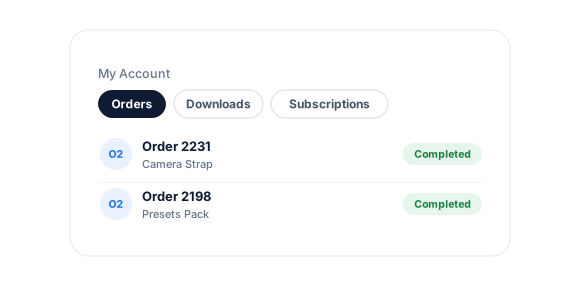
Let users view their WooCommerce orders from the My Account page. They can also view and manage the individual orders.
View Downloads
Allow users to access the downloadable files of their orders from the My Account page.
View Subscriptions
The WooCommerce Subscriptions integration lets users view and access their subscriptions from the account page.
View Memberships
The integration with the WooCommerce Memberships plugin lets users view and manage their memberships from the ProfilePress account page.
Easy to Set Up
Get the addon up and running in minutes. No tearing out of hair. It’s a promise.
WooCommerce add-on
Everything included.
WooCommerce addon is part of ProfilePress, so there’s no extra plugin to install, configure, or keep updated.
Sell memberships as products
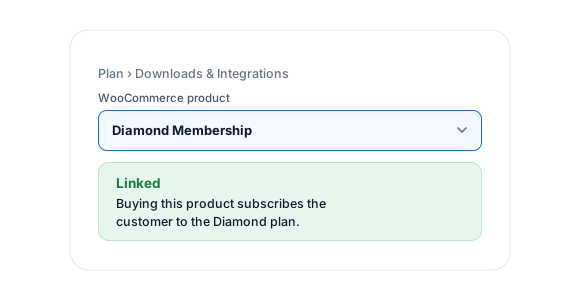
Buying a WooCommerce product subscribes the customer to a ProfilePress membership plan.
Automatic member discounts
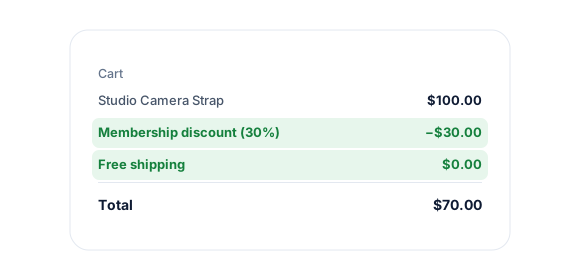
Link a coupon to a plan, and it’s applied automatically for active members.
Members-only products
Use content protection to hide products from non-members and create a private store.
Billing and shipping fields
Collect billing and shipping details at registration and let members edit them later.
Better account forms
Replace the WooCommerce login, registration, and account details forms with ProfilePress.
Orders in My Account
Members view orders, downloads, subscriptions and memberships from one account page.
WooCommerce, up close.
01
Sell memberships as WooCommerce products
Link a WooCommerce product to a ProfilePress plan. Buyers are subscribed automatically, and if an order is canceled or refunded, the subscription becomes inactive.
02
Members-only discounts and stores
Attach a coupon to a plan, and it’s applied automatically for active members—free shipping included. Use content protection to hide products from non-members.
03
One account area for everything
Replace WooCommerce login, registration, and account forms, and show orders, downloads, subscriptions, and memberships in ProfilePress My Account.
Up and running in minutes.
No code required. Read the full WooCommerce guide.
1
Switch it on
Go to ProfilePress › Add-ons and switch on WooCommerce.
2
Configure
Link WooCommerce products and coupons to your membership plans.
3
Go live
Choose which WooCommerce forms to replace under Settings › WooCommerce.
WooCommerce FAQ
Still unsure? Talk to our support team.
Is WooCommerce included with ProfilePress?
Yes. WooCommerce is included in the ProfilePress Plus and Agency plans. Activate it from ProfilePress › Add-ons—there’s no extra plugin to install.
What happens if an order is refunded?
If a WooCommerce order is canceled or refunded, the linked membership subscription becomes inactive automatically.
Do I need to know how to code?
No. Everything is configured from the ProfilePress settings in your WordPress dashboard.
Can I try ProfilePress first?
Yes. Explore most features on the live demo, and every plan comes with a 14-day money-back guarantee.
Related add-ons
eCommerce, affiliate & more.
Pair add-ons together to build exactly the membership experience you want.
SliceWP
Commissions · Recurring commissions
AffiliateWP
Referral tracking · Commissions
Polylang
Login · Registration
All add-ons
41+ ways to extend ProfilePress
Add memberships to
your WooCommerce store.
Give members automatic product discounts, manage billing and shipping fields, and replace WooCommerce’s account forms.