
Payment gateway add-on
WordPress PayPal Checkout
Accept payments via PayPal in WordPress, including Visa, Mastercard, Venmo, Discover, iDEAL, American Express, Bancontact, BLIK, giropay, MyBank, Przelewy24.
Supported payment methods
- PayPal
- Venmo
- Visa
- Mastercard
- American Express
- Discover
- iDEAL
- Bancontact
- BLIK
- giropay
- MyBank
- Przelewy24
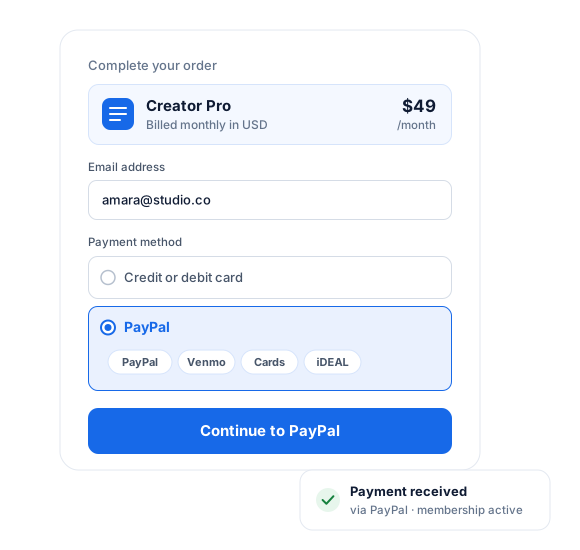
WordPress PayPal Plugin Features
Our PayPal Addon is packed with features that let you accept payments on your WordPress website. These include one-time charges and subscriptions.
You can also quickly refund a customer from within your WordPress dashboard, helping to provide impressive customer service.
Easy Setup of PayPal Checkout
Setting up the PayPal addon to start collecting payments is easy, making our plugin one of the best PayPal checkout plugins for WordPress.
PayPal + ProfilePress
Everything you need to get paid with PayPal.
The PayPal add-on connects your PayPal account to ProfilePress checkout so that you can sell memberships, courses, and digital downloads without extra plugins.
100+ currencies
Get paid by customers worldwide in over 100 currencies.
Refunds from WordPress
Refund a customer from your WordPress dashboard. No need to log in to PayPal.
Smart payment buttons
PayPal automatically offers extra options, such as Venmo, when they suit the customer.
One-time and recurring payments
Charge once, or bill members automatically on a recurring schedule with PayPal.
Free trials & sign-up fees
Set trial periods and one-off sign-up fees on any membership plan.
Checkout that creates the account
New customers get a member account automatically when they pay. No separate registration step.
PayPal Checkout Plugin for WordPress
01
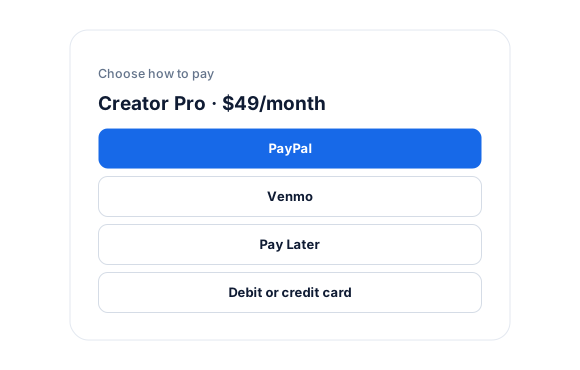
Checkout options your customers already trust
PayPal’s smart payment buttons appear right on your ProfilePress checkout. PayPal decides which options suit each buyer—Venmo isn’t offered outside the US, for example.
- PayPal balance, Venmo and cards
- Visa, Mastercard, American Express, Discover
- iDEAL, Bancontact, BLIK, giropay, MyBank, Przelewy24
02
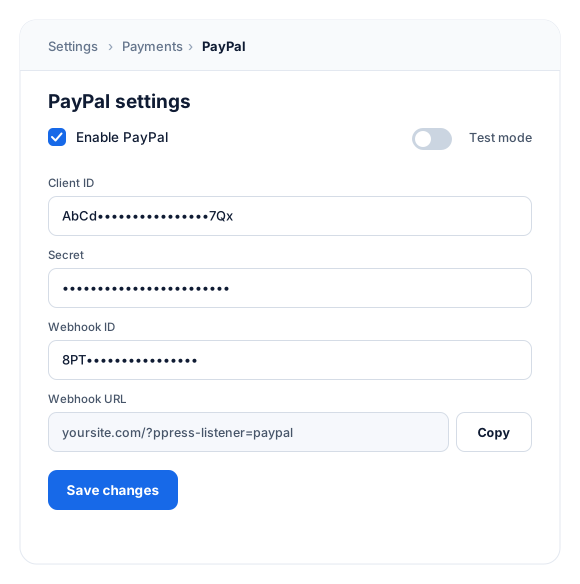
Connect your PayPal app in minutes
Create an app in the PayPal developer dashboard, then paste its Client ID, Secret, and Webhook ID into ProfilePress. Webhooks keep orders and subscriptions in sync automatically.
- Live and Sandbox apps
- Webhook URL ready to copy
- Option to hide billing address fields
03
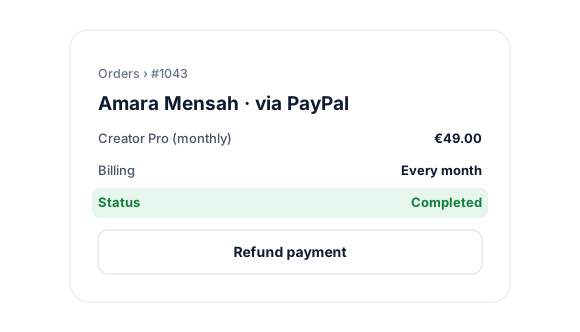
Subscriptions and refunds, handled in WordPress
Sell one-time products and recurring memberships in over 100 currencies, and refund customers from your WordPress dashboard without logging in to PayPal.
Start accepting PayPal payments in minutes.
No code and no developer needed. Connect your PayPal account once, and every membership plan can use it.
Test with the PayPal Sandbox
Turn on test mode, create a Sandbox app, and use PayPal’s test buyer and business accounts to run purchases before going live.
1
Activate the add-on
Go to ProfilePress › Add-ons and switch on PayPal. There’s nothing else to install.
2
Connect your PayPal account
Create an app at developer.paypal.com, then add its Client ID, Secret, and Webhook ID under ProfilePress › Settings › Payments › Payment Methods.
3
Start selling
Run a test purchase in test mode, then share your plan’s checkout link or add it to your pricing page.
PayPal add-on FAQ
Still unsure? Talk to our support team.
Is the PayPal add-on included with ProfilePress?
Yes. PayPal is included in every ProfilePress premium plan: Standard, Plus and Agency. Activate it from ProfilePress › Add-ons—there’s no extra plugin to install.
Can I offer PayPal alongside Stripe and other payment methods?
Yes. Enable as many payment methods as you like, and customers choose their preferred option at checkout.
Does it support recurring subscriptions?
Yes. Create recurring membership plans in ProfilePress and PayPal bills your members automatically on each renewal.
Can I test payments before going live?
Yes. Turn on test mode in ProfilePress, create a PayPal Sandbox app, and run purchases with PayPal’s test accounts.
Does ProfilePress charge transaction fees?
No. Paid ProfilePress plans never take a percentage of your sales. You only pay PayPal’s own processing fees.
More payment gateways
Offer every way your customers want to pay.
Stripe comes built in. Mix and match gateways, and let each customer choose at checkout.
Mollie
iDEAL, SEPA & more
Paystack
Cards, transfer, USSD
Razorpay
UPI, cards & wallets
Paddle
Merchant of record
All add-ons
41+ ways to extend ProfilePress
Start accepting PayPal
payments in WordPress.
Get ProfilePress with the PayPal add-on and launch your membership site this week.