
Payment gateway add-on
Razorpay checkout for WordPress: get paid in India
Accept one-time and recurring payments in WordPress from Indian customers via Razorpay.
Supported payment methods
- UPI
- Visa
- Mastercard
- RuPay
- American Express
- Netbanking
- Paytm
- MobiKwik
- Freecharge
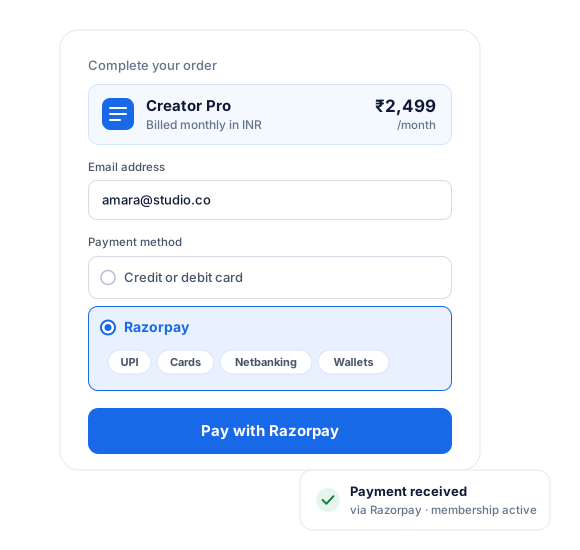
WordPress Razorpay Checkout Features
Razorpay is a popular payments platform in India that lets you accept online payments in WordPress via over 100 payment metthrough 100+ing Credit/Debit cards, Netbanking, UPI, and Wallets.
ProfilePress is the best Razorpay WordPress plugin.
The WordPress checkout experience with ProfilePress and Razorpay is modern and seamless, which keeps your customers happy and your conversion rates high.
The Razorpay Addon is packed with features that let you collect payments on your website, including one-time charges and recurring payments, making ProfilePress the best Razorpay WordPress plugin.
Razorpay Integration with WordPress
Setting up our Razorpay for WordPress plugin to start collecting payments is easy.
Razorpay + ProfilePress
Everything you need to get paid with Razorpay.
The Razorpay add-on connects your Razorpay account to ProfilePress checkout so that you can sell memberships, courses, and digital downloads without extra plugins.
UPI, cards, netbanking & wallets
Give Indian customers the payment options they expect, including RuPay and Paytm.
Branded popup checkout
Set the theme color and logo shown in the Razorpay payment popup.
Automatic status updates
Webhooks keep orders and subscriptions in sync as Razorpay confirms each payment.
One-time and recurring payments
Charge once, or bill members automatically on a recurring schedule with Razorpay.
Free trials & sign-up fees
Set trial periods and one-off sign-up fees on any membership plan.
Checkout that creates the account
New customers get a member account automatically when they pay—no separate registration step.
Razorpay, up close.
01
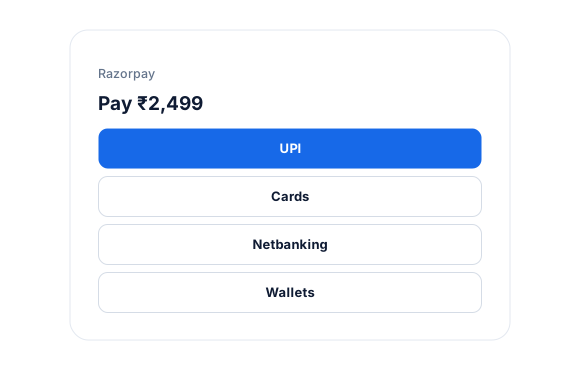
UPI, cards, netbanking and wallets
The Razorpay popup gives Indian customers the options they expect, including UPI, RuPay cards, netbanking, and wallets such as Paytm and MobiKwik.
- UPI and RuPay
- Netbanking
- Paytm, MobiKwik and Freecharge
02
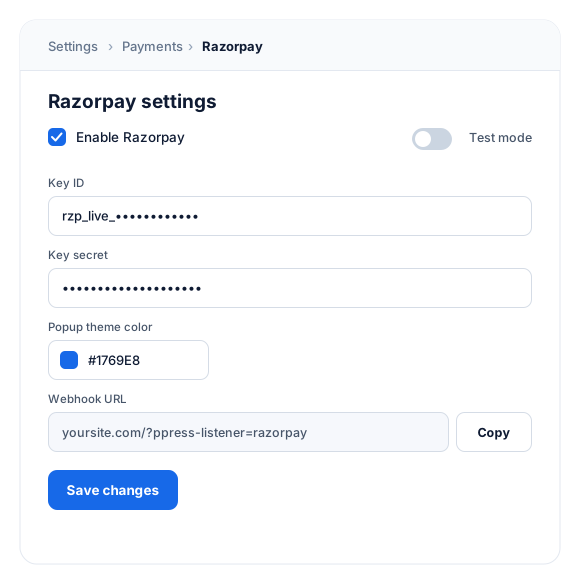
Connect with your Key ID and Secret
Add your Key ID and Key Secret from Razorpay, set up the webhook, and choose a theme color and logo for the payment popup.
- Webhook-driven status updates
- Branded popup checkout
03
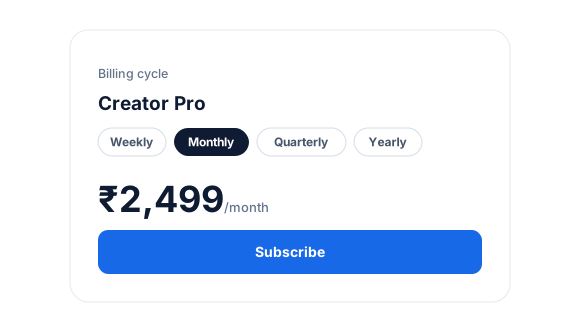
Weekly to yearly subscriptions
Sell memberships that renew weekly, monthly, quarterly, or yearly. Daily billing cycles aren’t supported by Razorpay.
Start accepting Razorpay payments in minutes.
No code and no developer needed. Connect your Razorpay account once, and every membership plan can use it.
Supported billing cycles
Razorpay subscriptions can renew weekly, monthly, quarterly, or yearly. Daily billing cycles aren’t supported by Razorpay.
1
Activate the add-on
Go to ProfilePress › Add-ons and switch on Razorpay. There’s nothing else to install.
2
Connect your Razorpay account
Add your Key ID and Key Secret from Settings › API Keys in Razorpay, set up the webhook, and pick a theme color and logo for the popup.
3
Start selling
Run a test purchase in test mode, then share your plan’s checkout link or add it to your pricing page.
Razorpay add-on FAQ
Still unsure? Talk to our support team.
Is the Razorpay add-on included with ProfilePress?
Yes. Razorpay is included in every ProfilePress premium plan: Standard, Plus and Agency. Activate it from ProfilePress › Add-ons—there’s no extra plugin to install.
Can I offer Razorpay alongside Stripe and other payment methods?
Yes. Enable as many payment methods as you like, and customers choose their preferred option at checkout.
Does it support recurring subscriptions?
Yes. Razorpay subscriptions can renew weekly, monthly, quarterly or yearly. Razorpay doesn’t support daily billing cycles.
Can I test payments before going live?
Yes. Turn on test mode in ProfilePress, add your Razorpay test credentials and run a test purchase before going live.
Does ProfilePress charge transaction fees?
No. Paid ProfilePress plans never take a percentage of your sales. You only pay Razorpay’s own processing fees.
More payment gateways
Offer every way your customers want to pay.
Stripe comes built-in. Mix and match gateways, and let each customer choose at checkout.
PayPal
100+ currencies
Mollie
iDEAL, SEPA & more
Paystack
Cards, transfer, USSD
Paddle
Merchant of record
All add-ons
41+ ways to extend ProfilePress
Start accepting Razorpay
payments in WordPress.
Get ProfilePress with the Razorpay add-on and launch your paid membership website this week.