
Monetization add-on
Fixed subscription expiration: end memberships on a set date
The Fixed Subscription Expiration addon lets subscriptions to non-recurring plans end on a specific date or after a set duration.
- Specific end date
- Set duration
- One-time plans
Included in Standard, Plus and Agency plans
Popular with associations and nonprofits →
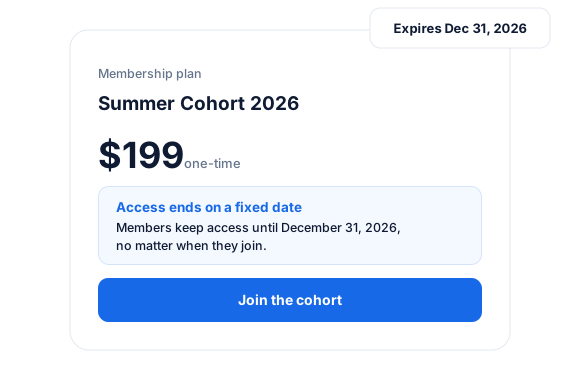
This addon enables you to manage seasonal cohorts or memberships tied to specific seasons in WordPress.
You can set the expiration date to a fixed date or to a variable date, independent of when the member started.
Once the membership expires, the member must complete the checkout process again in WordPress to renew their membership.
Note that this only supports one-time purchase membership plans, not recurring plans.
Membership Expiration on a Specific Date
Create WordPress membership plans that expire on a specific date.
This is perfect for annual memberships that start at the beginning of the year and end on December 31st, often called a “calendar year membership”.
Membership Expiration After a Set Duration
If you want users to have their subscriptions to a specific membership plan expire after a set duration, such as a few days, weeks, months, or years, this addon for our WordPress membership plugin makes that possible.
Fixed Subscription Expiration add-on
Everything included.
Fixed Subscription Expiration is part of ProfilePress, so there’s no extra plugin to install, configure, or keep updated.
Specific end date
Every member’s access ends on the same date, whenever they joined—great for cohorts and seasons.
Fixed duration
Give each member access for a set period after purchase, such as 30 days or 6 months.
Access that expires automatically
When the subscription ends, ProfilePress removes access to protected content for you.
Fixed Subscription Expiration, up close.
01
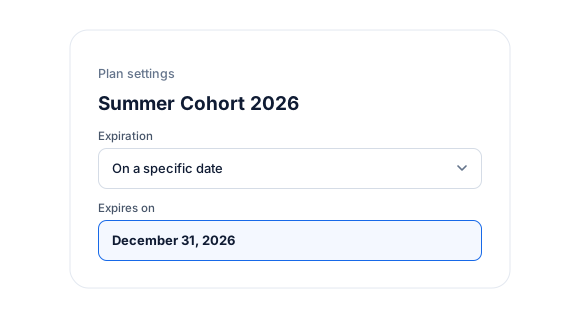
Access that ends on a specific date
Every member’s access ends on the same date, no matter when they joined. Ideal for cohorts, seasons, events, and school terms.
02
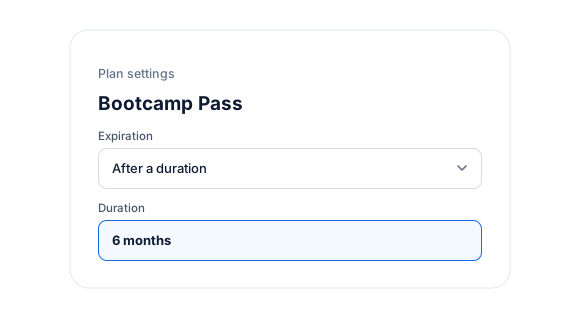
Or after a set duration
Give each member access for a fixed period after purchase, such as 30 days, 6 months, or a year.
03
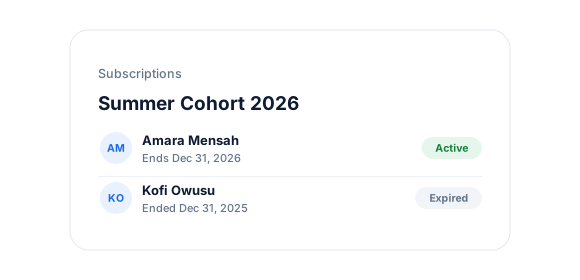
Access ends automatically
When the subscription ends, members lose access to the protected content tied to the plan—no manual cleanup.
Up and running in minutes.
No code required.
1
Switch it on
Go to ProfilePress › Add-ons and switch on Fixed Subscription Expiration.
2
Configure
Create or edit a non-recurring membership plan.
3
Go live
Choose an expiration date or duration, then share the checkout link.
Fixed Subscription Expiration FAQ
Still unsure? Talk to our support team.
Is Fixed Subscription Expiration included with ProfilePress?
Yes. Fixed Subscription Expiration is included in every ProfilePress premium plan: Standard, Plus and Agency. Activate it from ProfilePress › Add-ons—there’s no extra plugin to install.
Does it work with recurring plans?
No. Fixed expiration is designed for non-recurring (one-time) plans. Recurring plans renew on their billing cycle instead.
Do I need to know how to code?
No. Everything is configured from the ProfilePress settings in your WordPress dashboard.
Can I try ProfilePress first?
Yes. Explore most features on the live demo, and every plan comes with a 14-day money-back guarantee.
Related add-ons
Monetization & billing.
Pair add-ons to build the exact membership experience you want.
Pay What You Want
Memberships · Digital products
Auto-Renewal Checkbox
Opt-in renewals · Checkout checkbox
PDF Receipts
View · Print
All add-ons
41+ ways to extend ProfilePress
Run memberships on
your calendar.
Start building a WordPress membership website with ProfilePress to create subscription plans that expire after a certain duration or on a specific date.