
Email marketing add-on
Sync WordPress user registrations to Campaign Monitor
Subscribe WordPress users and members to Campaign Monitor email lists when they checkout and register on your site.
Subscribes users when they
- Register
- Check out
- Join a membership plan
- Update their profile
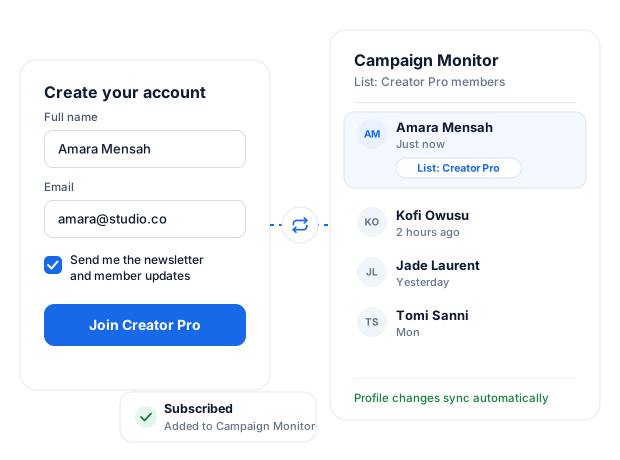
Quick Setup in WordPress
Get the Campaign Monitor integration in WordPress up and running in minutes.
Add the email list you want to use and map the merge fields.
Membership Integration
The Campaign Monitor addon can add users, members, or customers to specific email lists based on the membership plan they purchase or subscribe to on your WordPress website.
You can also let users choose whether to subscribe to the Campaign Monitor list for the membership plan they purchase during checkout.
Want to ensure members are removed from your marketing list when their subscription expires, or their membership becomes inactive? We’ve got you.
Registration Forms Integration
Add email list sign-up checkboxes to your WordPress registration form so users can opt into your Campaign Monitor list.
You can also allow registering WordPress users to select the email list to which they would like to be added.
Sync Tool
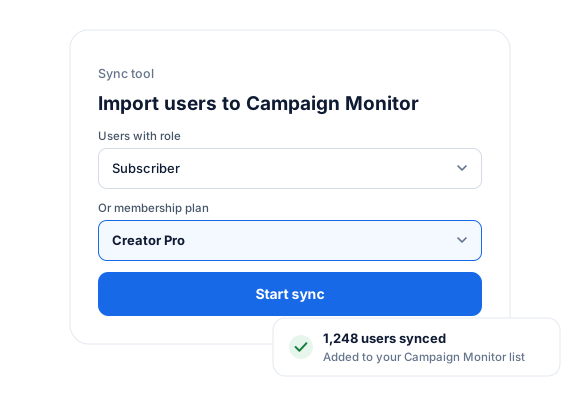
There is a Sync tool that lets you import all your WordPress users into a Campaign Monitor list. You can decide to sync only users of specific roles.
The addon also watches for changes in your WordPress users and automatically synchronizes any detected changes with your specified list. Also, when members subscribe to a plan, they will be added to the Campaign Monitor list you have configured for that plan. And if their subscription expires, they will be removed from the list.
Manage Subscription Page
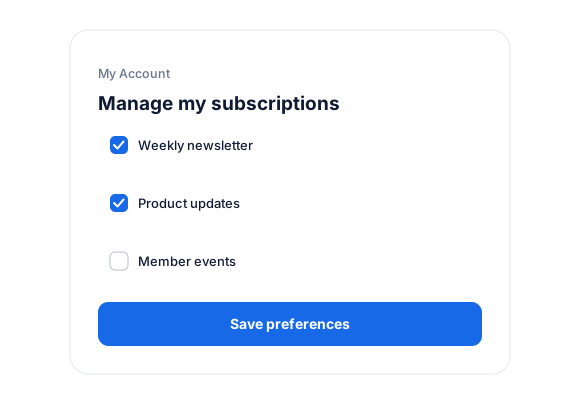
A “manage my subscriptions” page where logged-in users of your WordPress site can manage their email preferences from their account page. That is, they can unsubscribe or subscribe themselves to some of your emails and not others.
Campaign Monitor + ProfilePress
Grow your Campaign Monitor list from every signup.
Stop exporting CSV files. The Campaign Monitor add-on connects your membership site to Campaign Monitor and keeps both in step, automatically.
Subscribe at signup and checkout
Add users to your Campaign Monitor lists when they register, buy a product, or subscribe to a membership plan.
A list for every plan
Link membership plans to lists. Members are added when they subscribe and removed when their subscription expires.
Opt-in checkboxes
Add sign-up checkboxes to registration and checkout forms, and let users choose the lists they want to join.
Automatic profile sync
When members update their profile or change their email address, Campaign Monitor is updated too.
Bulk sync tool
Import existing WordPress users into Campaign Monitor in one go, filtered by user role or membership plan.
Manage my subscriptions
Members subscribe to and unsubscribe from your lists themselves, right from their account page.
Campaign Monitor for WordPress, up close.
01
Let members choose what they receive
Add sign-up checkboxes to registration and checkout forms and let users pick the Campaign Monitor lists they want to join. Members can change their mind anytime from “Manage my subscriptions” in My Account.
- Opt-in checkboxes on forms
- Self-service subscription management
02
Link lists to membership plans
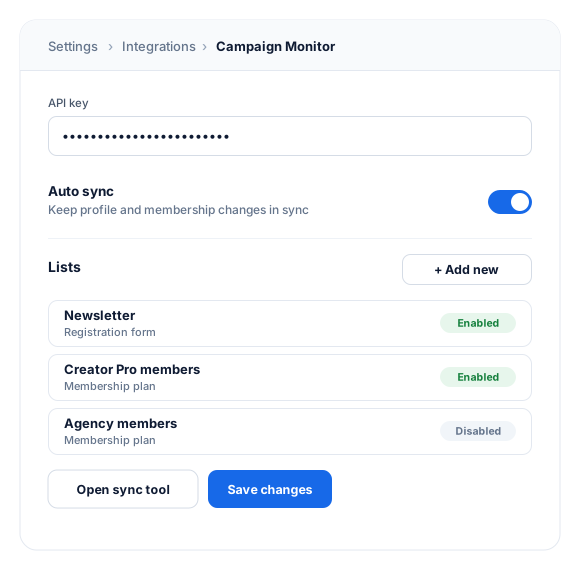
Connect each membership plan to a Campaign Monitor list. Members are added when they subscribe and removed when their subscription expires, so members-only campaigns always reach the right people.
- Automatic profile sync
- Field mapping to custom fields
03
Bring your existing users along
The sync tool imports existing WordPress users into Campaign Monitor in bulk—everyone, or only users with a specific role or membership plan.
Always in sync
From first signup to final renewal.
Your Campaign Monitor lists follow each member’s journey, so every email reaches the right people.
Signs up
Added to your list
New users who opt in at registration join the list you choose.
Joins a plan
Added to the plan’s list
Paying members land in the list linked to their membership plan.
Updates profile
Details stay current
Name and email changes flow to Campaign Monitor automatically.
Membership expires
Removed from the plan’s list
Expired members stop receiving members-only campaigns.
Connect Campaign Monitor to WordPress in minutes.
Paste your Campaign Monitor API key, add the lists you want to use, and turn on auto sync. No code required.
- Field mapping. Map WordPress profile fields to your Campaign Monitor custom fields.
1
Activate the add-on
Go to ProfilePress › Add-ons and switch on Campaign Monitor.
2
Add your API key
Under ProfilePress › Settings › Integrations › Campaign Monitor, paste your API key and add your lists.
3
Link forms and plans
Show list checkboxes on your forms, link plans to lists, and run the sync tool for existing users.
Campaign Monitor add-on FAQ
Still unsure? Talk to our support team.
Is the Campaign Monitor add-on included with ProfilePress?
Yes. Campaign Monitor is included in every ProfilePress premium plan: Standard, Plus and Agency. Activate it from ProfilePress › Add-ons—there’s no extra plugin to install.
What happens when a membership expires?
If you’ve linked the plan to a Campaign Monitor list, the member is removed from that list automatically when their subscription expires.
Can I add my existing WordPress users to Campaign Monitor?
Yes. The sync tool imports existing users into a list in bulk. You can sync everyone, or only users with a specific role or membership plan.
Can members manage their own email subscriptions?
Yes. Members can subscribe to or unsubscribe from your lists on the “Manage my subscriptions” page in their account area.
Can I send custom profile fields?
Yes. Map WordPress and ProfilePress profile fields to your Campaign Monitor fields so every contact arrives with the details you need.
More email integrations
Use the email platform you love.
ProfilePress connects to the most popular email marketing services. Pick one, or switch anytime.
Mailchimp
Sync members to Mailchimp audiences
MailerLite
Sync members to MailerLite groups
Brevo
Sync members to Brevo contact lists
FuseWP
Sync WooCommerce, forms, and LMS plugins to your email list or CRM too
Turn every WordPress registration into
a Campaign Monitor subscriber.
Add members to the right Campaign Monitor list for their plan, and remove them automatically when their membership ends.