
Billing add-on
Subscription pausing for WordPress: pause instead of cancel
The Subscription Pausing addon lets members pause their subscriptions and memberships in WordPress instead of canceling them. Members take a break without being billed, then pick up right where they left off.
- Pause from My Account
- Auto-resume
- Stripe, PayPal, Razorpay, Paddle
Included in Plus and Agency plans
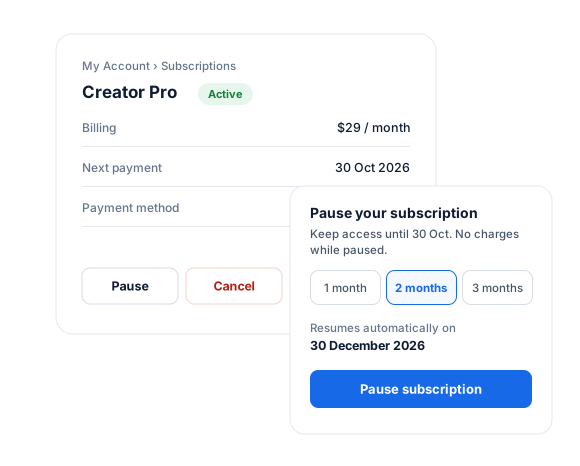
Subscription Pausing Overview
Members often cancel because they need a break: a holiday, a busy season, or a tight month. Every one of those cancellations is a member you have to win back. Subscription Pausing gives them a better option on their WordPress My Account page.
While a subscription is paused, the member isn’t charged. They keep access until the end of the billing period they already paid for, then lose access to members-only content until the subscription resumes. When the pause ends, billing and access resume automatically.
Pausing works in ProfilePress with active, recurring subscriptions paid through Stripe, PayPal, Razorpay, or Paddle.
Use Cases for Subscription Pausing
An online course or coaching membership can retain students who need to step away during exams, holidays, or busy work periods. Instead of canceling and losing their progress and community, students pause for a month or two and come back to the same account.
Fitness, wellness, and seasonal memberships often see members drop off at predictable times of the year. Letting them pause through the off-season, an injury, or travel keeps them on your books and brings them back paying, without having to win them over again.
Publishers, communities, and content subscriptions can offer pausing as a retention step for members on a tight budget. A short, no-charge break is often all it takes to turn a cancellation into a returning subscriber.
Beyond those examples, the addon is useful for:
- Membership sites reducing churn by offering a pause before a member cancels.
- Clubs and associations whose members are away for part of the year.
- Subscription boxes and services where customers want to skip a few billing cycles.
- Support teams who need to pause a member’s billing during a dispute, outage, or special circumstance.
Pause and Resume in a Few Clicks
Members choose how long to pause for, like “Until December 23”, and confirm. Before they confirm, they’re told exactly when the membership pause ends and how long they keep access.
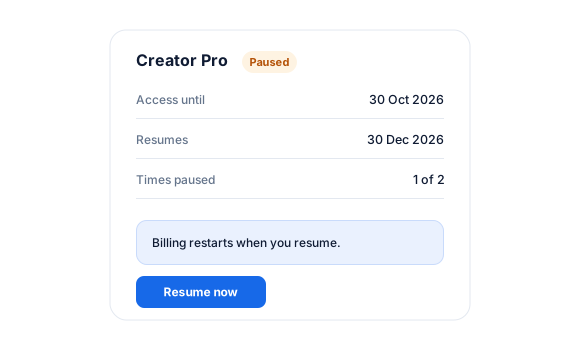
Paused subscriptions show when they resume, with a Resume button for members who want to come back early:
- Resume while the paid period is still running, and billing simply continues from the paid-until date.
- Resume after it ends, and billing restarts straight away. Access returns as soon as the payment goes through.
You Set the Rules
Decide how pausing works on your WordPress membership site:
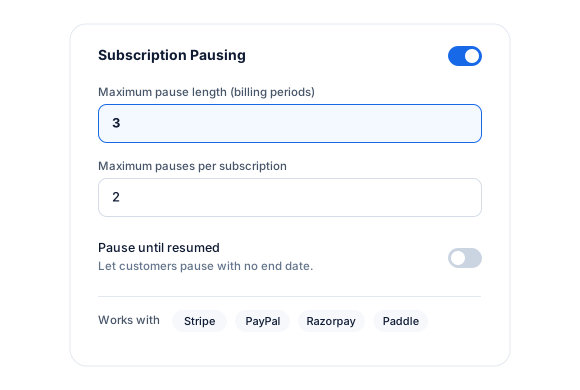
- Maximum Pause Length: the longest a member can pause for, from 1 to 12 billing periods.
- Pause Limit: how many times a member can pause the same subscription, or no limit at all.
- Pause Until Resumed: optionally let members pause with no end date and resume whenever they like.
Different Rules for Each Plan
Every membership plan can follow your global settings, turn pausing off, or have its own rules.
For example, let monthly members pause up to twice, for up to 3 months each time, and don’t let members on a discounted plan pause at all.
Stay in Control as an Admin
Pause any member’s subscription yourself from the subscription screen in WordPress by changing its status to Paused and choosing how long to pause it. Your pause limits don’t apply.
Each paused subscription shows when and by whom it was paused, when it resumes, how long the member keeps access, and how many times it has been paused.
Keep Members in the Loop
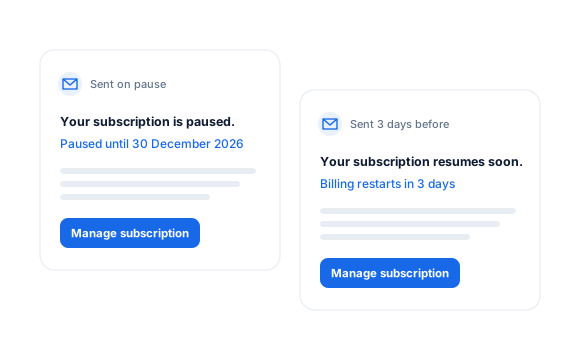
Members get an email confirming their subscription is paused, how long they keep access, and when it resumes.
A reminder email goes out a few days before a pause ends, so billing never surprises them. You choose how many days before, and both emails can be edited in the ProfilePress email settings.
Synced With Your Payment Gateway
Stripe
Pauses payment collection. Pauses made in the Stripe dashboard or Stripe customer portal sync back.
PayPal
Suspends the subscription and reactivates it when the pause ends.
Razorpay
Suspends the subscription and reactivates it when the pause ends.
Paddle
Schedules the pause with Paddle, which resumes the subscription at the end date.
Subscription Pausing, up close.
01
Set the rules once
Turn on pausing in Payments settings, then set the maximum pause length, how often a subscription can be paused, and whether customers can pause until they choose to resume.
02
Paused, not lost
A paused subscription shows its resume date in My Account. Customers can resume early, and billing restarts automatically when the pause ends.
03
Keep customers in the loop
Customers get an email when their subscription is paused and a reminder a few days before it resumes, so the next charge is never a surprise.
Up and running in minutes.
No code required. Read the full Subscription Pausing guide.
1
Switch it on
Go to ProfilePress › Add-ons and switch on Subscription Pausing.
2
Set your limits
In Payments settings, choose the longest pause and how often members can pause.
3
Let members pause
Customers see a Pause button on their subscriptions in My Account.
Subscription Pausing FAQ
Still unsure? Talk to our support team.
Is Subscription Pausing included with ProfilePress?
Yes. Subscription Pausing is included in the ProfilePress Plus and Agency plans. Activate it from ProfilePress › Add-ons—there’s no extra plugin to install.
Which payment gateways support pausing?
Stripe, PayPal, Razorpay and Paddle. For PayPal, Razorpay and Paddle, add the pause and resume events to your webhook so changes made in the gateway sync back to ProfilePress.
Do I need to know how to code?
No. Everything is configured from the ProfilePress settings in your WordPress dashboard.
Can I try ProfilePress first?
Yes. Explore every feature on the live demo, and every plan comes with a 14-day money-back guarantee.
Related add-ons
Monetization & billing.
Pair add-ons to build the exact membership experience you want.
Content Dripping
Release content over time · Unlock emails
Fixed Subscription Expiration
Specific end date · Set duration
Auto-Renewal Checkbox
Opt-in renewals · Checkout checkbox
All add-ons
41+ ways to extend ProfilePress
Build a paid subscription
website today.
Get ProfilePress with Subscription Pausing and every tool you need to sell, protect, and grow your online business.