
Search for “WordPress login activity plugin” and you’ll find dozens of options. Some are full security suites, some are audit logs that record every click in the dashboard, and some only care about failed logins. They all claim to “track logins”, but they track very different things, for very different people.
This guide compares the most popular WordPress login activity and user logging plugins so you can pick the right one, or the right combination, for your site. We’ll cover what each records, who can see the data, whether it alerts anyone, and what it costs.
Disclosure: ProfilePress is our plugin. We’ve aimed to be fair about where each tool is strongest. Features and pricing change, so check each plugin’s own page before you decide.
First, Decide What “Login Activity” Means for You
Before comparing plugins, it helps to know which of these three jobs you need done:
- Blocking failed logins. Stopping brute-force attacks by limiting login attempts, locking out IPs, and adding CAPTCHA. This is about attackers who don’t have the password.
- Auditing everything admins and users do. A complete record of logins, post edits, plugin changes, settings updates, and more, mostly for the site owner, agencies, and compliance.
- Protecting user accounts. Show each user their login history, alert them when their account is accessed from a new device, and let them sign out other sessions. This is about attackers who do have the password, and about account sharing.
Most sites need job 1. Business and multi-author sites often need job 2. Membership, course, community, and eCommerce sites, where many people hold accounts, need job 3, and it’s the one most plugins skip.
Quick Comparison
| Plugin | Best for | Successful login history | Users see their own logins | New device alerts to users | Free version |
|---|---|---|---|---|---|
| ProfilePress | Membership and user account sites | Yes | Yes | Yes | Yes |
| WP Activity Log | Full admin audit trail | Yes | No | No (admin notifications are premium) | Yes |
| Simple History | Lightweight change log | Yes | No | No | Yes |
| Wordfence | All-round security and firewall | Limited | No | Alerts go to site admins | Yes |
| Limit Login Attempts Reloaded | Brute-force protection | With cloud plan | No | No | Yes |
| All In One Login | Login page hardening | Focus on failed logins and lockouts | No | No | Yes |
1. ProfilePress
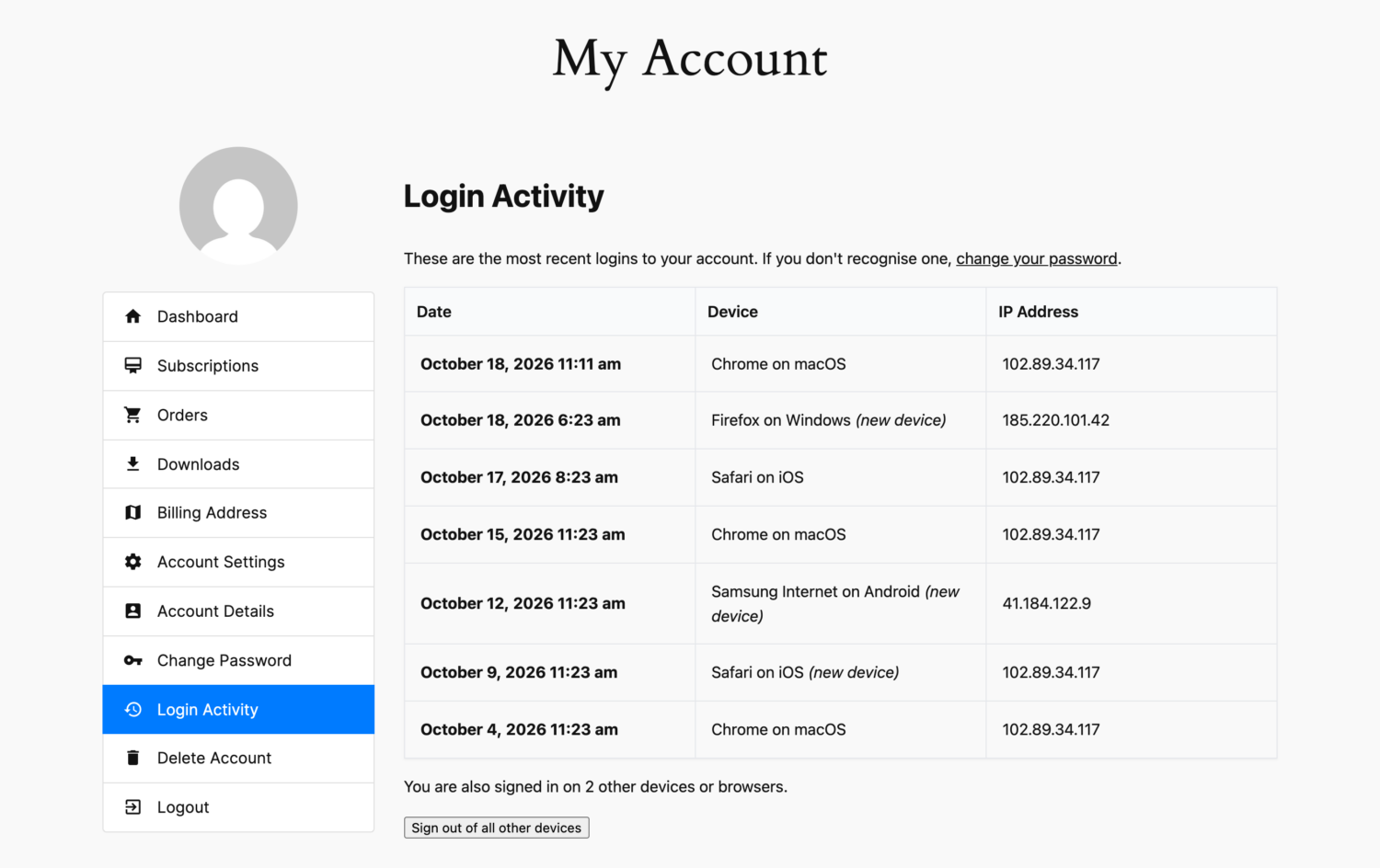
ProfilePress is a WordPress membership and user profile plugin, with custom login and registration forms, user profiles, member directories, a My Account page, and paid memberships. Since version 4.17.6, it also tracks login activity from the account owner’s point of view.
Login activity features
- Login Activity tab on the My Account page showing each user’s recent logins with date, device (e.g. “Chrome on macOS”), and IP address.
- New device detection using a secure device cookie plus an IP-and-browser fingerprint, with unfamiliar devices labeled (new device).
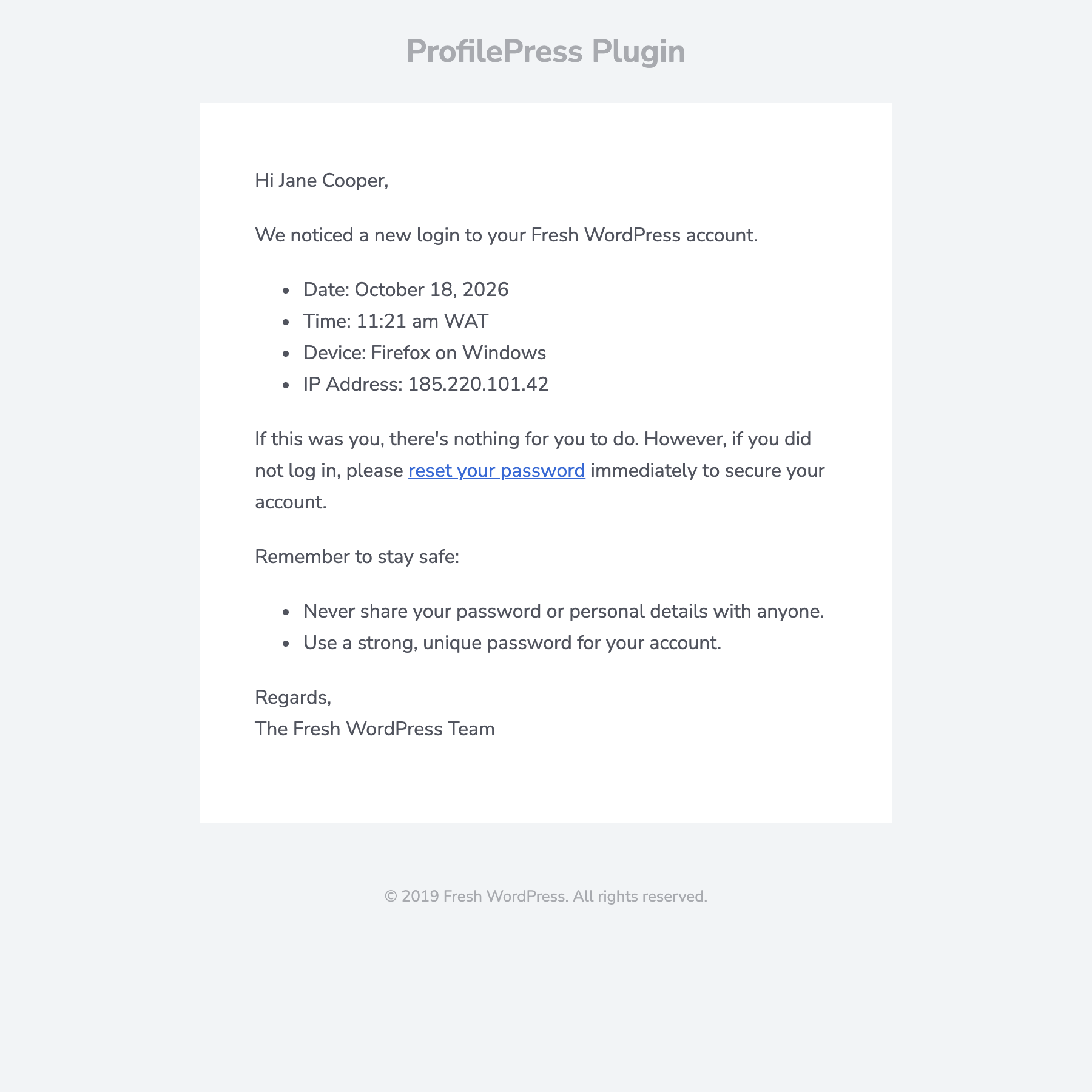
- Login notification email to the user, sent for logins from a new device (default) or for every login, fully customizable with placeholders.
- Sign out of all other devices button for users.
- Disable Concurrent Logins setting to stop one account from being used from several locations at once.
- Rate limiting of repeated failed logins, registrations, and password reset requests.
- Login history included in WordPress’s personal data export and erase tools.
Limitations
ProfilePress is not a full audit log. It records logins, not every post edit or settings change. There’s no site-wide login report screen in the dashboard. The focus is on each user’s own account, although a short snippet adds a Last Login column to the Users screen (see our login activity tracking guide). It keeps the 10 most recent logins per user by default, and a filter can raise that.
Pricing
All login activity features are in the free plugin. Premium plans add paid memberships, content protection, integrations, and more.
Choose ProfilePress if you run a site where users have accounts that matter to them, such as a membership site, online course, community, or customer portal, and you want them to be able to spot and stop unauthorized access themselves.
2. WP Activity Log
WP Activity Log is one of the most comprehensive audit log plugins for WordPress. It records a wide range of events, including logins, logouts, failed logins, content changes, user profile edits, plugin and theme activity, settings changes, and more.
Strengths
- Very detailed event logging across WordPress core and popular plugins.
- Configurable log retention and control over who can view the log.
- Premium plans add notifications, reports, advanced search and filters, user session management, and external database storage.
Limitations
It’s built for site owners and administrators, not end users. Members can’t see their own login history, and alerts go to the admin rather than the account owner. On large, busy sites, a full audit log can grow quickly, so plan your retention settings.
Choose WP Activity Log if you need a complete audit trail of who did what in the dashboard, for example on agency-managed, multi-author or compliance-sensitive sites.
3. Simple History
Simple History is a lightweight, free activity log that shows recent changes on your site in a clean feed in the dashboard. It records user logins and logouts, and logs failed login attempts with the IP address, distinguishing wrong passwords from non-existent usernames.
Strengths
- Easy to read, with almost no setup.
- Logs a broad range of changes besides logins, such as posts, plugins, users, and settings.
- Privacy-friendly options, including IP anonymization and log retention controls.
Limitations
Like other audit logs, it’s admin-facing only. It has no user-facing login history or new-device alerts for account owners.
Choose Simple History if you want a free, readable overview of what’s changing on your site and who’s logging in, and you don’t need user-facing features.
4. Wordfence
Wordfence is a full security plugin with a firewall, malware scanner, two-factor authentication , and login security. Its email alert settings can notify the site’s alert recipients when an administrator or a regular user signs in, and you can restrict those alerts to sign-ins from a new device.
Strengths
- A complete security suite: firewall, scanning, brute-force protection, and 2FA in one plugin.
- Admin alerts for sign-ins, including a new-device-only option.
- Live traffic view showing recent logins and visits.
Limitations
Login alerts go to the site’s configured alert email addresses, not to the account owner. On a site with thousands of members, that means either a flood of emails to the admin or no alerts for regular users. Users have no way to view their own login history.
Choose Wordfence if you want an all-in-one firewall and security scanner. It works well alongside ProfilePress: Wordfence protects the site, and ProfilePress protects each user’s account.
5. Limit Login Attempts Reloaded
Limit Login Attempts Reloaded (LLAR) is a popular plugin for stopping brute-force attacks. It limits how many times an IP address can try to log in and locks it out after too many failures. Its cloud plans add features like off-site storage of successful login logs, which helps if you’re worried about tampered logs.
Strengths
- Simple, effective brute-force protection.
- Cloud-based logs and lockout management on its cloud plans.
Limitations
Its main focus is failed logins. Successful login history depends on the cloud plan, and it offers no user-facing login history or account-owner alerts.
Choose LLAR if your main concern is bots hammering your login page. Note that ProfilePress already rate-limits repeated failed logins from the same IP, so you may not need both. ProfilePress has a setting to disable its own rate limiting if you prefer a dedicated plugin.
6. All In One Login
All In One Login (AIO Login) focuses on hardening the login page itself. It can change the login URL, customize the login page design, add reCAPTCHA and two-factor authentication, limit login attempts, ban IP addresses, and create temporary access links. Its activity logs focus on lockouts and failed logins, with IP address, location, and user agent.
Strengths
- Many login page security features in one place.
- Useful details on failed attempts and lockouts.
Limitations
Its logging centers on failed logins and lockouts rather than successful logins, and the data is admin-only.
Choose AIO Login if you want to lock down your login page with a custom URL, CAPTCHA, and 2FA from one plugin.
Which Login Activity Plugin Should You Choose?
Here’s a quick way to decide:
- Membership, course, community, or customer account site? Start with ProfilePress. It’s the only option here that shows users their own login history, emails them about new devices, lets them sign out other sessions, and can block simultaneous logins.
- Need a full audit trail of admin actions? Add WP Activity Log or Simple History.
- Want a firewall and malware scanner? Add Wordfence.
- Heavy brute-force traffic or a need for cloud lockout management? Add Limit Login Attempts Reloaded.
- Want to harden the login page with a custom URL and CAPTCHA? Add All In One Login.
These plugins aren’t mutually exclusive. A common, solid setup for a membership site is ProfilePress for user accounts and login activity, a security plugin for the firewall and scanning, and two-factor authentication for every admin account.
What to Look for in Any Login Activity Plugin
Whichever tool you pick, check these points:
- Does it record successful logins, or only failed ones? Successful logins are how stolen passwords show up.
- Who sees the data? Admin-only logs need someone to review them. User-facing history and alerts spread that work across your whole user base.
- Is there new device detection? It’s the difference between useful alerts and noise.
- Can users act on it? A “Sign out of all other devices” option turns a warning into a fix.
- How is the data stored? Check where logs live, how long they’re kept, and whether they work with WordPress’s personal data export and erase tools.
- What does it cost to get the features you need? Some key features, like notifications or successful login logs, are paid add-ons in some plugins.
Frequently Asked Questions
What’s the best free WordPress login activity plugin?
For user accounts, ProfilePress offers login history, new-device alerts, and session sign-out for free. For an admin-facing change log, Simple History is a good free choice.
Can I use ProfilePress with Wordfence or WP Activity Log?
Yes. They do different jobs and work alongside each other. If you use another plugin for brute-force protection, you can turn off ProfilePress’s built-in rate limiting under ProfilePress > Settings > General > Login.
Do any of these show users their own login history?
Of the plugins in this comparison, ProfilePress is the only one built to show each user their recent logins on the front end of your site through the Login Activity tab on the My Account page.
The Bottom Line
Most login activity plugins are built for the site owner, to watch attackers or audit admins. That’s valuable, but on sites with many user accounts, account owners are best placed to spot a bad login.
ProfilePress gives them that ability for free: a Login Activity tab, new device login alerts, and one-click sign-out of other devices. Try ProfilePress, or read our guide on setting up login notification emails to get started.