
Creating an online course can cost almost nothing or several thousand dollars. The difference comes down to three choices: how much equipment you buy, where you host and sell the course, and whether you do the work yourself. For most solo creators, a good first course costs a few hundred dollars plus their time.
Here’s where the money goes, three example budgets, and how to keep the cost down without making a worse course. Prices are rough ranges as of 2026.
What you’ll pay for
| Cost | What it covers | Rough cost |
|---|---|---|
| Equipment | A microphone, a camera or webcam, lighting | $0 (your phone) to a few hundred dollars |
| Recording and editing software | Screen recording, video editing, slides | Free tools exist; paid ones are usually a monthly or yearly subscription |
| Video hosting | Hosting that restricts videos to your site | Free for public video; private hosting is usually a monthly plan |
| Course platform | Where students take and buy the course | From free (your own WordPress site) to a monthly platform fee or a share of each sale |
| Website hosting | If you sell from your own site | A few dollars to a few tens of dollars a month |
| Payment processing | Card fees on each sale | Usually around 3% of each payment; check your processor’s rates |
| Your time | Planning, recording, editing, building, marketing | Often 20 to 100+ hours for a first course |
| Outsourcing (optional) | Video editing, design, copywriting | Varies widely; the biggest cost for most produced courses |
Three example budgets
Lean: under $200 plus hosting
Record on your phone or computer with a USB microphone, use free screen-recording and editing tools, and sell from a WordPress site you already have with a free course plugin. Your main cost is your time. This is how most successful creators start, and it’s enough to find out whether people want the course before you invest more.
Mid-range: a few hundred to $1,500
Add a better microphone and simple lighting, a paid editing tool, private video hosting and a premium version of your course plugin for more payment options and features. The course looks and sounds professional, and you still do the work yourself.
Produced: several thousand dollars and up
Hire a video editor or studio, a designer for slides and workbooks, and a copywriter for the sales page. Worth it for a flagship course with an audience already waiting, not for a first course you haven’t validated.
The cost most people forget: your platform
Where you host and sell your course decides what you pay every month and on every sale, for as long as you sell it:
- Course marketplaces are free to join but keep a share of each sale and control your pricing.
- Hosted course platforms charge a monthly fee, which typically rises with the features and the number of students you need.
- Your own WordPress site costs your hosting plus your course plugin, with no share of your sales going to the platform.
Over a few years, platform fees often cost more than everything else on this list. If you already have a WordPress site, selling from it is usually the cheapest option.
What it costs to run a course with ProfilePress
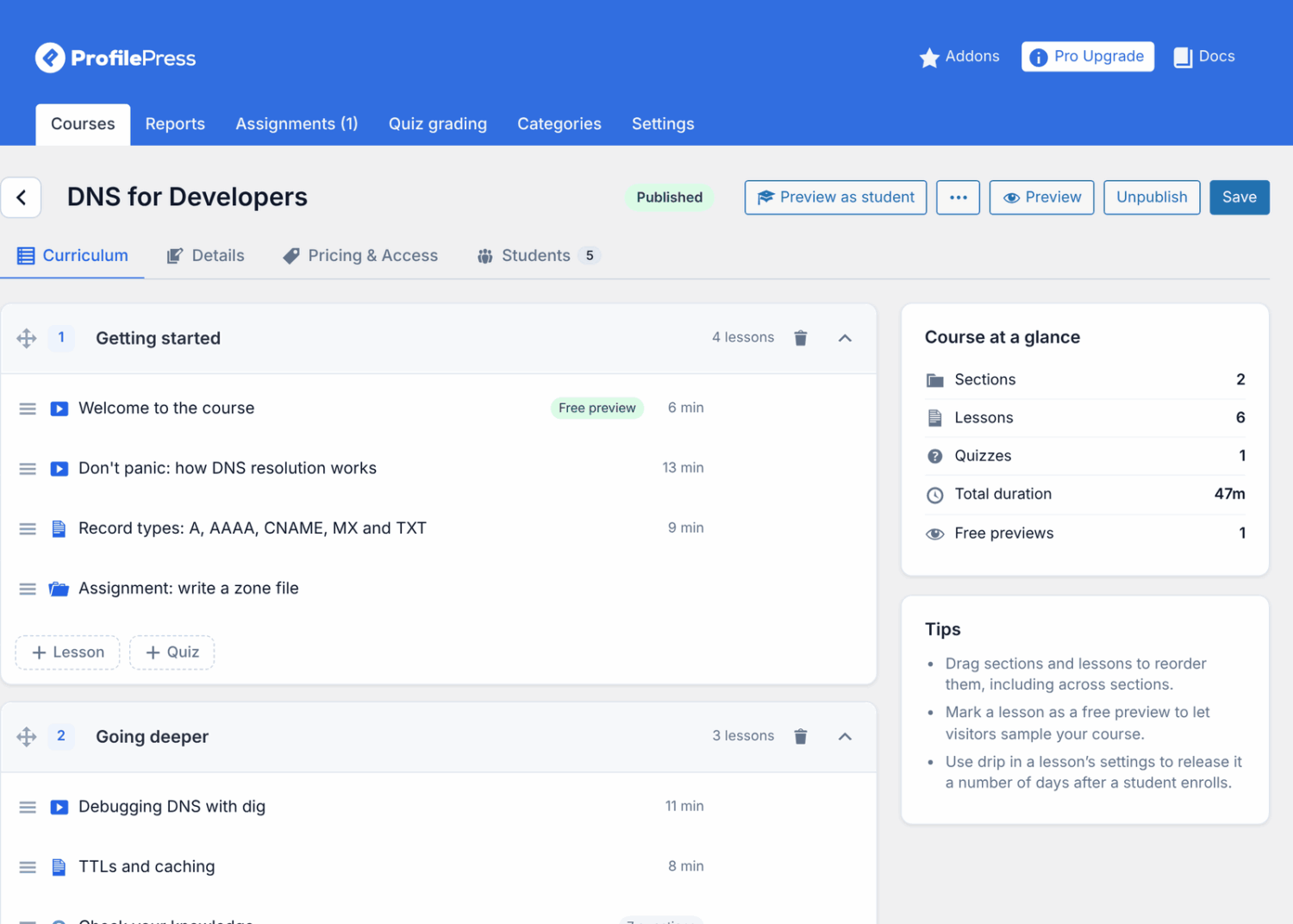
ProfilePress’s course builder is free on WordPress. It includes courses with video, text and quiz lessons, quizzes, certificates, drip and access rules, course emails, reports, reviews and Q&A, and selling through membership plans with Stripe checkout and coupons.
The free version adds a 2% fee to Stripe payments. ProfilePress Pro removes it and adds more payment gateways (PayPal, Mollie, Razorpay, Paystack and Paddle), email marketing integrations and add-ons. It’s priced per year by the number of sites: $129 for one site, $299 for three and $599 for unlimited sites. There’s no share of your course sales.
How to keep the cost down
- Validate first. Pre-sell the course or launch a mini course before buying equipment or hiring anyone.
- Spend on audio first. A decent microphone does more for a course than a better camera.
- Use what you have. A recent phone records good video; a window gives good light.
- Keep it short. Every extra hour of content is extra recording and editing time. A tight course outline saves more money than any tool.
- Own your platform. Avoid paying a share of every sale for the life of the course.
Frequently asked questions
Can I create an online course for free?
Nearly. With a phone, free recording tools and a free course plugin on a WordPress site you already pay for, your only cost is your time. See how to create an online course.
How long does it take to create an online course?
A focused first course of one to two hours usually takes a few weekends: planning, recording, editing and building. Larger courses take months.
Is it worth paying for a course platform?
Only if you don’t have a website and don’t want one. If you do, a course plugin on your own site costs less over time and keeps your students and revenue in one place.
How much should I charge for my course?
Price on the value of the result, not on what it cost you to make. See how to sell online courses for pricing models.
Spend on what students notice
Students notice clear audio, a focused course, and a smooth way to buy and learn. They don’t notice an expensive camera or a pricey platform. Start lean, prove the course sells, then invest in what makes it better.