
Community add-on
Sell BuddyPress and BuddyBoss group access
Enable users to choose groups to join during registration and ensure 2-way synchronization of WordPress profiles with BuddyPress/BuddyBoss extended profiles.
What you can sell
- Groups
- Extended profiles
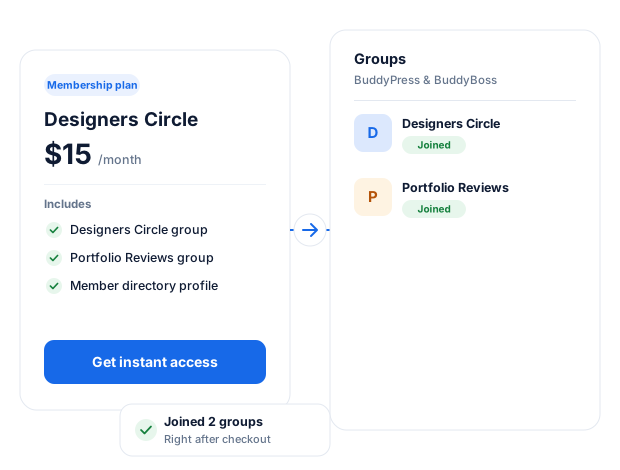
Sell Access To BuddyPress/BuddyBoss Groups
Our BuddyPress and BuddyBoss addon lets you sell access to specific groups. This lets you create private and hidden groups on your WordPress community website that only paid members or users subscribed to specific membership plans can access.
BuddyPress Profile Sync
When installed and activated, an Activate Sync checkbox will be added to the ProfilePress admin pages for creating and editing custom profile fields.
When you create a new custom profile field and check it, a corresponding extended profile (xprofile) field type will be created in BuddyPress/BuddyBoss.
If you are editing an existing profile field and you uncheck the checkbox, the corresponding xprofile field will be deleted. If you recheck it, a new corresponding xprofile field will be recreated.
How the 2-Way Syncing Works
Synchronization happens when users create an account and edit their profile in WordPress.
Say you created a “textarea” custom field to collect the home addresses of users; when this field is updated in BuddyBoss/BuddyPress profile edit screen, the data gets synced with the corresponding default WordPress profile of the users and vice versa.
The following BuddyPress/Bvice versarofile field types are supported for syncing with WordPress profile.
- Textbox / text field
- Datebox / date field
- Selectbox / select dropdown
- Multi Selectbox
- Checkbox
- Textarea
Join BuddyPress Groups
Let users select the BuddyBoss/BuddyPress groups to join during registration in WordPress.
Field Types
The group selection field on your WordPress registration form can either be a select dropdown or a checkbox.
BuddyPress + ProfilePress
Everything you need to monetize your community.
The BuddyPress add-on connects BuddyPress to ProfilePress memberships and checkout so that you can charge for groups without extra plugins.
Sell access to groups
Link BuddyPress or BuddyBoss groups to a membership plan and charge for access.
Pick groups at registration
Let new members choose which groups to join right on the registration form.
Extended profile sync
Sync WordPress profile fields with BuddyPress and BuddyBoss extended profile fields.
Works with BuddyBoss
The same add-on supports both BuddyPress and the BuddyBoss platform.
Every major payment gateway
Take payments through Stripe, PayPal, Razorpay, Paddle, Paystack, Direct Bank Transfer, Mollie.
Checkout built to convert
A fast, focused checkout that creates the student’s account as they pay.
BuddyPress, up close.
01
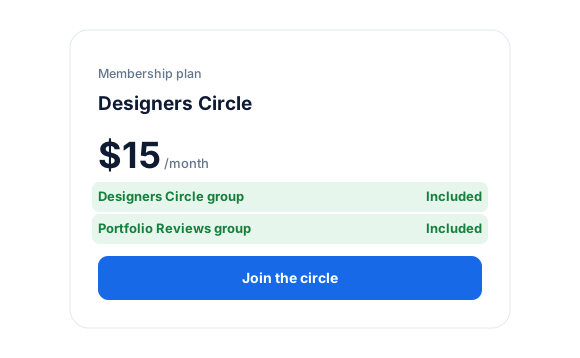
Sell access to private groups
Link BuddyPress or BuddyBoss groups to a membership plan. Set paid groups to private or hidden, and only paying members can join.
- Recurring or one-time plans
- Works with BuddyPress and BuddyBoss
02
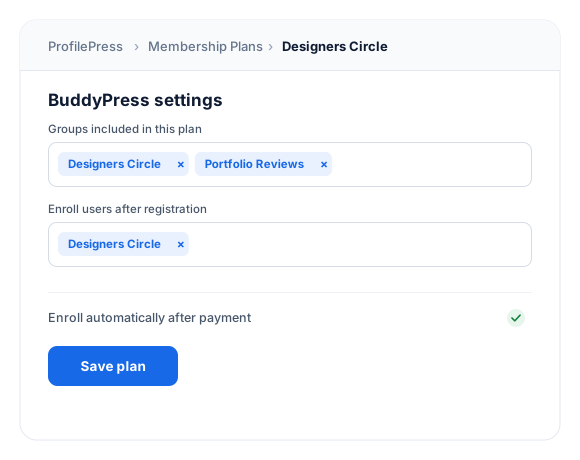
Link groups to a plan in seconds
In the plan’s Downloads & Integrations section, open the BuddyPress/BuddyBoss tab and pick the groups buyers get access to.
03
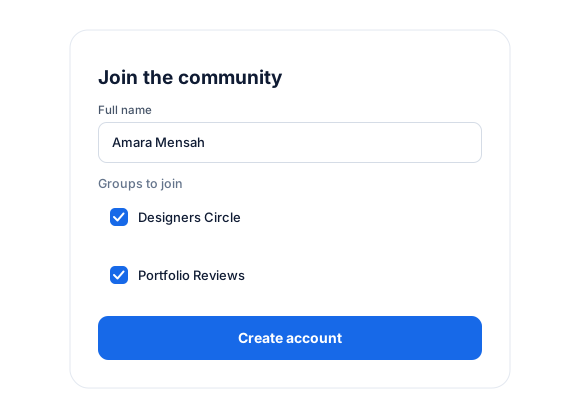
Groups and profiles at registration
Let new members choose groups to join on the registration form, and sync WordPress profile fields with BuddyPress and BuddyBoss extended profiles.
- Group selection on signup
- Extended profile field sync
How it works
From checkout to community in seconds.
No manual enrollment and no spreadsheets. ProfilePress gives every buyer the right groups automatically.
You set up
Link groups to a plan
Choose the BuddyPress groups included in a membership plan, or bundle several together.
Customer buys
Pays at checkout
The member pays with their preferred gateway and gets an account automatically.
Instantly
Enrolled automatically
ProfilePress enrolls them in the plan’s groups as soon as payment succeeds.
Signs up free
Enrolled on registration
You can also add new users to chosen groups the moment they register.
Connect BuddyPress in minutes.
Activate the add-on, choose the groups each plan unlocks, and you’re ready to sell. No code required.
Tip: make paid groups private
Set paid BuddyPress or BuddyBoss groups to private or hidden so only paying members can join and see their content.
1
Activate the add-on
Go to ProfilePress › Add-ons and switch on BuddyPress.
2
Link groups to plans
Open a membership plan and pick the BuddyPress groups it should unlock.
3
Share your checkout
Add the plan’s checkout link to your sales page and start welcoming members.
BuddyPress add-on FAQ
Still unsure? Talk to our support team.
Is the BuddyPress add-on included with ProfilePress?
Yes. BuddyPress is included in every ProfilePress premium plan: Standard, Plus and Agency. Activate it from ProfilePress › Add-ons—there’s no extra plugin to install.
Do I need WooCommerce to sell BuddyPress access?
No. ProfilePress has its own checkout and payment gateways so you can sell groups without WooCommerce.
Can I enroll users for free when they register?
Yes. Choose the groups new users should join after registration—no payment needed.
Which payment gateways can I use?
Supports Stripe, PayPal, Razorpay, Paddle, Paystack, Direct Bank Transfer, Mollie.
More course & community integrations
Bring your favorite learning platform.
ProfilePress works with the most popular WordPress LMS and community plugins.
LearnDash
Sell courses and groups
LifterLMS
Sell courses and memberships
Tutor LMS
Sell courses
Sensei LMS
Sell courses and groups
Academy LMS
Sell courses
MasterStudy LMS
Sell courses
FluentCommunity
Sell spaces and courses
All add-ons
41+ ways to extend ProfilePress
Sell access to your
BuddyPress groups.
Put private and hidden BuddyPress or BuddyBoss groups behind membership plans, and keep member profiles in sync.