
There’s more than one way to put content behind a gate. You can lock it completely for non-members, let visitors read a few pieces for free before asking them to subscribe, or release it to members gradually over time.
These are three different tools: a paywall, a metered paywall and drip content. They’re often mixed up, but they solve different problems and suit different kinds of websites. Pick the wrong one and you either give away too much or scare visitors off before they ever see your best work.
In this guide we’ll explain how each one works, compare them side by side, and help you decide which to use, or how to combine them, on a WordPress site with ProfilePress.
The Short Version
- Paywall: content is locked for anyone who isn’t a member. Question it answers: who can see this?
- Metered paywall: visitors can read a set number of pieces for free, then they must subscribe. Question it answers: how much can a non-member see before paying?
- Drip content: members get access gradually, based on how long they’ve been a member. Question it answers: when does each member get access?
Notice that the first two are about non-members: they decide how you convert visitors into subscribers. Drip content is about members: it decides how you keep subscribers engaged once they’ve joined.
1. Paywall
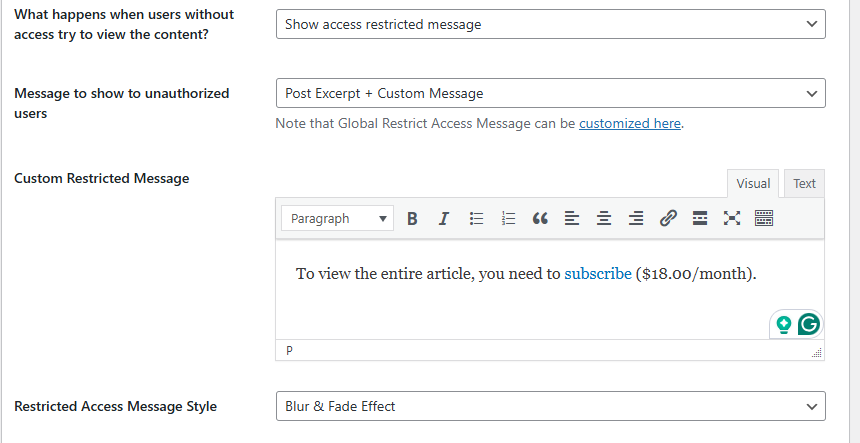
A paywall restricts content to members only. Visitors without access see a message instead, such as “This content is available to Premium members. Join now”, often with a short excerpt or a blurred preview to show what they’re missing.
In ProfilePress, this is done with content protection rules, included in the free plugin. You choose what to protect (specific posts, categories, pages or custom post types), who can access it (logged-in users, specific membership plans or roles), and what everyone else sees.
Paywall pros
- Simple to understand: members get in, everyone else doesn’t.
- Makes premium content feel truly exclusive.
- Works for any kind of content, from articles to downloads.
Paywall cons
- Visitors can’t sample your best content before paying.
- A hard wall on every article can hurt sign-ups if visitors don’t know you yet.
2. Metered Paywall
A metered paywall lets guests and non-members view a limited number of protected pieces within a set timeframe, such as three articles a day or ten a month. Once they reach the limit, the paywall kicks in and they’re asked to subscribe. This is the model used by The New York Times, Medium and many online magazines.
With the ProfilePress Metered Paywall addon, you set how many free views visitors get and over what period, on top of the content you’ve already protected.
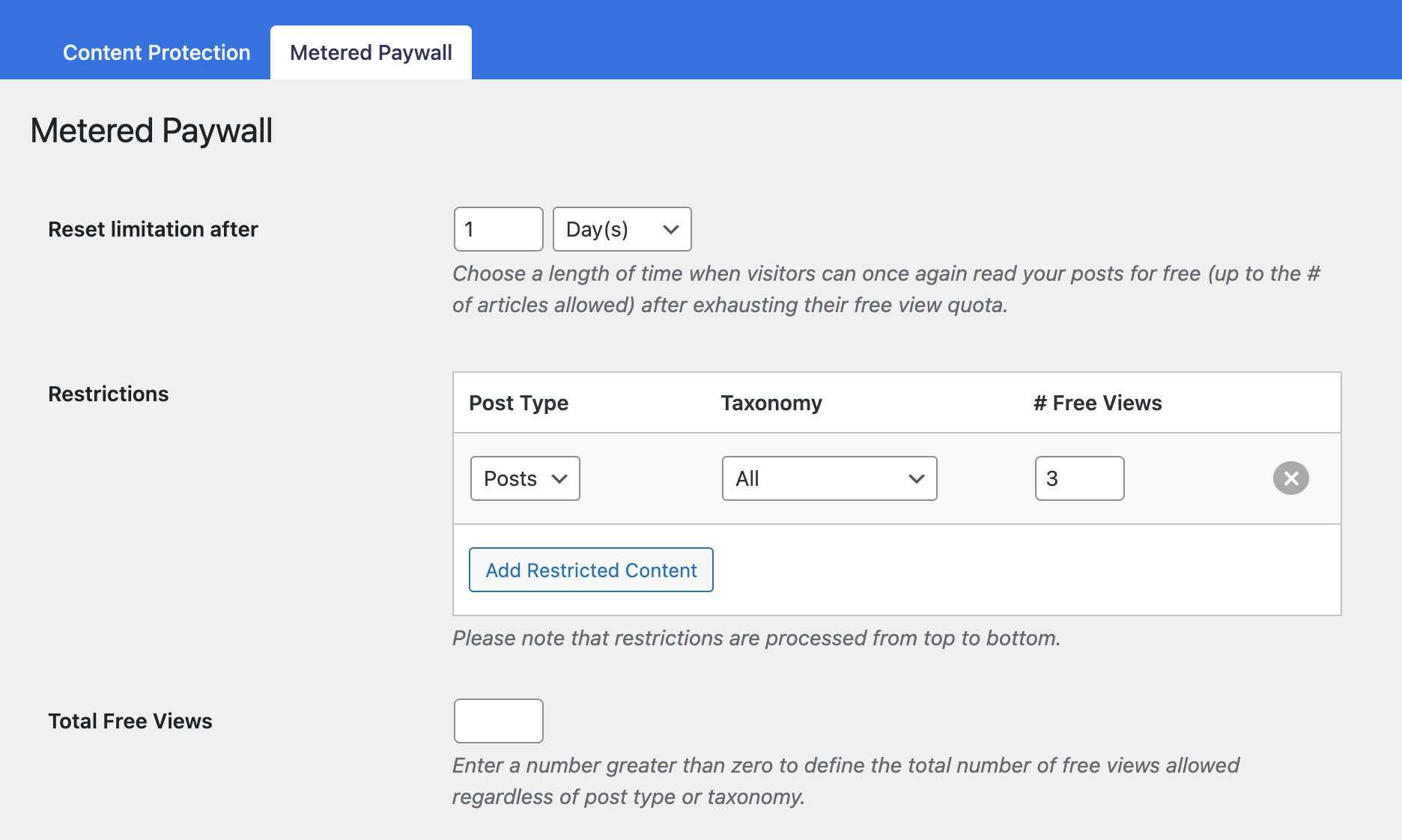
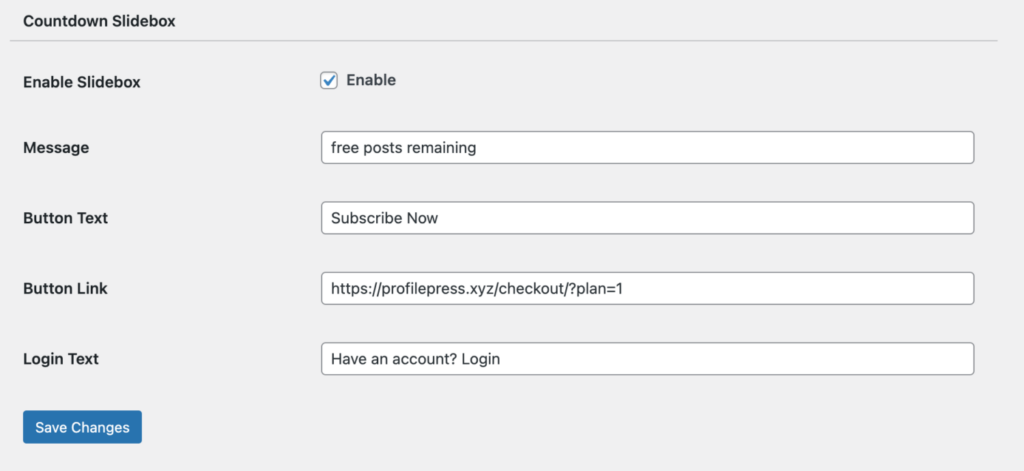
The addon can also show a countdown slidebox telling visitors how many free views they have left, and record IP addresses so readers can’t reset their meter by switching to a private window.
Metered paywall pros
- Visitors get to know your content before being asked to pay.
- Regular readers hit the limit, which targets exactly the people most likely to subscribe.
- Search engines can still access and index protected content.
Metered paywall cons
- Works best with a large volume of content and regular traffic.
- Casual visitors who read one article a month never hit the meter, so they never see the offer.
3. Drip Content
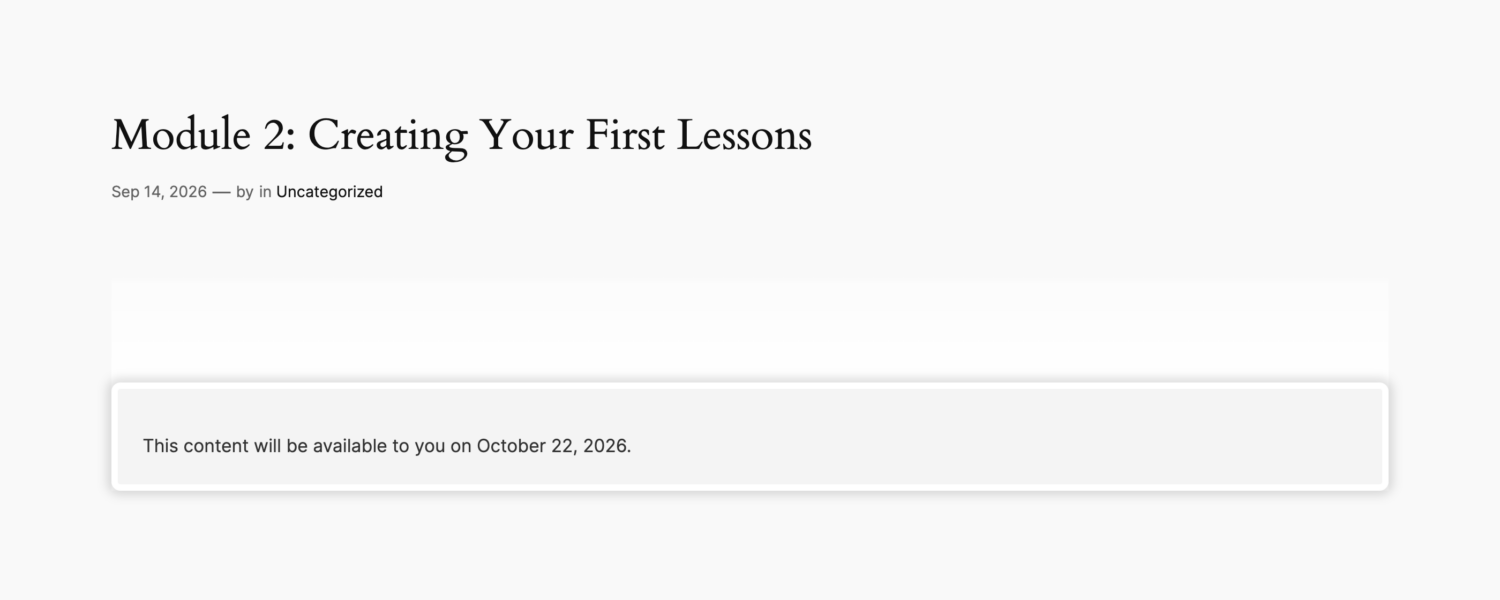
Drip content applies to people who already have access. Instead of unlocking everything on day one, content opens up gradually for each member: Module 1 after 7 days, Module 2 after 14 days, and so on, counted from the day they subscribed or registered.
With the ProfilePress Content Dripping addon, you add a delay to a content protection rule. Members who are still waiting see when the content unlocks for them:
Drip content pros
- Reduces overwhelm and guides members through content in the right order.
- Creates regular reasons for members to come back.
- Discourages “join, download everything, cancel”.
Drip content cons
- Doesn’t help convert visitors on its own. It works after someone has joined.
- Can frustrate members if the schedule is too slow.
Side-by-Side Comparison
| Paywall | Metered paywall | Drip content | |
|---|---|---|---|
| Who it affects | Non-members | Non-members | Members |
| Main goal | Exclusivity | Conversion | Engagement and retention |
| Free sampling | Excerpt or preview only | A set number of full pieces | Not applicable |
| Best content type | Premium resources, downloads | Articles, news, blogs | Courses, programs, challenges |
| Best for | Clear premium offers | High-traffic publishers | Course creators and coaches |
| In ProfilePress | Content protection (free) | Metered Paywall addon | Content Dripping addon |
Which Should You Use?
- You publish lots of articles and rely on search traffic: use a metered paywall, so new readers can sample your work and loyal readers are nudged to subscribe.
- You sell premium resources, templates or downloads: use a paywall. The value is the resource itself, so it should be clearly members-only.
- You sell a course, coaching program or challenge: use a paywall plus drip content. The paywall keeps non-members out, and dripping guides members through the program.
- You run a publication with a premium course or archive: combine all three. A metered paywall converts readers, the paywall protects premium sections, and dripping releases your course to members over time.
Using Them Together
These tools stack because they all build on ProfilePress content protection:
- Protect your content with a content protection rule. This is your paywall.
- Add a meter with the Metered Paywall addon if you want visitors to read some protected content for free.
- Add a drip delay to rules for content members should get gradually.
For example, a fitness site might let visitors read three workout articles a month for free (metered paywall), keep its workout library for members only (paywall), and drip its 12-week training program to members one week at a time (drip content).
Three Real-World Setups
A niche news site
A site covering the electric vehicle industry publishes five articles a day and gets most of its traffic from Google. It protects all articles with a content protection rule, then uses a metered paywall to give visitors five free articles a month. Casual readers never notice the paywall. Daily readers hit it within a week, see a countdown slidebox, and are offered a monthly subscription. Members get unlimited articles plus a weekly analysis newsletter.
A course creator
A photography teacher sells an eight-week course. There’s no reason to meter it: the course is the product. A paywall keeps the lessons for paying students only, and drip content releases one module a week, so students practise each technique before moving on. A free blog with tips and tutorials does the job of attracting visitors.
A professional association
A membership organisation for accountants publishes public news, members-only guidance notes and a 12-month certification program. Public news is free. Guidance notes sit behind a paywall for members. The certification program is dripped monthly, so members work through it at the intended pace and stay subscribed for the full year.
Common Mistakes to Avoid
- Metering content that isn’t protected. A metered paywall only limits content that’s already protected by a content protection rule. Protect first, then meter.
- A hard paywall with no preview. Show an excerpt or a blurred preview so visitors can see what they’re missing. “Members only” with nothing else converts poorly.
- Dripping a library. Don’t make members wait for reference content they need now. Drip sequential programs, not archives.
- Being too generous with the meter. If your typical reader never reaches the limit, nobody sees the offer. Check how many articles regular readers view and set the meter just below that.
Frequently Asked Questions
Is a metered paywall bad for SEO?
Search engines can still access and index content protected by the ProfilePress Metered Paywall addon, so your articles can rank while visitors still hit the meter.
Can I drip content to free members?
Yes. Count the drip from the user’s registration date instead of a subscription. Read how to drip content to free registered users.
Can visitors get around a metered paywall with a private window?
The Metered Paywall addon’s IP blocker records the IP address of each visitor. If they use up their free views and switch to a private window or another browser, they’re still stopped and asked to subscribe.
Do I need all three?
No. Start with a paywall. Add a metered paywall if you need to convert more readers, and drip content if you need members to stay engaged longer.
Gate Content the Way Your Audience Uses It
Paywalls create exclusivity, metered paywalls convert readers, and drip content keeps members engaged. They aren’t competitors: they’re layers. Start with ProfilePress content protection, then add the Metered Paywall and Content Dripping addons where they fit.
Still deciding whether to drip at all? Read Drip Content or Instant Access? How to Choose for Your Membership Site.