
How to Drip Content to Free Registered Users in WordPress
Most people think of drip content as something for paid memberships: subscribe, and a new lesson unlocks every week. But some of the most effective drip campaigns don’t involve payment at all.
Think of the free “5-day email course” that so many creators use to grow their audience. It works because it delivers value in small, regular doses and builds a habit before ever asking for money. Now imagine running that same course on your website instead of in an inbox: visitors register for free, and a new lesson unlocks for them every few days.
In this guide you’ll learn why dripping content to free registered users is such a powerful growth strategy, and how to set it up on WordPress with ProfilePress Content Dripping, no payment or membership plan required.
Why Drip Content to Free Members?
When people hear “free”, they expect everything at once. So why make free members wait? Because a schedule changes how people engage:
- It builds a habit. A member who comes back on day 1, day 3 and day 7 is forming a routine around your site. That routine is what eventually turns into a paid subscription.
- It grows registered users, not just page views. To get the course, visitors create an account. You now have a real user you can email, segment and convert.
- It creates natural upgrade moments. At the end of a free sequence, members have seen your teaching style and got results. That’s the best possible moment to offer your paid program.
- It keeps content on your site. Unlike an email course, lessons live on pages you control, with your branding, your navigation and your calls to action next to every lesson.
- It avoids the “download and disappear” problem. A free PDF is downloaded once and forgotten. A free course that unlocks over a week keeps people coming back.
Great Uses for Free Drip Content
- A free mini course that introduces your paid program, such as “7 Days to Your First Online Sale”.
- An onboarding sequence for new community or SaaS users, unlocking one “getting started” guide at a time.
- A challenge, like a 14-day fitness challenge or a 30-day writing challenge, with one task unlocked per day.
- A lead magnet series, for example a set of templates or checklists released over a week.
- A trial of your premium content, where free members get a taste of what paying members receive.
How Drip Content From Registration Works
ProfilePress Content Dripping adds a delay to a content protection rule. Usually the delay counts from when a member subscribes to a paid plan. For free members, you count from a different starting point: the day the user registers.
So if a lesson is set to unlock 3 days after registration, a user who signs up on Monday sees it on Thursday. A user who signs up next month gets it three days after their own registration. Everyone gets their own personal schedule, automatically.
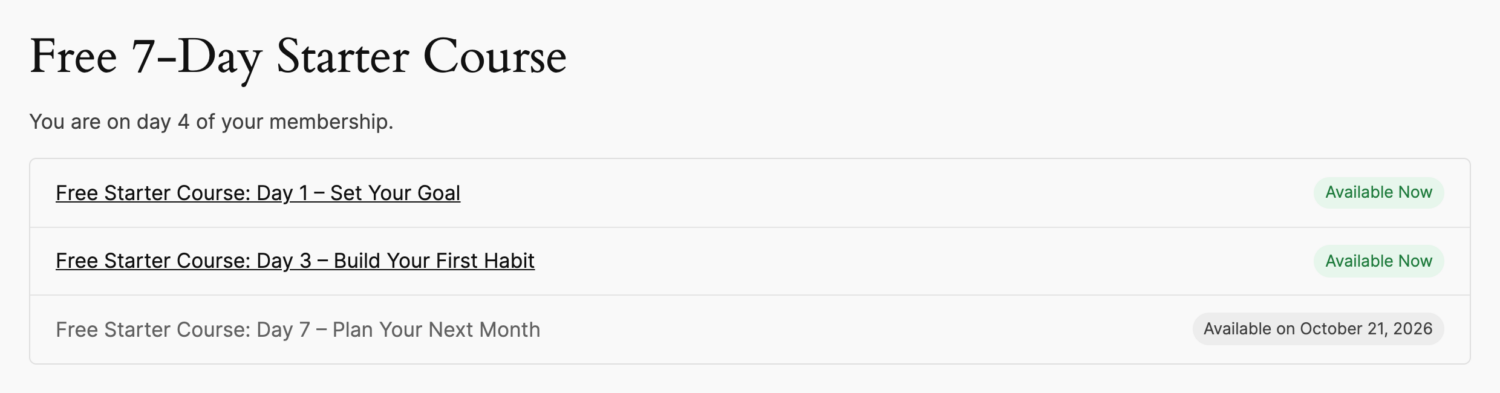
Here’s what a free member sees on day 4 of a three-lesson starter course:
How to Drip Content to Free Registered Users in WordPress
Step 1: Install ProfilePress and Enable Content Dripping
Content Dripping is a premium ProfilePress addon. With ProfilePress Premium installed, go to ProfilePress > Addons and enable Content Dripping.
Make sure registration is open on your site and you have a registration form members can use. ProfilePress lets you build custom registration forms and place them on any page.
Step 2: Create a Lesson for Each Step
Write each lesson as a normal WordPress post or page. For a seven-day starter course you might have:
- Day 1: Set Your Goal
- Day 3: Build Your First Habit
- Day 7: Plan Your Next Month
Step 3: Protect Each Lesson for Logged-In Users
Go to ProfilePress > Content Protection and create a protection rule for the first lesson. Under Who can access the content?, choose Logged in users.
This is the key difference from a paid course: leave the membership plans empty. That way every registered user can access the lesson, whether or not they’ve bought anything. Dripping only works on rules that are limited to logged-in users, so this setting is required.
Step 4: Drip From the User’s Registration Date
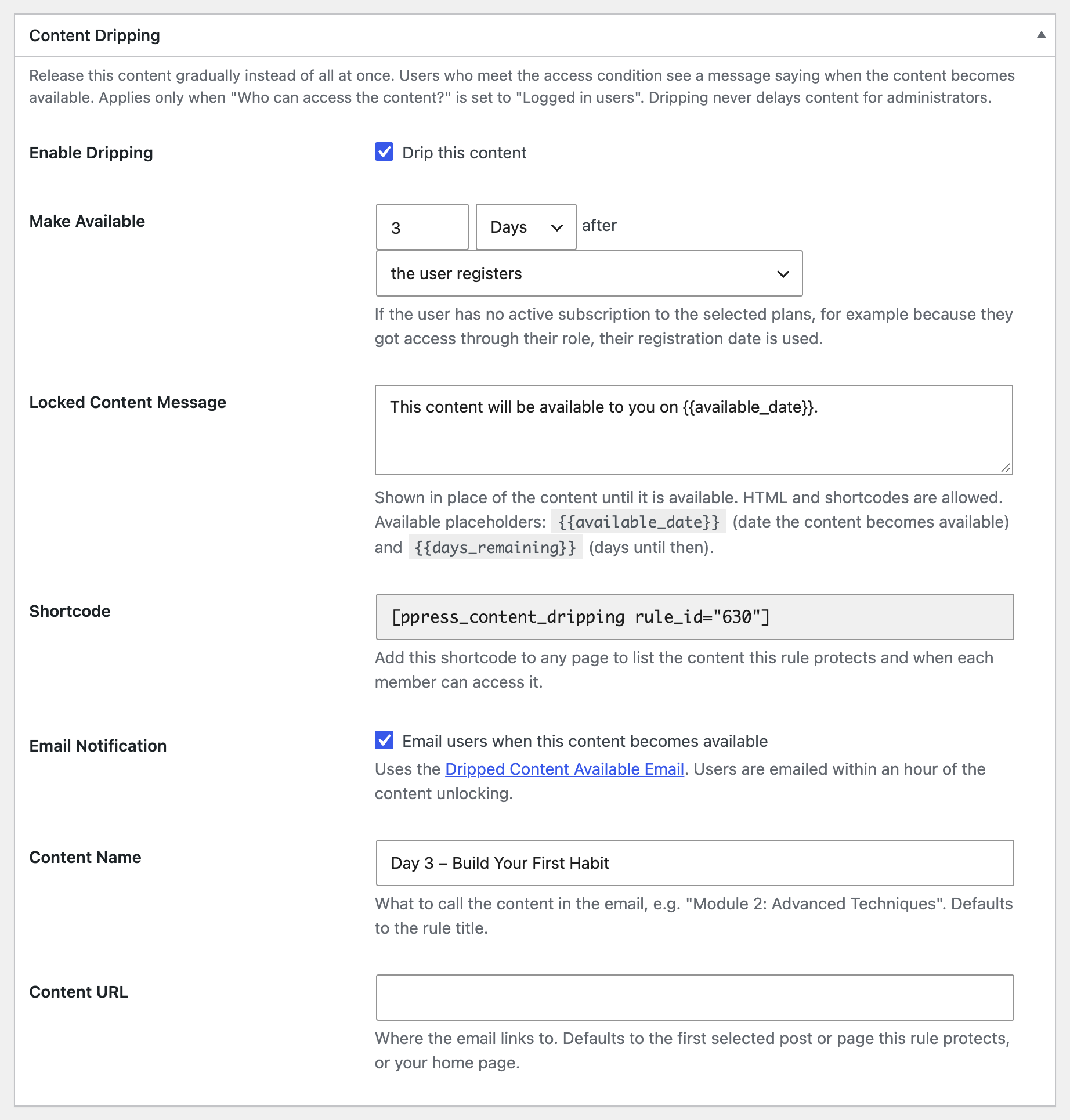
In the same rule, scroll to the Content Dripping box and tick Drip this content. Under Make Available, set the delay, for example 3 Days, and choose the user registers as the starting point.
While you’re here, you can also:
- Edit the Locked Content Message members see before the lesson unlocks. Use
{{available_date}}for the unlock date or{{days_remaining}}for a countdown. - Tick Email users when this content becomes available so members get an email when the lesson opens, and give it a friendly Content Name such as “Day 3 – Build Your First Habit”.
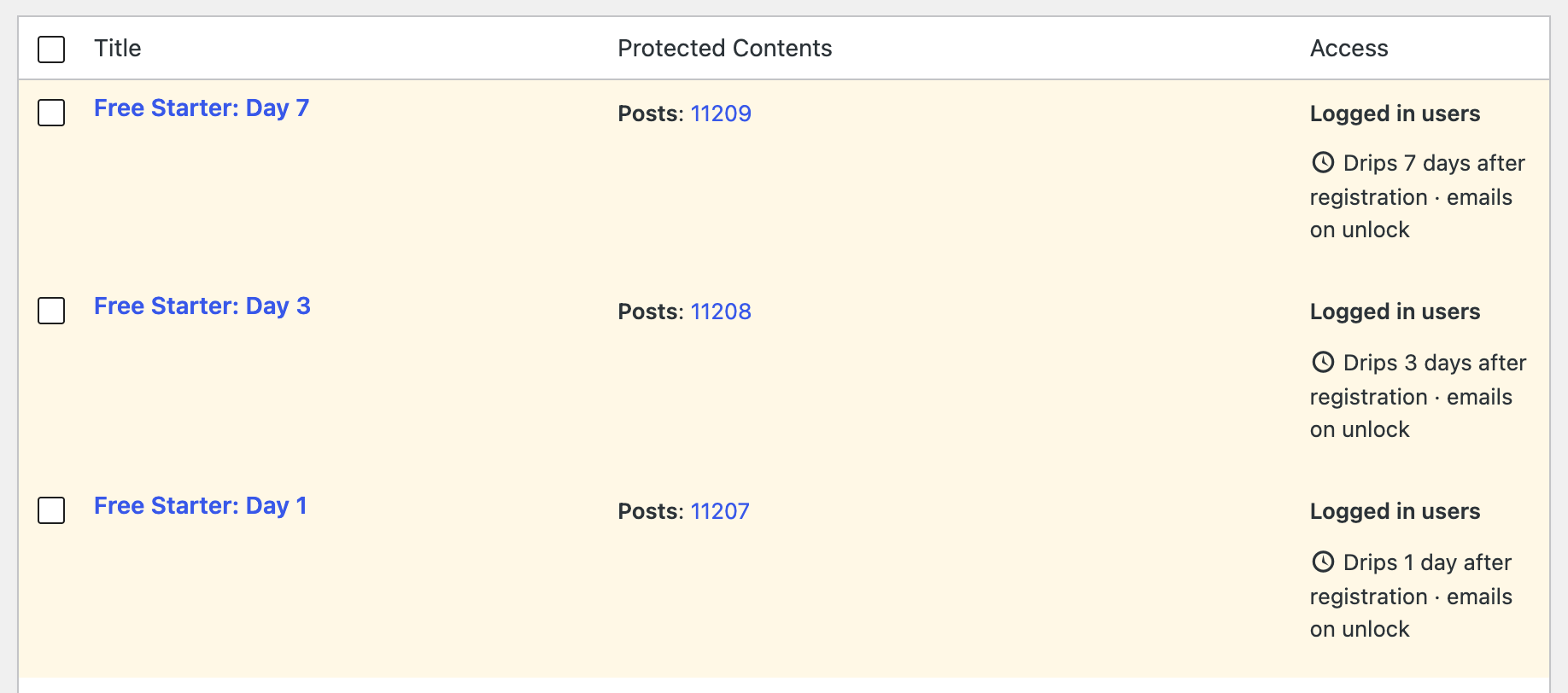
Save the rule and repeat for each lesson, with a different delay each time. A rule has one delay, so every lesson that unlocks on a different day needs its own rule. The rules list shows the full schedule:
Our documentation explains every setting in detail: how to drip content in WordPress.
Step 5: Create a Course Page
Create a page such as “Free Starter Course” and add the Content Dripping shortcode with all your rule IDs, separated by commas:
[ppress_content_dripping rule_id="629,630,631" title="Free 7-Day Starter Course"]Each registered user sees which lessons are available now and the date each locked lesson unlocks for them. Logged-out visitors see a prompt to log in, which is a natural spot to add a “Register for free” link. See our guide to building a course outline page for all the shortcode options.
Step 6: Send New Users to the Course
Finally, make sure new users land on the course straight after they sign up. In ProfilePress > Settings > General, set up a redirect after registration to your course page. ProfilePress can also log users in automatically after they register, so they go straight from the signup form to Day 1.
Turn the Free Course Into Paid Members
A free drip course is a funnel. Here’s how to make the most of it:
- Make the first lesson available immediately. Protect it with a rule that has dripping turned off, so new users get an instant win the moment they register.
- Mention the paid program inside every lesson. A short, relevant call to action beats a hard sell at the end.
- Use the locked message to build anticipation. “Day 7 unlocks in {{days_remaining}} days. In the meantime, here’s what paid members are working on…”
- Make the last lesson a bridge. End the free sequence with “what’s next”, and link to your pricing page or a members-only offer.
- Follow up by email. Unlock emails bring people back on schedule. Add your own email marketing sequence for the upgrade offer.
Mistakes to Avoid
- Making the free course too long. Three to seven lessons over a week or two is plenty. A free course that runs for two months loses people before they reach your offer.
- Locking the first lesson. New users should get something the moment they register, while their interest is highest.
- Forgetting logged-out visitors. Your course page is also a landing page. Make sure visitors who aren’t registered yet can see what the course covers and how to sign up.
Free and Paid Dripping on the Same Site
You can run both at once. Free rules count from registration, and paid rules count from when a member subscribes to a selected membership plan. A user who registers for your free course today and buys your paid program next month gets the free lessons on their registration schedule and the paid lessons on their subscription schedule.
If you’re deciding whether to drip at all, or how fast, read our guides on drip content vs instant access.
Frequently Asked Questions
Do free members need a membership plan for dripping to work?
No. Set the rule’s Who can access the content? to Logged in users, leave the membership plans empty, and choose the user registers as the drip start. Every registered user gets the schedule.
What about existing users who registered long ago?
Their clock started when they registered, so lessons with short delays will already be available to them. If you want everyone to start fresh, use a dedicated membership plan (it can be free) and drip from subscription instead.
Can administrators see all the lessons?
Yes. Administrators always see dripped content immediately, so you can check your lessons without waiting. To see the course page as a new member would, add ?ppress_drip_preview=1 to its URL.
Start Your Free Drip Course
A free course that unlocks over a few days builds a habit, grows your list of registered users, and sets up the perfect moment to offer your paid program. With ProfilePress Content Dripping, it’s a few protection rules and one shortcode.
Learn more about the Content Dripping addon, or read why drip content is the secret to a successful membership site.