
Membership add-on
Run your own WordPress affiliate program, built into ProfilePress
Our Affiliates addon for WordPress lets you recruit affiliates, track the members they refer, and pay commissions on every membership sale, without installing a separate affiliate plugin.
- Referral links & coupons
- Lifetime commissions
- PayPal payout CSV
Included in Plus and Agency plans
Your happiest members, bloggers, and partners already talk about your membership site. An affiliate program rewards them for every new member they send your way, so you only pay for marketing that brings in sales.
Until now, that meant adding a separate affiliate WordPress plugin and connecting it to ProfilePress. The Affiliates addon builds the whole program into ProfilePress: applications, referral tracking, commissions, payouts, and an affiliate area inside My Account.
Because it reads ProfilePress orders directly, commissions follow your plans, coupons, taxes, and refunds automatically, with nothing to sync.
Recruit and Approve Affiliates
Logged-in users apply from the Affiliate tab in My Account, enter their payment email, and agree to your terms of use. You decide how people join:
- Review each application and approve or reject it, one at a time or in bulk.
- Turn off approval so new affiliates can start sharing straight away.
- Add affiliates yourself from the WordPress dashboard, with their own rate and coupon.
Tracking That Works with Caching
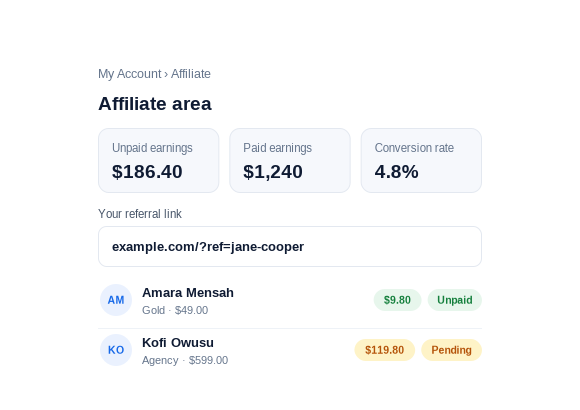
Each affiliate gets a referral link using their ID or a friendly slug, such as example.com/?ref=jane-cooper. When a visitor clicks it, a tiny script records the visit and remembers the affiliate in a cookie for as long as you choose, 30 days by default.
Tracking runs in the browser, so it keeps working on cached pages and behind CDNs, and a setting lets sites behind Cloudflare or another proxy use the visitor’s real IP address. See how referral tracking works.
Commissions on Your Terms
Pay a percentage of the order or a flat amount, and set it at three levels:
- A site-wide default rate for every affiliate.
- A rate for each membership plan, or no commissions at all on plans you choose.
- A custom rate for individual affiliates, which overrides the others.
You can also leave tax out of commissions, skip $0 referrals, and reject a referral automatically when its order is refunded. Learn how commissions are calculated.
Coupons and Lifetime Commissions
Assign a ProfilePress coupon to an affiliate, and every order that uses it is credited to them, even without a click on their link. That’s perfect for podcasts, videos, and social posts.
With lifetime commissions switched on, a referred customer stays linked to their affiliate, so the affiliate earns on that customer’s future purchases too.
Simple Payouts
When it’s time to pay affiliates in WordPress, create payouts for every affiliate above your minimum payout in one go. Download a PayPal mass payment CSV, send the money, then mark the payout as paid. Affiliates get an email and see the payment in their account.
An Affiliate Area in My Account
Affiliates see their earnings, referrals, visits, and payouts in the Affiliate tab of My Account. They can generate a referral link for any page on your site, copy banners and text links you create, and update their payment email.
Six emails keep everyone informed, from new applications to payouts sent, and you can edit or turn off each one in your ProfilePress email settings. Take a tour of the affiliate area.
WordPress Affiliate Plugin
Everything included.
Affiliates is part of ProfilePress, so there’s no extra affiliate WordPress plugin to install, configure, or keep updated.
Referral links
Cache-friendly tracking with a cookie length you choose.
Affiliate coupons
Credit sales to an affiliate whenever their coupon is used.
Lifetime commissions
Keep referred customers linked to the affiliate who found them.
Flexible rates
Percentage or flat rates per site, plan, or affiliate.
PayPal payouts
Batch unpaid commissions into a PayPal mass payment CSV.
Banners & text links
Creatives that include each affiliate’s link automatically.
Affiliate program for WordPress.
01
A commission rate for every plan
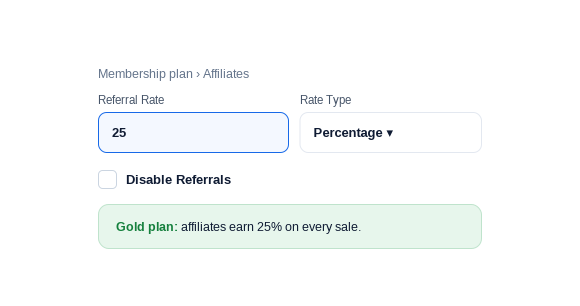
Open a membership plan’s Affiliates tab to give it its own referral rate, as a percentage or a flat amount, or to stop it paying commissions at all.
02
Every sale credited to the right affiliate
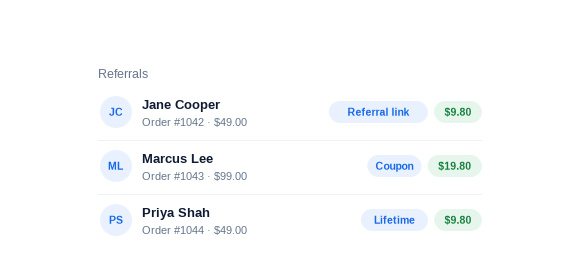
An affiliate’s coupon wins first, then a lifetime customer link, then the referral cookie. Self-referrals are blocked, and refunded orders lose their commission.
03
Pay everyone in a few clicks
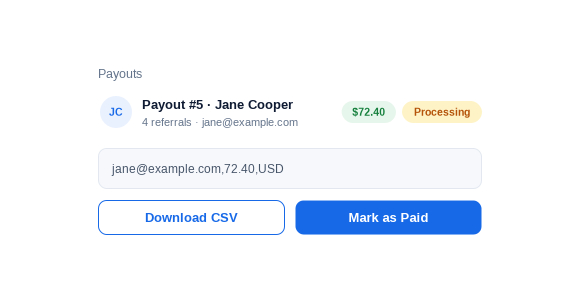
Create payouts from unpaid commissions, download the PayPal CSV, and mark them paid. Each referral in the payout is marked paid, and the affiliate gets an email.
Up and running in minutes.
No code required. Read the full Affiliates guide.
1
Switch it on
Go to ProfilePress › Add-ons and switch on Affiliates.
2
Set your commission
Choose your default rate, cookie length, and how affiliates join.
3
Invite affiliates
Affiliates apply from My Account and start sharing their links.
Affiliates FAQ
Still unsure? Talk to our support team.
Is Affiliates included with ProfilePress?
Yes. Affiliates is included in the ProfilePress Plus and Agency plans. Activate it from ProfilePress › Add-ons. There’s no extra plugin to install.
Do affiliates earn commission on renewals?
No. Affiliates earn on the first payment for a plan, and renewal payments don’t create referrals. With lifetime commissions on, they also earn on new purchases the customer makes later.
Does tracking work with page caching and CDNs?
Yes. Visits are recorded in the browser, so referral links keep working on cached pages and behind CDNs such as Cloudflare.
I use AffiliateWP or SliceWP. Should I switch?
You can, if you want everything in ProfilePress. Turn off the AffiliateWP or SliceWP integration once you switch, so orders don’t earn commission twice. Existing affiliate data isn’t imported.
Do I need to know how to code?
No. Everything is configured from the ProfilePress settings in your WordPress dashboard.
Can I try ProfilePress first?
Yes. Explore most features on the live demo, and every plan comes with a 14-day money-back guarantee.
Related add-ons
Grow your membership.
Pair add-ons together to build exactly the membership experience you want.
Team Memberships
Seats · Team invites
Metered Paywall
Free article limit · Conversions
Pay What You Want
Flexible pricing · Donations
All add-ons
41+ ways to extend ProfilePress
Turn your members into
your sales team.
Reward affiliates for every member they refer in WordPress, track commissions in your dashboard, and pay them in a few clicks.