
Most membership sites launch the same way: the creator spends months building a library of lessons, videos and downloads, opens the doors, and gives every new member access to all of it on day one.
It feels generous. In practice, it’s often why members cancel. Faced with 60 lessons at once, many people binge a few, feel overwhelmed by the rest, and quietly stop logging in. A month later, they wonder what they’re paying for.
The sites that keep members for months or years usually do something different: they drip content. Instead of handing over everything at once, they release it step by step, so there’s always something new and a reason to come back.
In this guide, you’ll learn what drip content is, why it works, when it doesn’t, how to plan a drip schedule, and how to set it up on a WordPress membership site with ProfilePress Content Dripping.
What Is Drip Content?
Drip content (also called dripping or drip-feeding) is content that unlocks gradually for each member, based on how long they’ve been a member. A lesson might unlock 7 days after someone joins, the next one after 14 days, and so on.
The key word is each. Drip content isn’t the same as publishing a new post every week for everyone. Every member gets their own schedule, starting from the day they joined. Someone who signs up today starts at Module 1, just like someone who signed up last year did.
Here’s what that looks like from a member’s point of view:
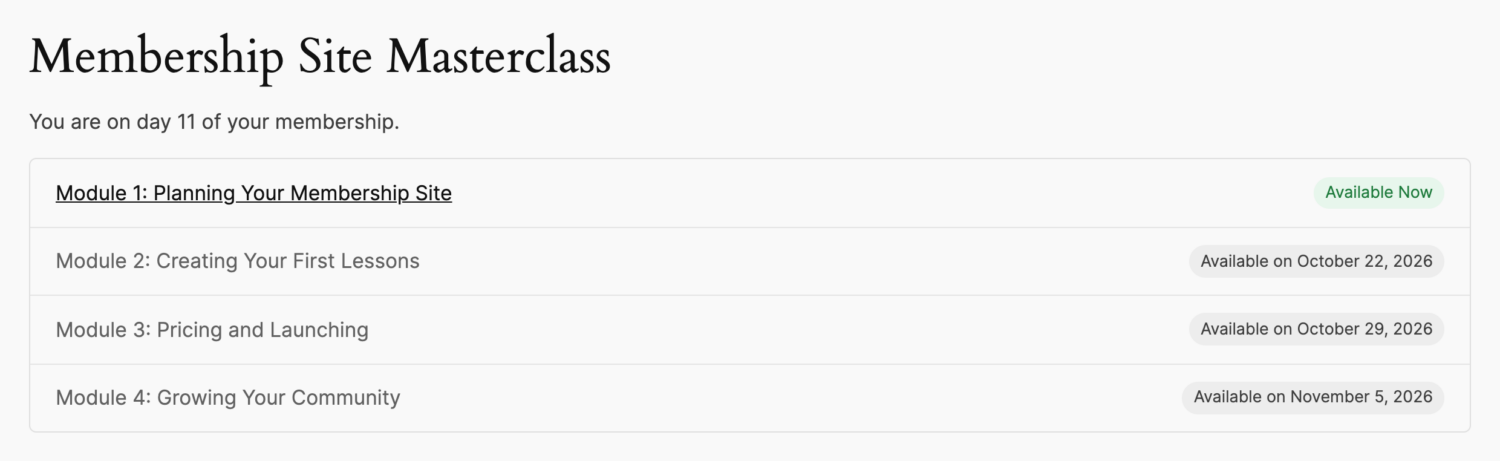
This member is on day 11 of their membership. Module 1 is open, and they can see exactly when the next three modules will unlock for them.
Why Drip Content Works
1. It reduces overwhelm
A course with 40 lessons visible on day one looks like homework. One or two lessons a week looks doable. Releasing content in small steps helps members finish what they start instead of giving up halfway.
2. It gives members a reason to come back
Every unlock is a new reason to log in. When members know Module 3 opens next Thursday, they have a date to look forward to, and your site becomes part of their routine.
3. It protects your recurring revenue
If everything is available on day one, a member can join, download it all and cancel after the first month. Dripping spreads the value across the subscription, so staying subscribed is the only way to get the whole program.
4. It lets you guide the learning path
Some content only makes sense in order. You can’t price a product you haven’t planned, and you can’t grow a community you haven’t launched. Dripping makes sure members see the basics before the advanced material.
5. It turns a library into an experience
A library of content is something you browse. A program that unfolds week by week feels like a journey with a beginning, a middle and an end. That feeling is a big part of what people are willing to keep paying for.
When Drip Content Isn’t the Right Choice
Dripping isn’t always the answer. It can frustrate members when:
- People join for a specific resource. A template library, a stock photo membership or a reference database should usually be fully available. Nobody wants to wait three weeks for the one template they came for.
- Your audience is advanced. Experienced members may want to skip ahead to what’s relevant to them.
- The schedule is too slow. If members finish a lesson in a day and then wait two weeks for the next one, they’ll feel held back rather than guided.
Many successful sites use a mix: a core library that’s open immediately, plus a structured program that drips over time. That way new members get instant value and a reason to stay. Not sure which approach suits you? Read Drip Content or Instant Access? How to Choose.
How to Plan a Drip Schedule
Before you touch any settings, sketch your schedule on paper. A few guidelines help:
- Give value on day one. Never leave a new member with nothing to open. Make a welcome lesson, a quick win or a starter resource available immediately.
- Match the pace to the work. If a module takes a week to work through, release one a week. If it takes an evening, release more often.
- Group content into steps. Instead of dripping every single lesson, release meaningful chunks: “Week 1”, “Module 2”, “Month 3 bonus”.
- Front-load the transformation. Put the content that delivers the first real result early. Members who see progress stay.
- Always show what’s next. A visible schedule turns waiting into anticipation. Hidden content just feels missing.
A simple four-module course might look like this:
- Day 0: Welcome and quick-start guide (no drip)
- Day 7: Module 1: Planning Your Membership Site
- Day 14: Module 2: Creating Your First Lessons
- Day 21: Module 3: Pricing and Launching
- Day 28: Module 4: Growing Your Community
How to Drip Content on WordPress with ProfilePress
ProfilePress is a WordPress membership plugin with built-in content protection. The Content Dripping addon adds a delay to any content protection rule, so members who have access still have to wait until the content unlocks for them.
For the full step-by-step setup, see our documentation on how to drip content in WordPress. Here’s an overview of how it works.
Step 1: Protect the content
Go to ProfilePress > Content Protection and create a protection rule for the content you want to drip, such as a lesson post or a group of pages. Under Who can access the content?, choose Logged in users and select the membership plans that should get access. Dripping only applies to rules that are limited to logged-in users.
Step 2: Turn on Content Dripping
In the same rule, scroll to the Content Dripping box and tick Drip this content.
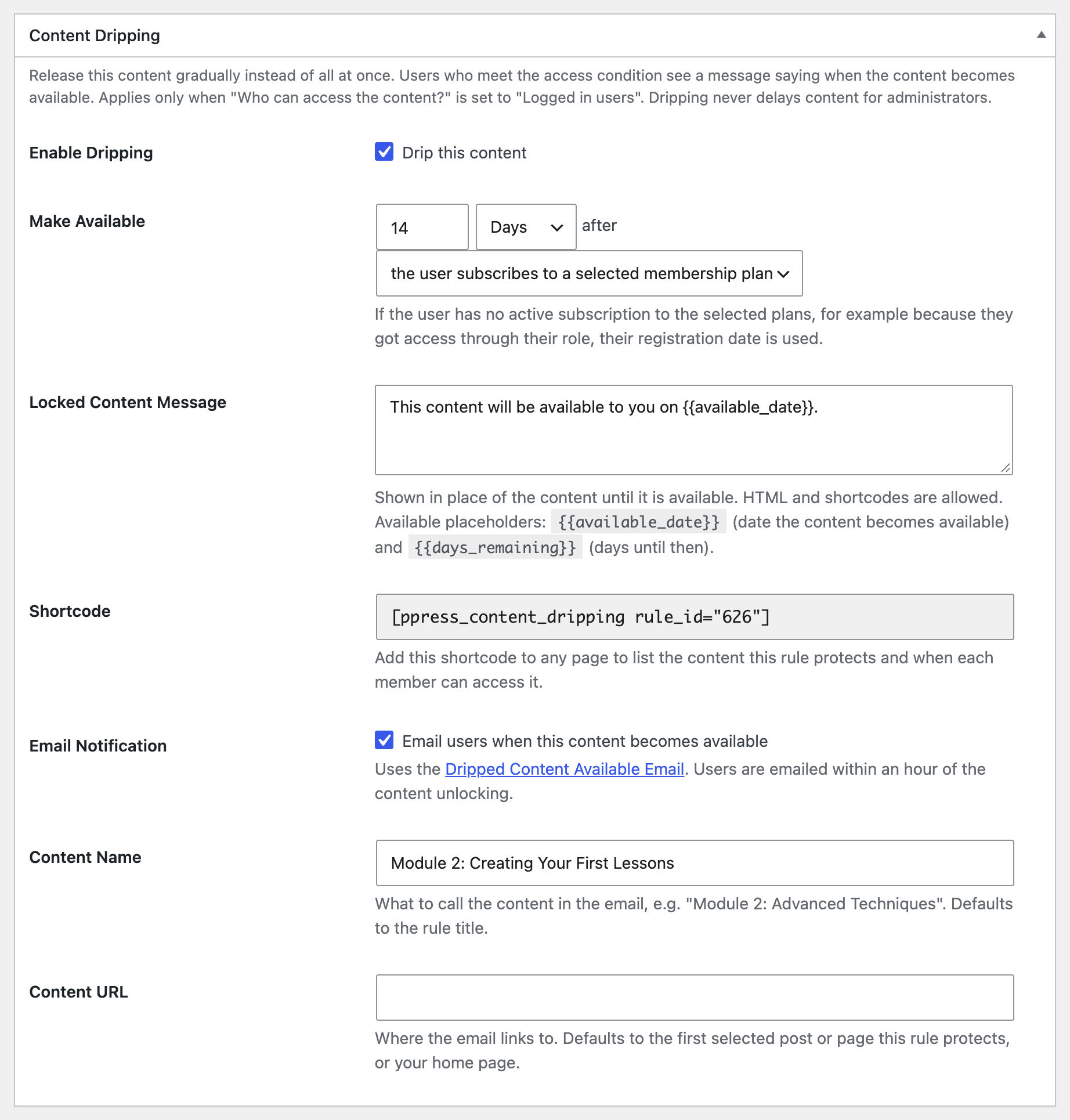
Then set Make Available, for example 14 Days after the user subscribes to a selected membership plan. You can count in days, weeks or months, and start the clock from either:
- the user subscribes to a selected membership plan, which is ideal for paid courses and programs, or
- the user registers, which works for free members and onboarding sequences too.
If a member got access through their user role rather than a subscription, ProfilePress counts from their registration date instead.
Step 3: Write the locked content message
Members who are still waiting see a message in place of the content. The default reads “This content will be available to you on {{available_date}}.” You can change it, use HTML and shortcodes, and include {{days_remaining}} to show a countdown such as “Only 3 days to go!”
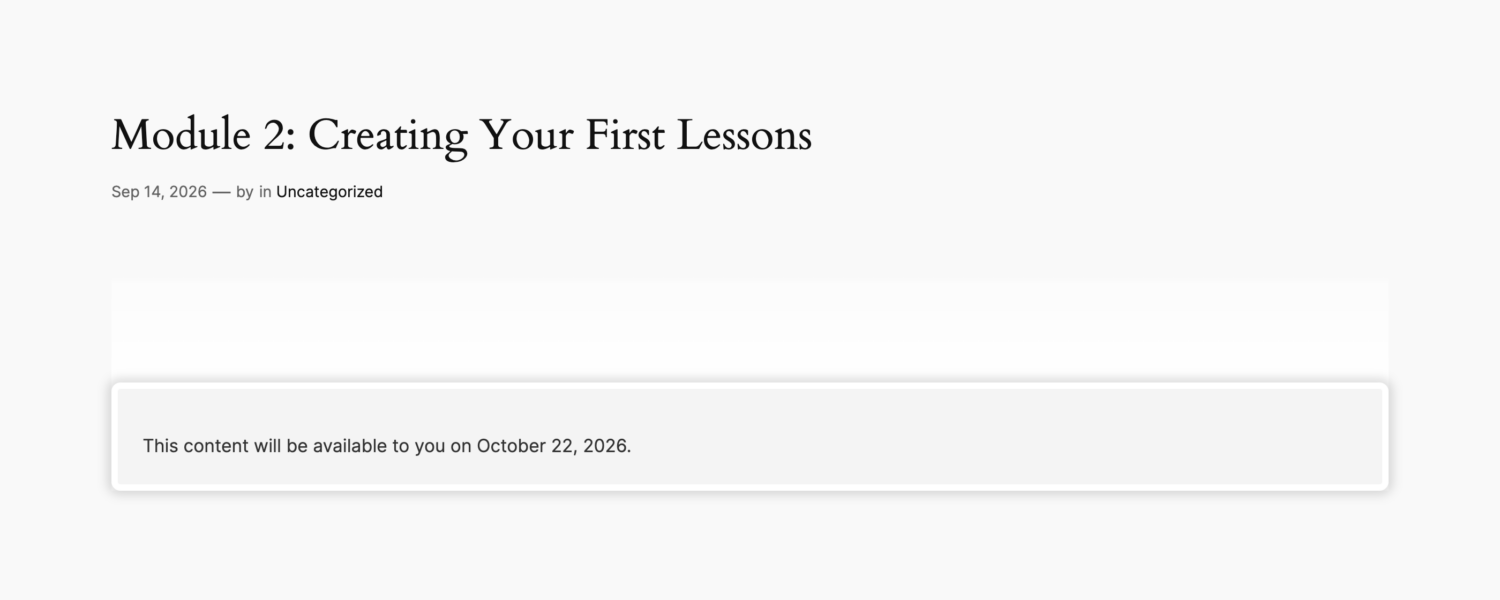
Members waiting for dripped content aren’t redirected away. They see the unlock date right on the page, so they know the content exists and when they’ll get it. Locked content is also hidden from site search until it unlocks.
Step 4: Create one rule per step
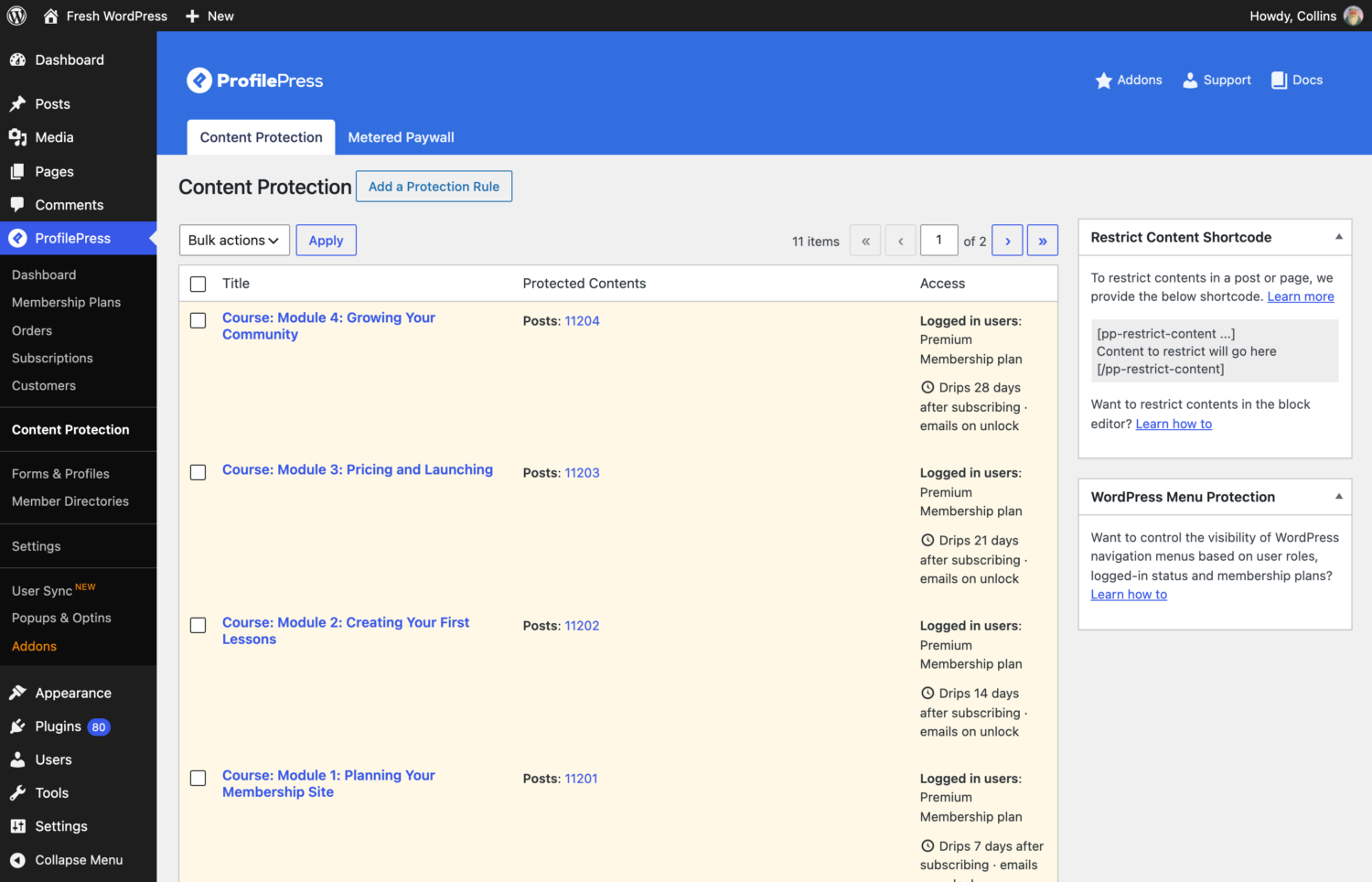
Each rule has one delay, so everything in a rule unlocks on the same day. To release content in stages, create a rule for each step, such as Module 1 at 7 days, Module 2 at 14 days, and Module 3 at 21 days. The rules list shows each rule’s schedule at a glance:
Step 5: Tell members when content unlocks
Tick Email users when this content becomes available in the rule, and ProfilePress sends members an email within an hour of each unlock, with a button that takes them straight to the new content. Learn more in our guide on notifying members when new content unlocks.
Step 6: Show members what’s coming
Every drip rule comes with a shortcode you can paste on any page to build a course outline. It lists what’s available now and the date each locked item unlocks for that member. See our guide on building a course outline page.
Drip Content Best Practices
- Test with a real member account. Administrators always see dripped content immediately, so they can check it without waiting. Use a test member account to see exactly what your members see.
- Make the wait feel intentional. A friendly locked message that explains why content is released step by step (“so you can put each module into practice first”) works better than a bare date.
- Combine dripping with notifications. An unlock nobody notices is a missed chance to bring a member back.
- Review your schedule with data. If members finish lessons well before the next unlock, speed it up. If they fall behind, slow it down or release smaller pieces.
- Keep some content open. A welcome module, a community area, or a resource library gives members something to do between unlocks.
Frequently Asked Questions
Is drip content the same as scheduled posts?
No. A scheduled post goes live for everyone on a fixed date. Drip content unlocks for each member on their own schedule, starting from the day they subscribe or register.
Can I drip content to free members?
Yes. Set the rule to make content available after the user registers. Free registered users then get their own drip schedule, which is a great way to run an onboarding sequence or a free mini course. Here’s how to drip content to free registered users.
What happens if a member cancels?
A canceled subscription that hasn’t expired yet still counts as active, so the member keeps their place in the schedule until their access actually ends.
Do I need ProfilePress Premium?
Content Dripping is a premium addon. See the ProfilePress pricing page for the plans that include it.
Start Dripping Your Content
Drip content isn’t about holding things back. It’s about giving members the right content at the right time, with a reason to come back every week. Plan a simple schedule, show members what’s coming, and tell them when something new unlocks.
With ProfilePress Content Dripping, you can set it all up from the content protection rules you already use. Get ProfilePress and turn your content library into a program members stay subscribed to.