
7 Best WordPress File Upload Plugins in 2026
Ever searched for the best WordPress file upload plugin only to realize how overwhelming the options can be?
We’ve tested and compared popular options, so you don’t waste hours figuring out which works best.
In this article, you’ll discover what a WordPress file upload plugin is, why you need one, and the best options.
What is a WordPress File Upload Plugin?
A WordPress file upload plugin adds a file submission feature to your website, allowing your visitors, clients, customers, or members to send you files directly through a form on your site without needing your email address or access to your dashboard.
Think of it as a digital drop box that lives right on your website. Someone visits your page, fills out a form, attaches a file, hits submit, and the file lands exactly where you need it; whether that’s your media library, a dedicated folder on your server, or a cloud storage platform like Google Drive or Dropbox.
Depending on which file upload plugin for your WordPress website you end up with, you can control what gets uploaded. You can restrict file types, cap file sizes, require users to be logged in before uploading, and even set up automatic email notifications so you’re alerted the moment a new file comes in.
Why You Need a WordPress File Upload Plugin
Below are some reasons to add a file upload feature to your WordPress site.
1. Easy file submission for users: A file upload plugin makes it simple for visitors to send documents, images, or other files directly from your website. Instead of attaching files to emails or using external platforms, users can complete everything in one place.
2. Better organization of files: All uploaded files are stored and managed inside your WordPress dashboard or connected storage. This means you don’t have to dig through emails or scattered folders. Everything stays structured, making it easier to track submissions.
3. Improved security control: Without a proper system, file uploads can expose your website to risks. A good plugin lets you control file types, set size limits, and block unsafe formats. This helps reduce the chances of harmful files being uploaded to your site.
4. Faster workflow and communication: Instead of back-and-forth emails asking users to resend files or clarify attachments, everything is submitted the first time. This speeds up processes like job applications, customer support requests, and client onboarding.
Let’s get into the best WordPress file upload plugins in 2026 and find the perfect fit for your website.
1. ProfilePress

ProfilePress is a WordPress ecommerce plugin that includes file upload functionality. It allows users to upload files via registration and profile forms, making it useful for membership websites, online learning platforms, client portals, and businesses that need to collect documents such as résumés, IDs, certificates, or verification files directly from users.
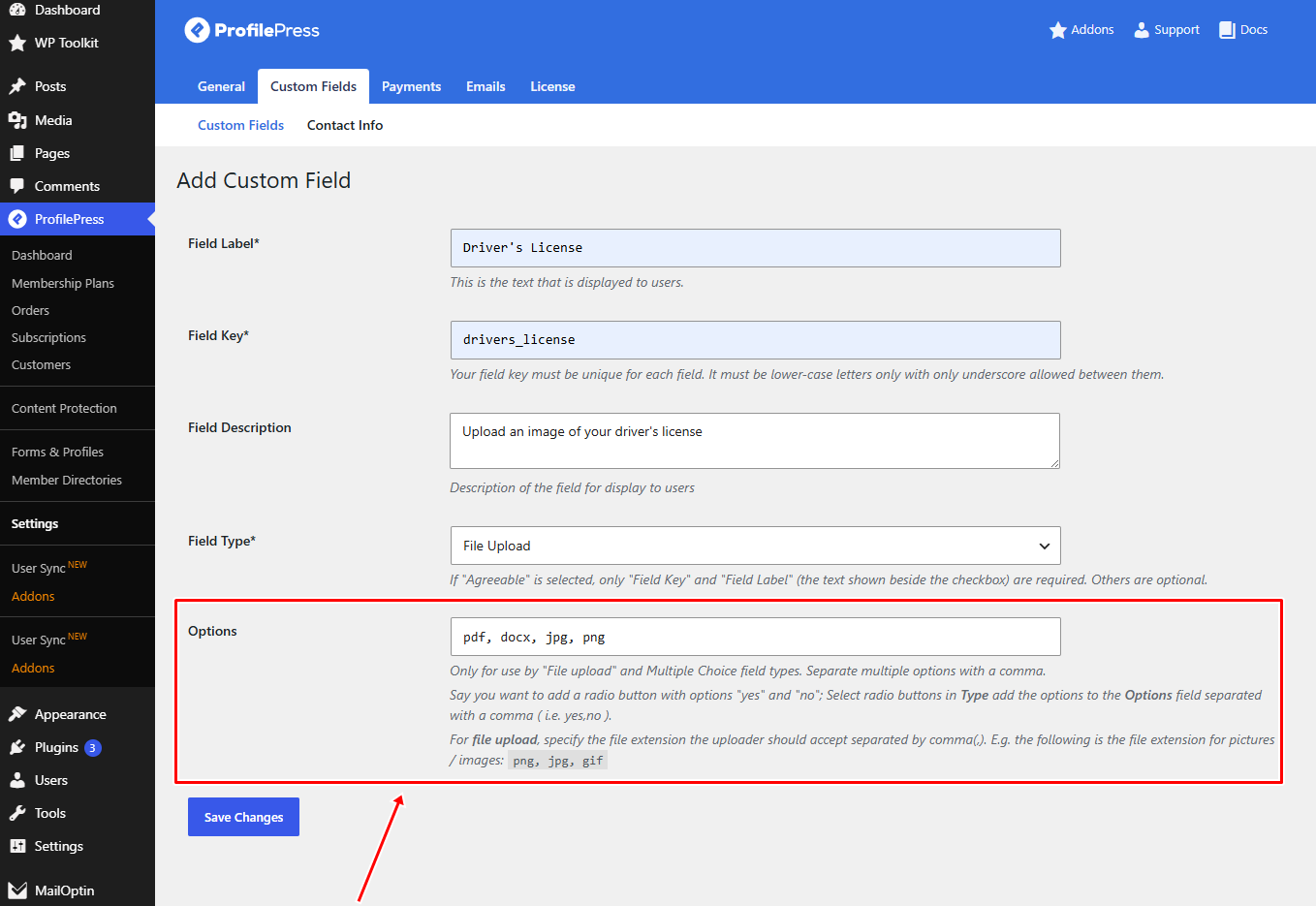
Another thing that makes ProfilePress unique is the level of control it gives website owners over file uploads. You can choose the exact file formats users are allowed to upload, including PDF, DOCX, JPG, and PNG files. This helps prevent unwanted uploads, keeps submissions organized, and adds an extra layer of security to your website.
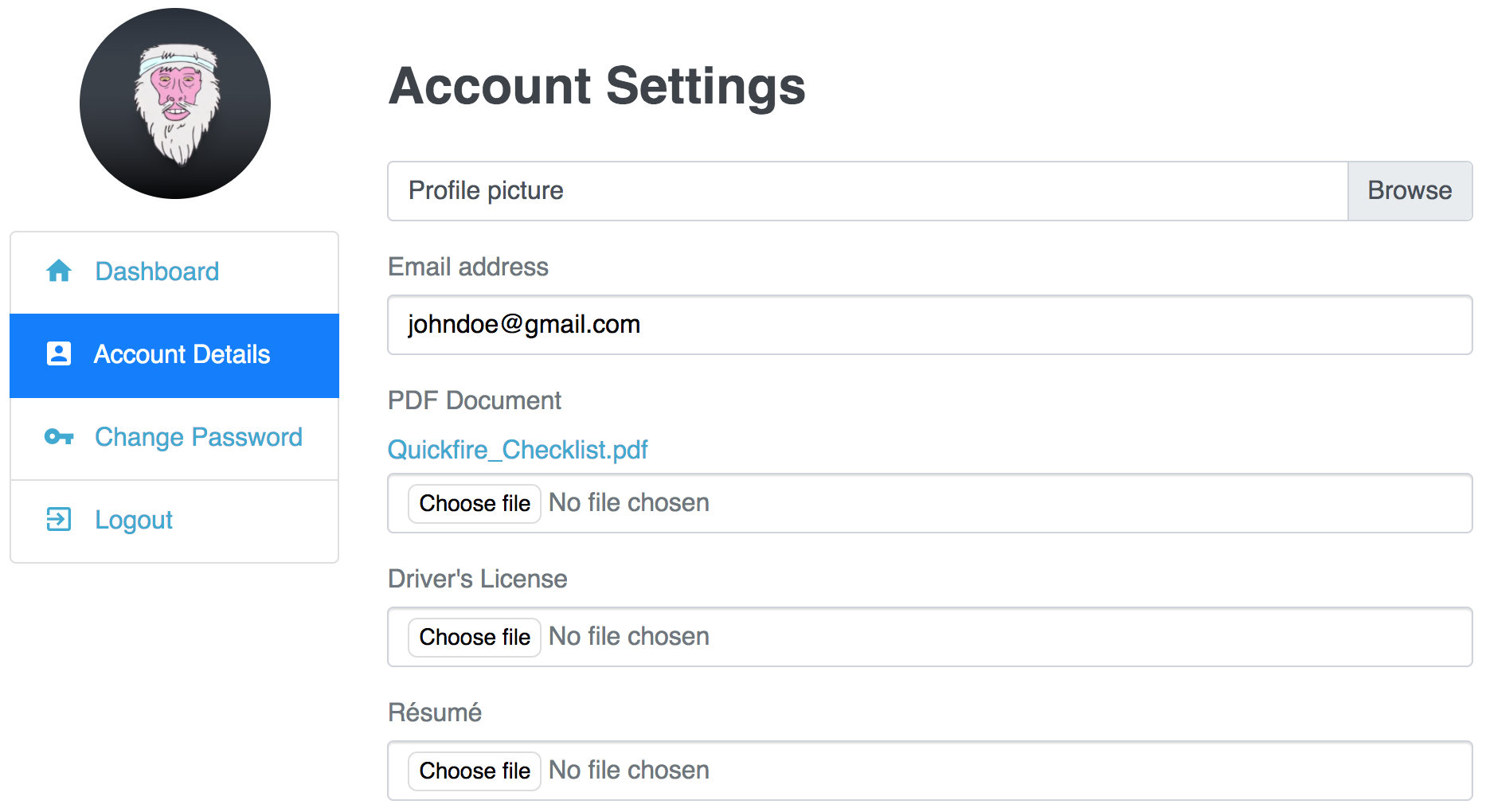
ProfilePress also allows website owners to display links to uploaded files on users’ profile pages. This allows users to access their submitted documents whenever needed, quickly.
Beyond file uploads, ProfilePress supports subscriptions, digital product sales, content restrictions, member directories, and integrations with platforms such as WooCommerce, Tutor LMS, LearnDash, and Mailchimp, making it an ideal choice for websites that need file-upload functionality alongside memberships, payments, and user management.
How File Uploads Work in ProfilePress
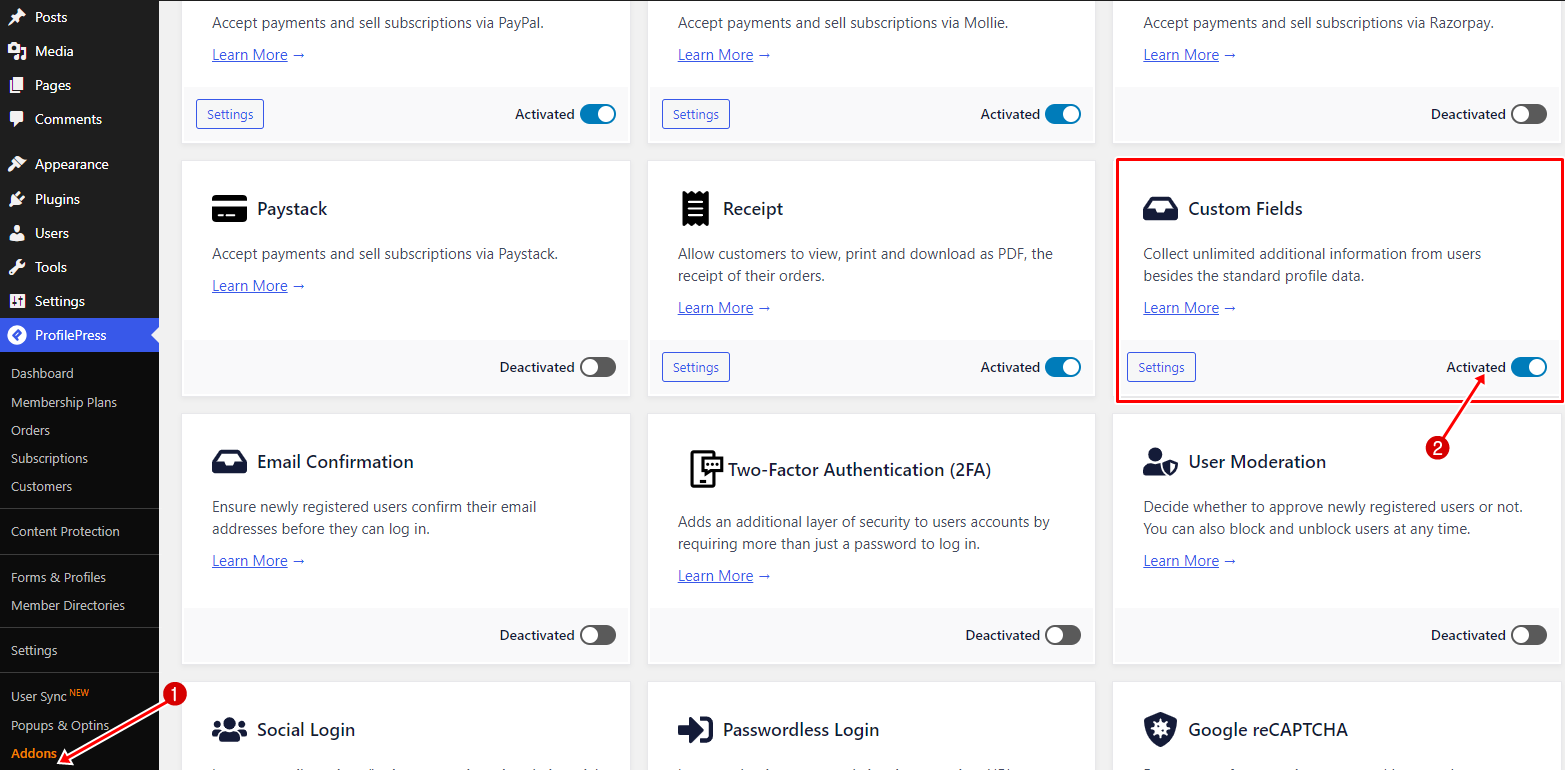
To create a file upload field in WordPress using ProfilePress, install and activate the plugin, then enable the Custom Fields addon from ProfilePress > Addons inside your WordPress dashboard.
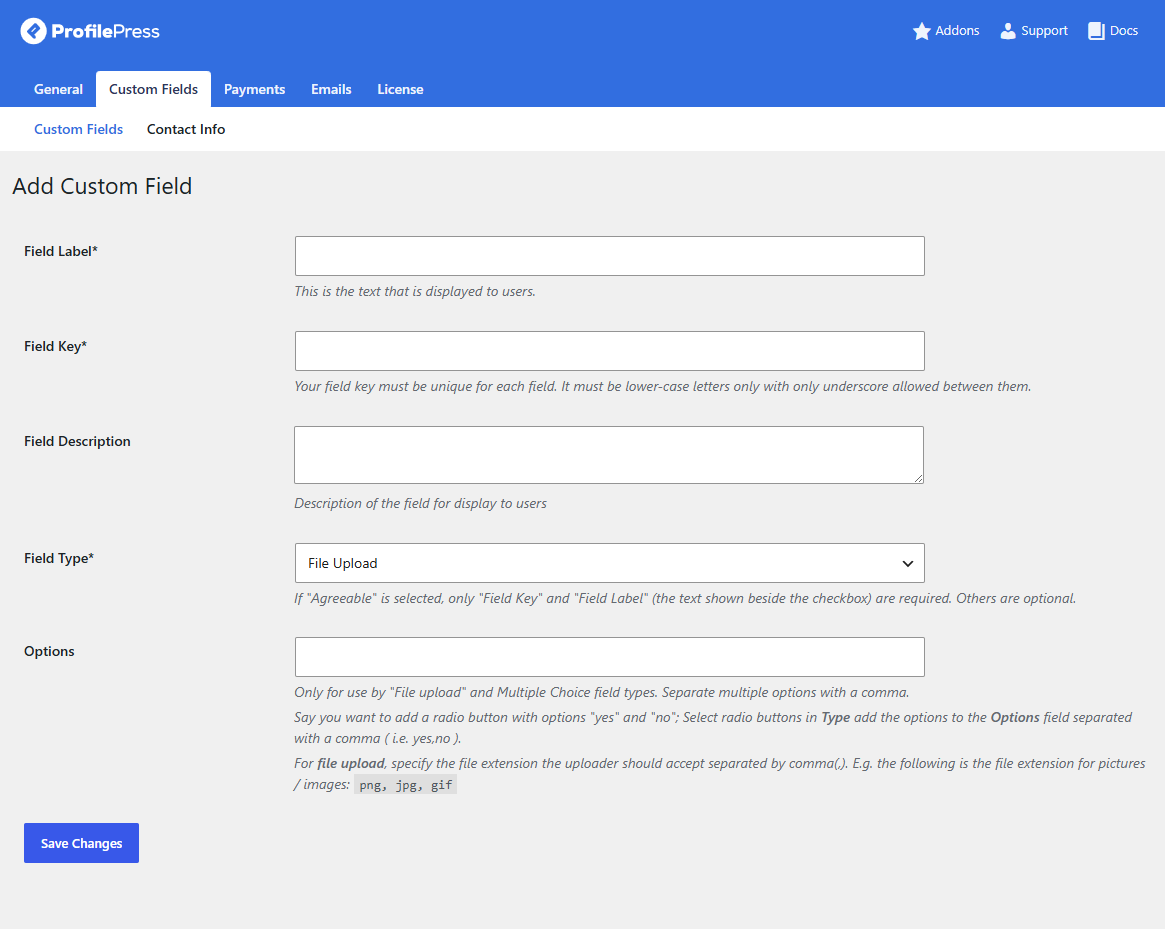
After enabling the addon, navigate to Settings > Custom Fields and click Add New.
Then select the Field Type as File Upload. This allows you to create upload fields for items such as driver’s licenses, résumés, certificates, and profile documents. You can also define which file formats are allowed by entering accepted file extensions.
Once created, these upload fields can be added to your website registration forms or edit profile forms created with ProfilePress.
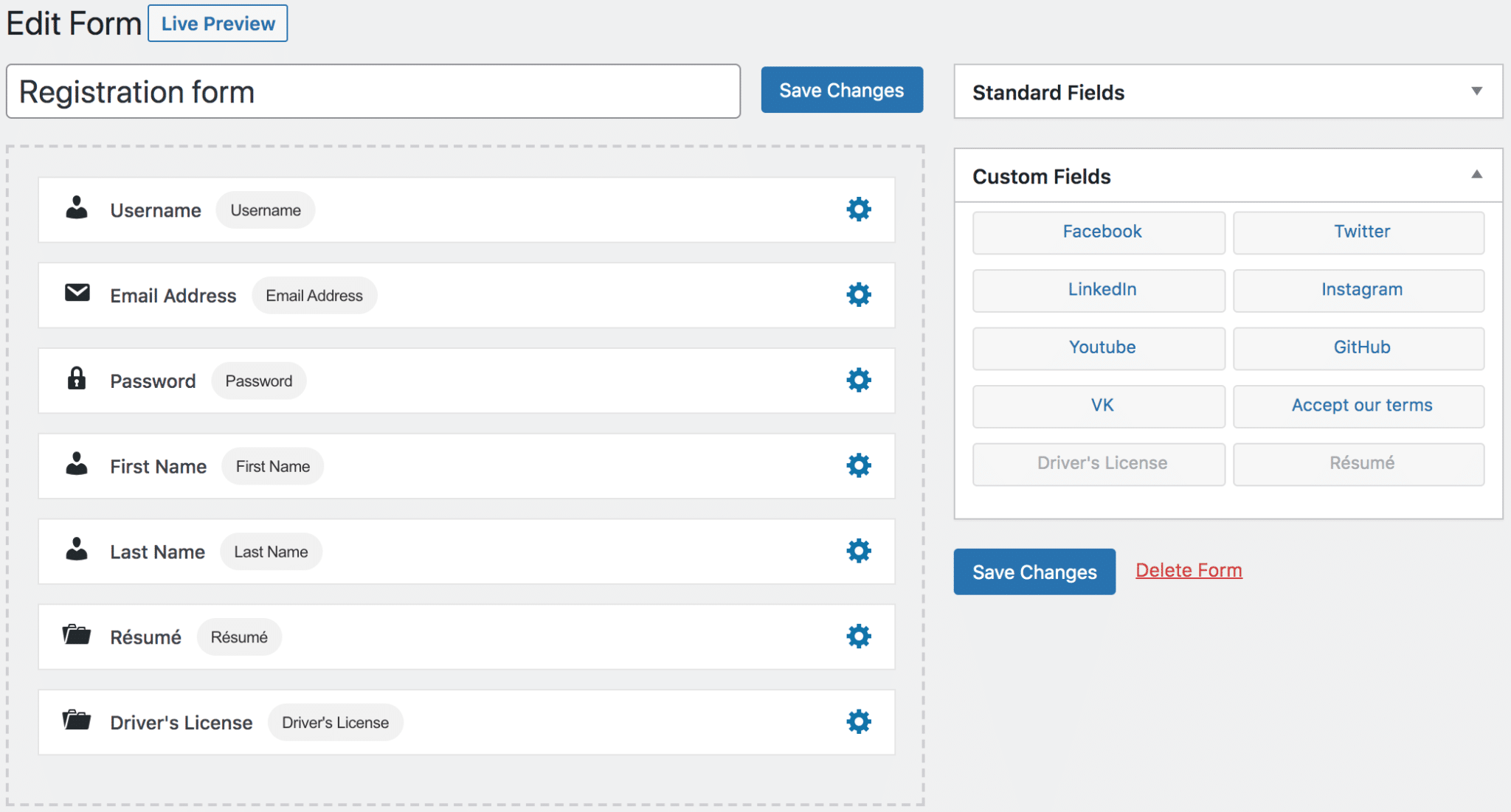
This allows users to upload files when registering for your WordPress website or updating their profile information while logged in.
Features of ProfilePress
- Frontend file uploads during registration and profile editing
- Drag-and-drop form builder
- Custom user registration and login forms
- Membership and subscription management
- Digital product and downloadable file support
- Content restriction and paywall features
- Stripe, PayPal, Paystack, RazorPay, Mollie, and Bank Transfer support
- User profiles and member directories
- Social login integration
- Google reCAPTCHA and Cloudflare Turnstile support
- WooCommerce membership integration
- Email customization and automation
- Two-factor authentication (2FA)
Price
ProfilePress offers a free version with essential features for building membership and user management systems. However, the file upload functionality is included in the Custom Fields addon, which is available only in the premium version. Premium plans start at around $129 per year.
Pros
- Combines file uploads, memberships, and ecommerce in one WordPress plugin
- Powerful drag-and-drop form builder
- Effective security and spam protection features
- Supports multiple payment gateways
- Excellent for membership and community websites
- Works well with major LMS and WooCommerce plugins
Cons
- Some integrations are available only in higher-tier plans
Best For
ProfilePress is best for membership websites, online course platforms, digital download stores, client portals, and businesses that need secure frontend file uploads alongside user management and payment functionality.
2. Ninja Forms

Ninja Forms is a popular WordPress form builder plugin that makes creating forms with file upload fields easy.
Using its drag-and-drop builder, you can quickly build forms that allow users to upload documents, images, résumés, videos, and other file types directly from your website.
We especially liked how flexible Ninja Forms is in managing uploads. You can control how many files users are allowed to submit, restrict certain file types, set minimum and maximum file sizes, and even organize uploaded files into custom folders automatically. For websites that collect a lot of user documents or applications, these settings can save a lot of time.
Another reason Ninja Forms earned a place on this list is its cloud storage support and upload security. The plugin integrates with services such as Google Drive, Dropbox, and Amazon S3.
It also validates uploads before they reach your website, helping reduce spam and blocking unsafe file types. We also found it helpful that uploaded files can be attached directly to email notifications, making it easier for teams to review submissions as soon as they arrive.
Features of Ninja Forms
- Drag-and-drop file upload fields
- Multiple file upload support
- File type and file size restrictions
- Custom file naming and organization
- Cloud storage integration with Google Drive, Dropbox, and Amazon S3
- Email attachment support for uploaded files
- Frontend file upload forms
- Secure file validation and upload protection
- Custom upload directories
Price
Ninja Forms offers a free core plugin, but the file uploads add-on is available through premium plans or as a standalone extension. Premium pricing starts at $59.40 per year.
Pros
- Easy drag-and-drop form builder
- Flexible file upload customization
- Supports cloud storage integrations
- Good security and file validation features
- Works well for both beginners and advanced users
- Allows multiple file uploads in one form
Cons
- File upload functionality requires a paid add-on
Best For
Ninja Forms is best for businesses, job application websites, customer support systems, client onboarding forms, and any WordPress website that needs flexible, secure file-upload forms.
3. Jotform

Jotform is a popular online form builder that works seamlessly with WordPress and makes it very easy to collect file uploads from users. Instead of building complex upload systems within WordPress, Jotform lets you create forms on its platform and embed them on your website.
When it comes to file uploads, Jotform offers a flexible and user-friendly experience. You can add file upload fields to any form and control how users interact with them. For example, you can limit the number of files per submission, set maximum file sizes, and choose which file types are allowed.
By default, users can upload a wide range of file formats, but you still have full control to restrict or customize these settings as needed.
Another advantage of Jotform is its integration capability. It integrates with several third-party tools and file-upload widgets, giving you more flexibility in how and where uploaded files are managed.
Whether you are collecting resumes, documents, or customer files, Jotform makes the entire process easy and accessible, especially for users who prefer an all-in-one hosted form solution rather than a traditional WordPress plugin.
Features of Jotform
- Easy WordPress integration and embedding
- Drag-and-drop form builder
- File upload field with customizable limits
- Restrict file types and file sizes
- Support for multiple file uploads per submission
- Integration with third-party storage and tools
- Mobile-friendly and responsive forms
- Cloud-based form management
- Pre-built form templates
- Advanced form customization options
Price
Jotform offers a free plan with basic features and a limited number of submissions. Paid plans start at $19.50 per month.
Pros
- Very easy to use with no coding required
- Hosted solution reduces WordPress load
- Flexible file upload controls
- Wide range of integrations
- Large library of ready-made templates
Cons
- Pricing can become expensive for high-volume use
- Forms are managed externally (not fully inside WordPress)
- Limited control compared to native WordPress plugins
Best For
Jotform is best for small businesses, freelancers, and organizations that want a quick and reliable way to collect file uploads through WordPress without managing complex plugin setups or server configurations.
4. WPForms
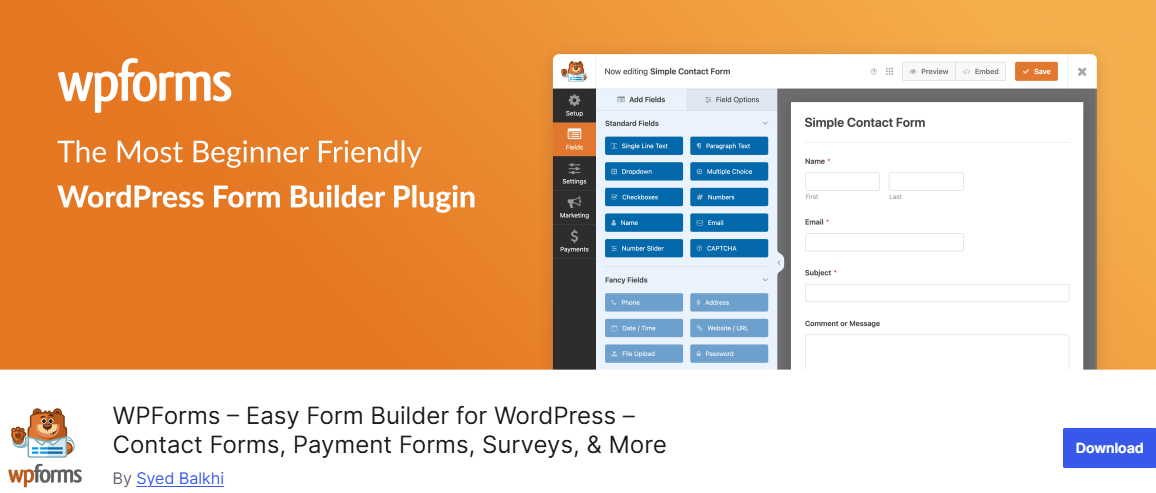
WPForms is often mentioned among the top WordPress file upload plugins, and after using it, it becomes clear why many people prefer it.
Setting up file uploads does not take much time. You can add a file upload field directly inside the form builder, and the settings you need are clearly visible. Options such as file-type limits and maximum upload size are easy to adjust.
Another part that makes it an excellent file upload plugin for WordPress is the level of control it offers over uploaded files. You can restrict access with password-protected forms or limit who can view submissions by user role. This helps you manage file access more effectively.
WPForms also handles notifications well. You can receive email alerts whenever someone submits a file, and the uploaded file can be included in the message. It also integrates with services like Google Drive and Dropbox, which help you store and organize files outside your WordPress site.
Features of WPForms
- Drag-and-drop form builder
- File upload field with multiple file support
- File type and size restrictions
- Password-protected file access
- User role-based file access control
- Email notifications with file attachments
- Google Drive and Dropbox integration
- Shortcode support for easy embedding
Price
WPForms offers a free version with basic form features. However, file upload functionality is available on premium plans starting at $49.50 per year.
Pros
- Very easy to use, even for beginners
- Fast setup with no coding required
- File control and access restrictions
- Supports multiple file formats, including documents, images, and videos
- Cloud storage integration for better file management
- Reliable performance for handling multiple uploads
Cons
- The file upload feature is not available in the free version
- Advanced features require higher-tier plans
Best For
WPForms is best for businesses, recruitment websites, service providers, and anyone who needs a simple but powerful way to collect and manage file uploads through WordPress forms.
5. Gravity Forms
Gravity Forms is an effective WordPress form builder that makes it easy to add file upload functionality to your website. Whether you want users to upload resumes, images, PDFs, or other documents, Gravity Forms provides a flexible system for collecting and managing files directly from your WordPress site.
With Gravity Forms, you can control allowed file types, set upload size limits, and allow users to upload multiple files through a single form field. This works well for job applications, client projects, or support requests where multiple documents are often required. The plugin also validates uploaded files individually, which helps reduce errors and improve security.
Another helpful feature is conditional logic. It allows you to show or hide file upload fields based on user selections in the form. For example, you can request portfolio uploads only when someone selects a creative role during an application.
It also integrates with cloud storage services such as Dropbox and Google Drive via add-ons, making it easier to keep uploaded files organized and accessible for teams managing submissions.
Features of Gravity Forms
- Drag-and-drop form builder
- Single and multiple file upload support
- File type and upload size restrictions
- Conditional logic for upload fields
- Individual file validation for security
- Cloud storage integration with Dropbox and Google Drive
- Email notifications with uploaded files
- Mobile-friendly forms
- Advanced workflow and automation support
- Integration with many third-party services
Price
Gravity Forms premium plans start from around $59 per year for the Basic License, which includes unlimited forms and entries with file upload functionality.
Pros
- Easy to use with advanced customization options
- Support for multiple file uploads
- Powerful conditional logic features
- Reliable file validation and security controls
- Integrates with cloud storage services
- Suitable for both beginners and advanced users
Cons
- No free version available
- Some advanced integrations require higher-tier licenses
Best For
Gravity Forms is best for businesses, agencies, application portals, and professional websites that need advanced file upload forms.
6. Formidable Forms
Formidable Forms is an excellent WordPress form builder that also works exceptionally well as a file upload plugin. It is designed for users who need more advanced forms, making it a great option for websites that regularly collect documents, images, videos, PDFs, and other user-submitted files.
What we really like about Formidable Forms is the level of control it gives you over uploads. You can choose which file types users are allowed to submit, set upload size limits, and decide how many files can be uploaded at once. Even when handling larger files or multiple uploads in a single form, the plugin keeps everything organized and performs well.
Another reason we added Formidable Forms to this list is its flexibility. It connects with email marketing services, CRM platforms, and automation systems, helping businesses keep uploaded files and user data organized in one place. We also found the interface easy to navigate, so you don’t have to spend time digging through complicated settings to create a working file upload form.
Features of Formidable Forms
- Drag-and-drop form builder
- File upload support for documents, images, videos, and PDFs
- Multiple file upload capability
- File type and file size restrictions
- Upload validation and security controls
- Integration with email marketing and CRM tools
- Mobile-friendly form layouts
- Customizable upload settings
- Supports advanced workflows and automation
- Works well for high-volume form submissions
Price
Formidable Forms offers a free version with basic form-building features. However, file upload functionality is available in the premium plans, which start at $39.50 per year.
Pros
- Handles large file uploads efficiently
- Easy-to-use interface with advanced functionality
- Upload customization options
- Good integration support with marketing and CRM platforms
- Reliable performance for complex forms and workflows
- Includes important security and validation features
Cons
- File upload features require a paid plan
- Advanced options may feel overwhelming for beginners
- Some integrations are limited to higher-tier plans
Best For
Formidable Forms is best for businesses, educational platforms, agencies, and websites that need advanced forms with secure, reliable file-upload functionality.
7. Iptanus File Upload

Iptanus File Upload is a flexible WordPress file upload plugin designed for users who want a simple but highly customizable way to accept file uploads on their website. The plugin allows users to upload files directly from posts, pages, or sidebars using a shortcode or widget.
What makes it notable is its customization options. You can add extra fields such as text inputs, email fields, dropdowns, and checkboxes, which let you collect more information along with each file upload. It also includes features such as upload progress indicators, email notifications after submissions, redirect settings after uploads, and webcam capture for photos or videos in supported browsers.
It also provides a file management area inside the WordPress dashboard where site administrators can view and handle uploaded files. For advanced use cases, it supports sending uploads to FTP and SFTP locations, giving more flexibility in how files are stored and managed.
Features of the Iptanus File Upload
- Frontend file uploads using shortcode or widget
- Upload forms for posts, pages, and sidebars
- Support for additional custom form fields
- Webcam screenshot and video upload support
- Upload progress bar and upload cancellation
- Notification messages and email alerts
- File management through the WordPress dashboard
- FTP and SFTP file storage support
- GDPR-compliant upload system
- Multilingual and localization support
- Custom redirect after successful uploads
- Highly customizable with many configuration options
Price
Iptanus File Upload offers a free version, but to access more features, you need to upgrade to the premium tier, which costs €40.00.
Pros
- Highly customizable upload system
- Supports frontend uploads from multiple locations
- Includes file management tools inside WordPress
- Works with older browsers and mobile devices
- Supports FTP and cloud-style file handling
- Useful additional features like webcam capture
Cons
- Interface may feel outdated compared to newer plugins
- Advanced customization can take time to learn
- Some modern features are limited to the Pro version
Best For
Iptanus File Upload is best for website owners who need a flexible, customizable frontend file-upload system with advanced file management and upload-control options.
Security Tips for File Upload Plugins
Now that you’ve seen the best WordPress file upload plugins available in 2026, the next thing to consider is security. No matter how good a plugin is, allowing users to upload files to your website always carries risks if proper protection is not in place.
Below are some important security tips to follow when using WordPress file upload plugins.
1. Restrict Allowed File Types: Only allow file formats that are necessary for your website. For example, if your form only needs documents and images, you can allow formats like PDF, DOCX, JPG, and PNG while blocking risky file types such as EXE, PHP, or JS files.
This helps reduce the chances of malicious files being uploaded to your server.
2. Set File Size Limits: Large file uploads can consume server resources and slow down your website. Setting maximum upload size limits helps protect your site from unnecessary storage usage and possible abuse.
3. Enable Spam Protection: Public upload forms can easily become targets for spam bots and fake submissions. Adding spam protection features like Google reCAPTCHA or Cloudflare Turnstile helps prevent automated uploads and protects your forms from abuse.
4. Store Files Securely: Leaving uploaded files publicly accessible can expose sensitive information. Whenever possible, use plugins that support private file storage or cloud storage services like Google Drive, Dropbox, or Amazon S3.
5. Limit User Access and Permissions: Not every user should have permission to upload or access files. Many plugins allow you to restrict uploads based on user roles, membership levels, or login status. This helps improve security and gives you more control over who can interact with uploaded content.
6. Keep Your Plugin Updated: Outdated plugins are among the most common causes of WordPress security problems. Developers regularly release updates to fix bugs, improve compatibility, and patch security vulnerabilities. Always keep your file upload plugin, WordPress core, and other plugins updated to the latest versions.
7. Use HTTPS on Your Website: HTTPS encrypts the data transferred between your website and visitors. This is important for protecting uploaded files and user information during submission. Without HTTPS, uploaded files and sensitive data may be exposed during transmission.
8. Regularly Monitor Uploaded Files: It is a good practice to review uploaded files regularly, especially on websites with high user activity. Monitoring uploads helps you identify suspicious files, spam submissions, or unauthorized content before they become a problem.
Conclusion
Choosing the right WordPress file upload plugin doesn’t have to feel overwhelming. By now, you should have a better understanding of what each plugin offers and which option best fits your website.
Whether you’re collecting client documents, accepting job applications, or handling member submissions, there’s a plugin here that can handle the job. The right choice is not always the plugin with the longest feature list. It’s the plugin that fits your actual needs and workflow.
Start by identifying what you want users to upload, decide on a budget that works for you, and choose a WordPress plugin that can continue to support your website as it grows.
We hope this article helped you discover the best WordPress file upload plugins for your website.