
ProfilePress Update 4.17.1 – 4.17.7 – Content Dripping, Subscription Pausing, Login Notifications & More
We are excited to announce the release of ProfilePress 4.17.7. Since 4.17.0, we’ve shipped two new premium addons, Content Dripping and Subscription Pausing, along with login notification emails, a Login Activity tab for members, a free trial ending reminder, built-in rate limiting for login and registration forms, and a large set of security hardening fixes.
New features
Content Dripping (Premium addon)
The new Content Dripping addon releases protected content to members gradually instead of all at once. Add a delay to any content protection rule, and members who meet the rule’s access condition get the content a set number of days, weeks or months after they subscribe to a membership plan, or after they register.
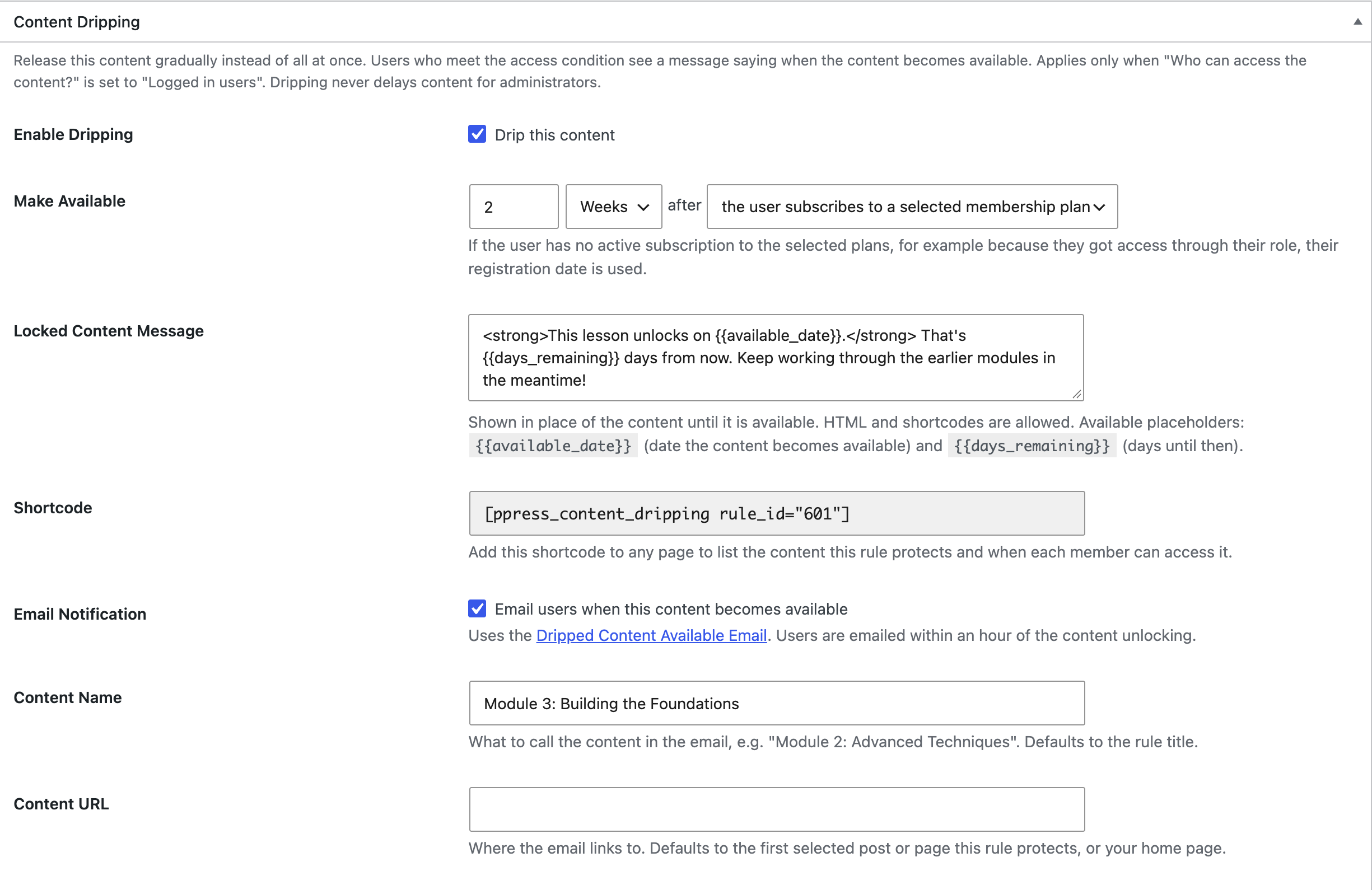
Until the content unlocks, members see a customizable message with the unlock date instead of being redirected away. The addon also includes:
- Dripped Content Available email: members are emailed within an hour of content unlocking for them.
- Course outline shortcode:
[ppress_content_dripping]lists everything in one or more drip rules, showing what’s available now and the date each locked item unlocks for that member.
Learn how to set it up in our documentation: How to Drip Content in WordPress with ProfilePress.
Subscription Pausing (Premium addon)
The new Subscription Pausing addon lets members pause their subscription for a few billing periods instead of canceling. A paused member isn’t charged, keeps access until the end of the period they’ve already paid for, and the subscription resumes automatically when the pause ends.
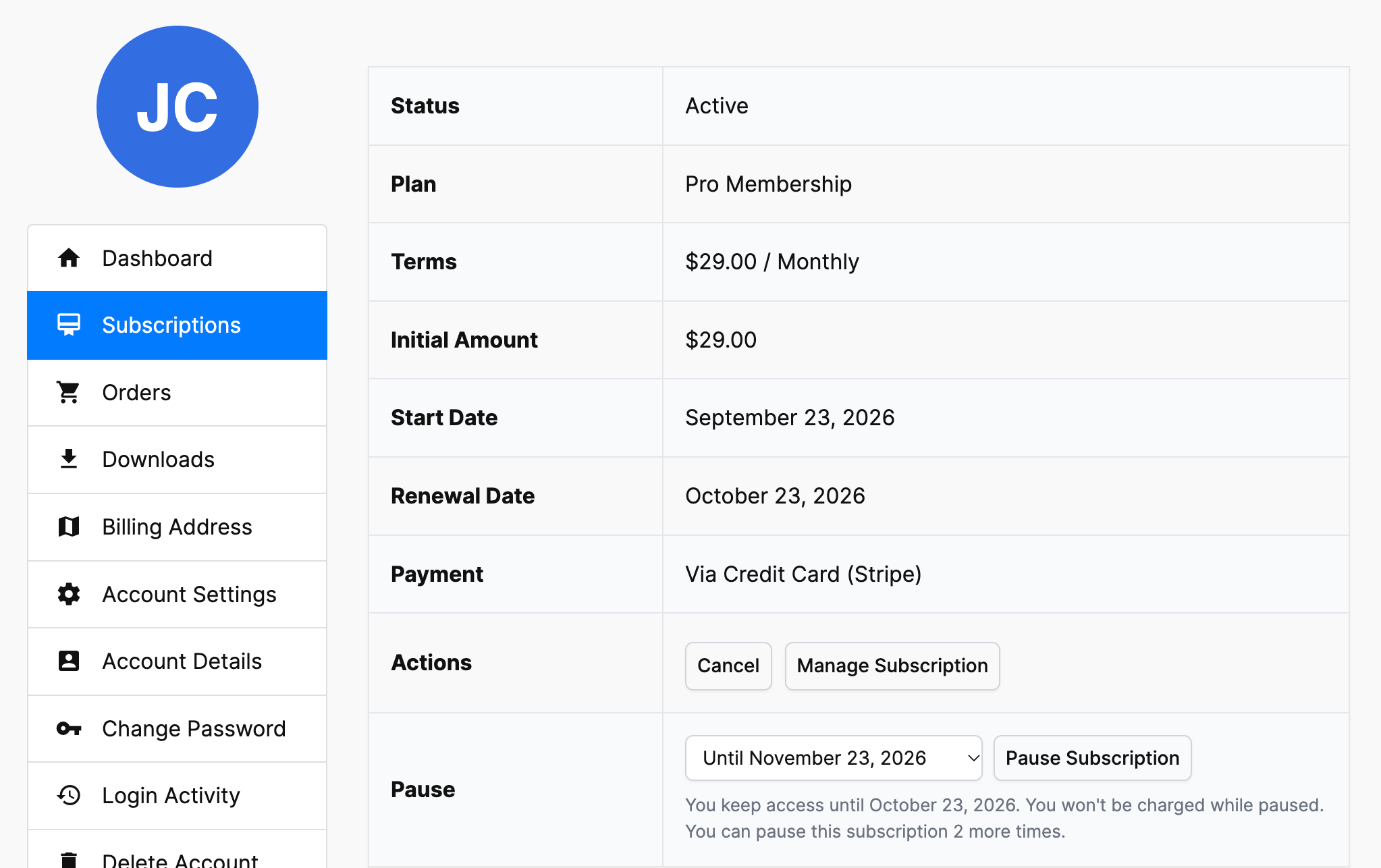
You control the maximum pause length, how many times a subscription can be paused, whether open-ended pauses are allowed, and different rules for each membership plan. Admins can pause and resume subscriptions from the WordPress dashboard, and members get a confirmation email plus a reminder before their subscription resumes. Pausing works with Stripe, PayPal, Razorpay, and Paddle.
If you use PayPal, Razorpay or Paddle, enable the pause and resume webhook events so ProfilePress stays in sync with your gateway:
- PayPal: add
BILLING.SUBSCRIPTION.SUSPENDEDto your webhook, along withBILLING.SUBSCRIPTION.ACTIVATED. - Razorpay: add
subscription.pausedandsubscription.resumed. - Paddle: add
subscription.pausedandsubscription.resumedto your notification destination.
Full setup steps: How to Let Members Pause Their Subscriptions in WordPress.
Login notification email
ProfilePress can now email users when their account is accessed, either only for logins from a new device (the default) or for every login. The email includes the date, time, device, and IP address of the login, plus a link to reset their password if it wasn’t them.
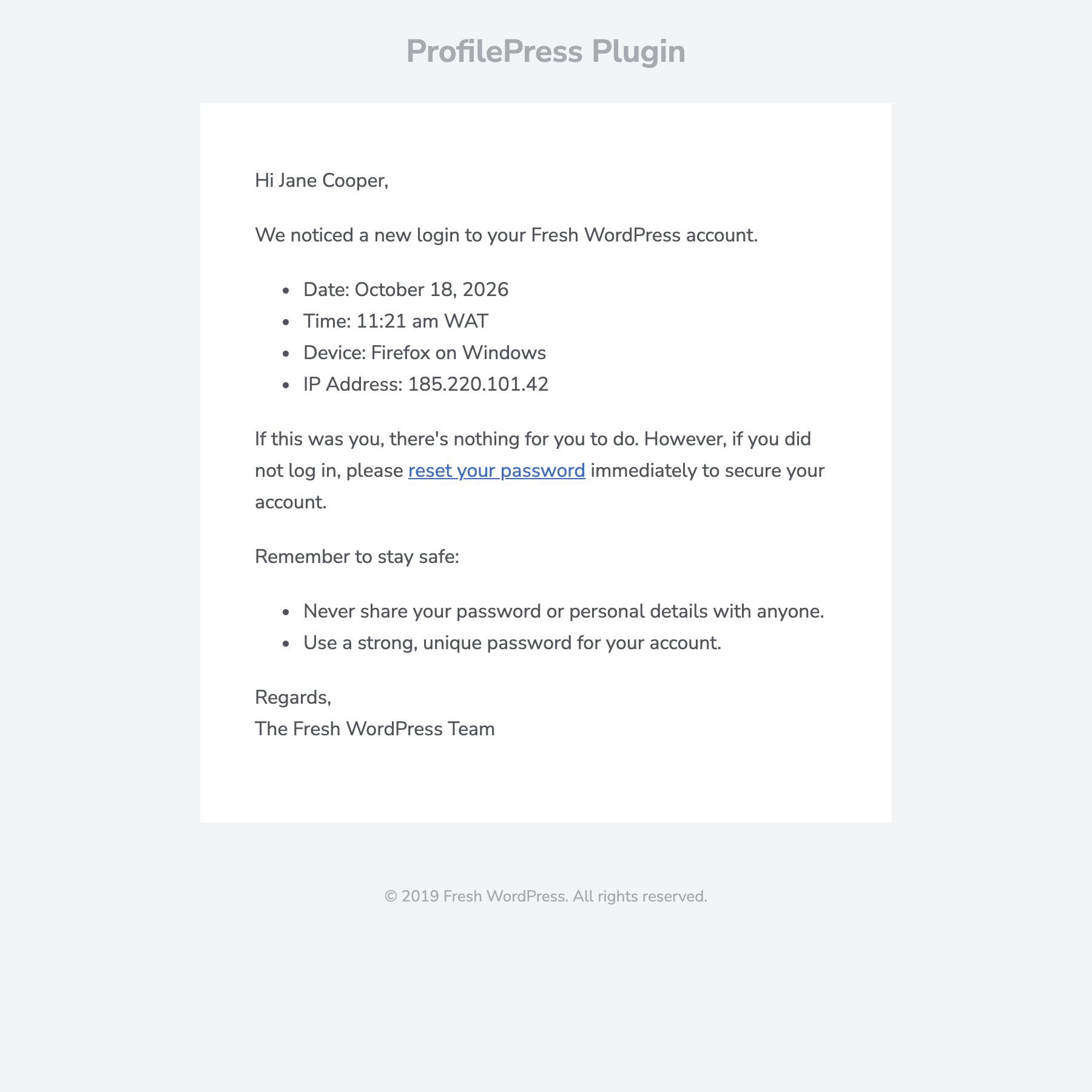
Enable it under ProfilePress >> Settings >> Emails >> Login Notification Email. It is off by default.
Login Activity tab in My Account
Members can now review recent logins in a new Login Activity tab on the My Account page, including the date, device, and IP address for each login. Logins from a new device are labeled, and members can sign out of all other devices with one click.
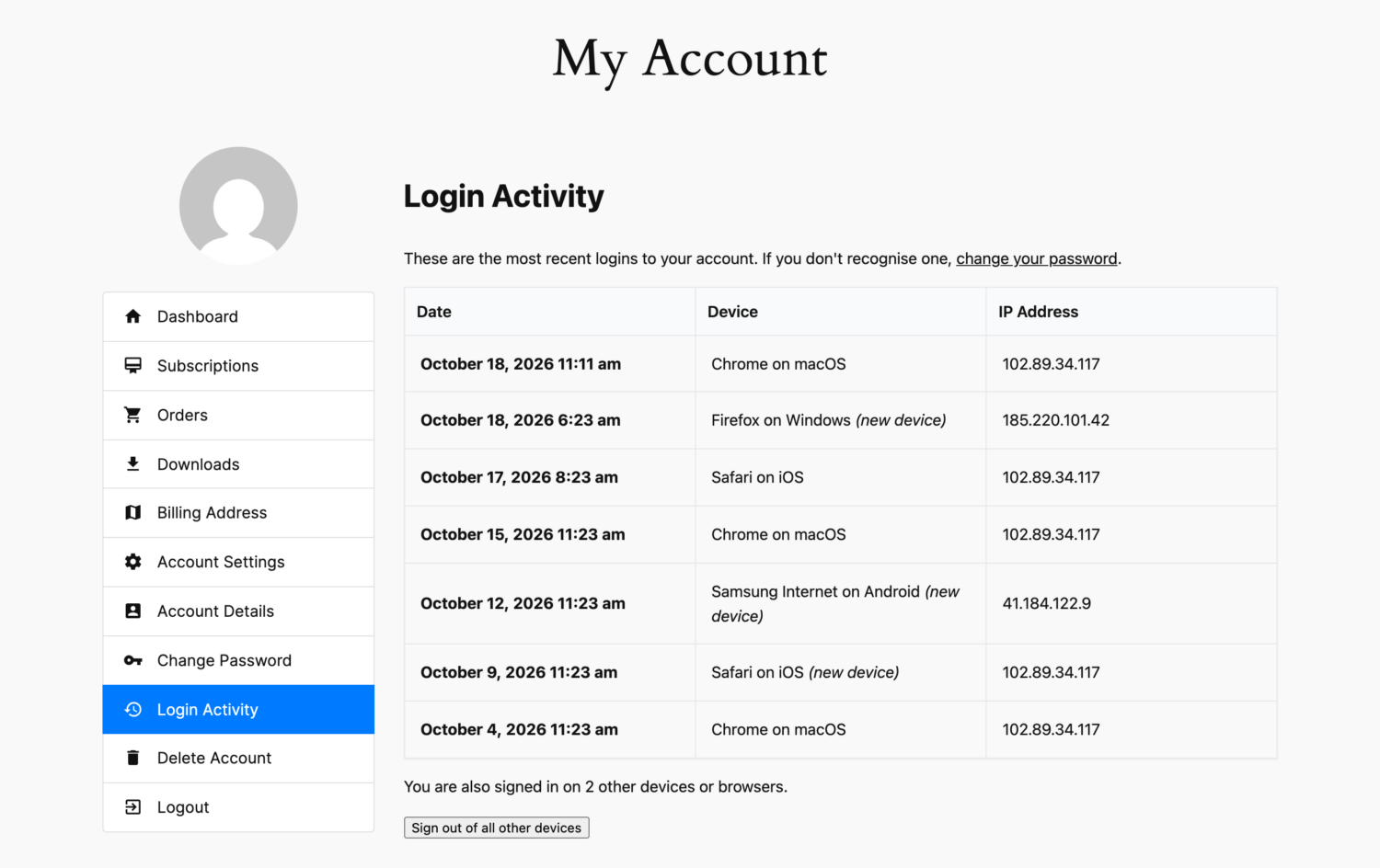
Read more: How to Track User Login Activity in WordPress.
Free Trial Ending Reminder email
A new Free Trial Ending Reminder email lets trialing customers know their free trial is about to end, a set number of days before they’re charged. While it’s enabled, trialing customers get this email instead of the Upcoming Renewal Reminder.
Rate limiting for login, registration and password reset forms
ProfilePress now limits repeated failed logins, registrations, and password reset requests from the same IP address, to slow down brute-force and spam attacks. If you already use a dedicated security plugin for this, you can turn it off under ProfilePress >> Settings >> General >> Login with the Disable Rate Limiting setting.
Improvements
- Members land in My Account after signup, checkout and login.
- Clearer paywall messages: the paywall now names the plans required to access the content, with Join and Log in links.
- Real server-side validation of required registration form fields, and registrations without a password are rejected when the form has a password field.
- Registration passwords are saved exactly as typed, so they always match at login.
- Disabled user registration is flagged before checkout, instead of checkout failing.
- Inline email validation during checkout, and LoginGuard protection on checkout and registration auto-login.
- Generated utility pages and admin accounts are kept off the public site.
- Coupons are revalidated when totals are calculated, fixing a race condition.
- User moderation is now enabled by default for checkout.
- Improved security of the license upgrader, and upgraded internal PHP dependencies.
Bug Fixes & Security
These releases include a large number of security fixes from our ongoing security review. We strongly recommend updating to 4.17.7 promptly.
- Shortcode injection: fixed several cases where shortcodes in profile fields, the bio field, frontend profile data, or comment content could execute on the front end.
- XSS fixes: in member directory filters, the contextual country and state checkout field, and the billing address and filename parameters.
- Member directory: fixed user meta enumeration through directory filters, and a role filter that could list users outside the directory’s configured roles.
- Forms: the registration and login form ID can no longer be tampered with to bypass invite codes, CAPTCHA or form-assigned user roles. Brute-force protection plugins now record failed logins made through ProfilePress login forms.
- File uploads: fixed unauthenticated file uploads through non-file custom fields. Files from failed registrations are now deleted.
- Checkout and plans: deactivated plans can no longer be purchased, checkout tax can no longer be bypassed, retention-only coupons can no longer be applied to new purchases, and subscribers can no longer obtain a paid plan without paying through a plan change.
- Content protection: comments on protected content are hidden from users without access, and fixed REST API and search bypasses for “Pages with Template”, “Home or Front Page” and “Blog or Posts Page” rules.
- Admin security: added missing capability checks on admin notice dismissal, login redirect settings and content protection AJAX. Email content saved by users without the
unfiltered_htmlcapability is now sanitized, and membership exports are protected against CSV formula injection and no longer written to the uploads folder. - Premium addons: improved security of user moderation, 2FA, LMS, email marketing integrations, Pay What You Want, Invite Codes, the auto-renewal checkbox, social login, email confirmation, BuddyPress, WooCommerce and passwordless login.
- LMS: LMS access is no longer revoked on subscription cancellation or expiry when another active plan still grants it. Fixed fatal errors in the Tutor LMS and Academy LMS integrations.
- Subscriptions and emails: removed the 10-per-day limit on renewal and expiration emails, stopped expiry emails going to customers who have resubscribed, fixed plan upgrades and downgrades after an old subscription expired, and kept the previous membership expiration on plan downgrades.
- Other fixes: passwordless login, the ESP Sync Tool listing all lists and audiences, discounted initial amounts on Paddle checkout, subscription amount editing when tax is disabled, the edit profile form showing updated data, searching users by country in member directories, form builder checkbox states, and PHP 8.3 and 8.5 deprecation notices.
For developers: the new
ppress_login_notification_email_enabledfilter lets you decide who receives login notification emails. For example, to send them only to administrators and editors:add_filter('ppress_login_notification_email_enabled', function ($enabled, $user) { return $enabled && array_intersect(['administrator', 'editor'], (array) $user->roles); }, 10, 2);
You can view the complete changelog here: https://profilepress.com/changelog/
– – –
Be sure to update to the latest version to take advantage of these new features and bug fixes. You can update your ProfilePress plugin from your website Dashboard by navigating to Dashboard>>Updates. You can also download the latest version from your ProfilePress account dashboard.
We are committed to improving our platform’s functionality and providing our users with the best possible experience.
If you have any feedback or suggestions, please contact our support team; we’ll gladly assist you. Thank you for using ProfilePress, and we hope you enjoy the new features.