
Per-seat pricing means a customer pays for each person who uses what they bought. Ten users cost ten times as much as one. It’s common in business software, and it works just as well for memberships and online courses sold to teams.
This guide explains how per-seat pricing works, when it beats fixed or flat pricing, how to choose your limits, and how renewals, seat changes, coupons, and taxes work when you charge per user in WordPress with ProfilePress.
What is per-seat pricing?
With per-seat pricing, you set a price for one seat, and the buyer chooses how many seats they need. A seat is one person’s access: one login to your membership, your courses, or your community.
The buyer is usually a manager or business owner buying for their team. They pay once for everyone, then add their colleagues. If the team grows, they buy more seats. If it shrinks, they pay for fewer.
Per-seat vs fixed seats vs flat pricing
| Model | How it works | Good for | Watch out for |
|---|---|---|---|
| Per seat | A price per person, times the number of seats the buyer picks. | Teams of very different sizes; revenue that grows with the team. | Buyers may share logins to save seats. |
| Fixed seats | Packages with a set number of seats, such as 5, 10 or 25, each at its own price. | A simple pricing page with clear tiers. | A team of 11 has to buy the 25-seat package. |
| Flat | One price, however many people use it. | Small, predictable groups, or when you want the simplest offer. | A team of 200 pays the same as a team of 5. |
Pros and cons of per-seat pricing
Pros
- Fair to every team size. A team of 3 and a team of 300 both pay for what they use.
- Revenue grows with your customers. When a client hires, you earn more without making a new sale.
- Easy to explain. “$15 per person per month” needs no pricing table.
- Easy to budget for. Managers know exactly what adding a person will cost.
Cons
- Big teams see a big number. A 100-seat order can be hard to approve, even if the per-person price is fair.
- Some buyers under-buy. They buy fewer seats than they need and share logins.
- Seat changes need care. You need fair rules for adding and removing seats part-way through a billing period.
Many sites offer both: per-seat pricing for most teams, plus a fixed or custom plan for very large ones.
How to choose your seat limits
Minimum seats. Set the minimum where a team plan stops making sense as a single purchase. If two people would just buy two individual plans, set the minimum to 3 or 5. A minimum also stops team plans being used as a cheaper individual plan.
Maximum seats. Set a maximum when very large teams should talk to you first, for a custom price, onboarding, or invoicing. Leave it empty if any size is welcome.
Per-seat price. Team seats are usually priced a little below your individual plan to reward bulk buying, but not so low that individuals club together to buy a team plan instead.
The owner’s seat. Decide whether the buyer uses one of the seats. A manager buying training for their staff often won’t take the course themselves, so every seat should be for someone they invite. A small business owner joining in with their team probably should use a seat.
How per-seat pricing works in ProfilePress
Per-seat pricing is part of the Team Memberships add-on, included in the ProfilePress Pro Plus and Agency plans. You turn any membership plan into a team plan, and the plan’s price becomes the price of one seat.
At checkout
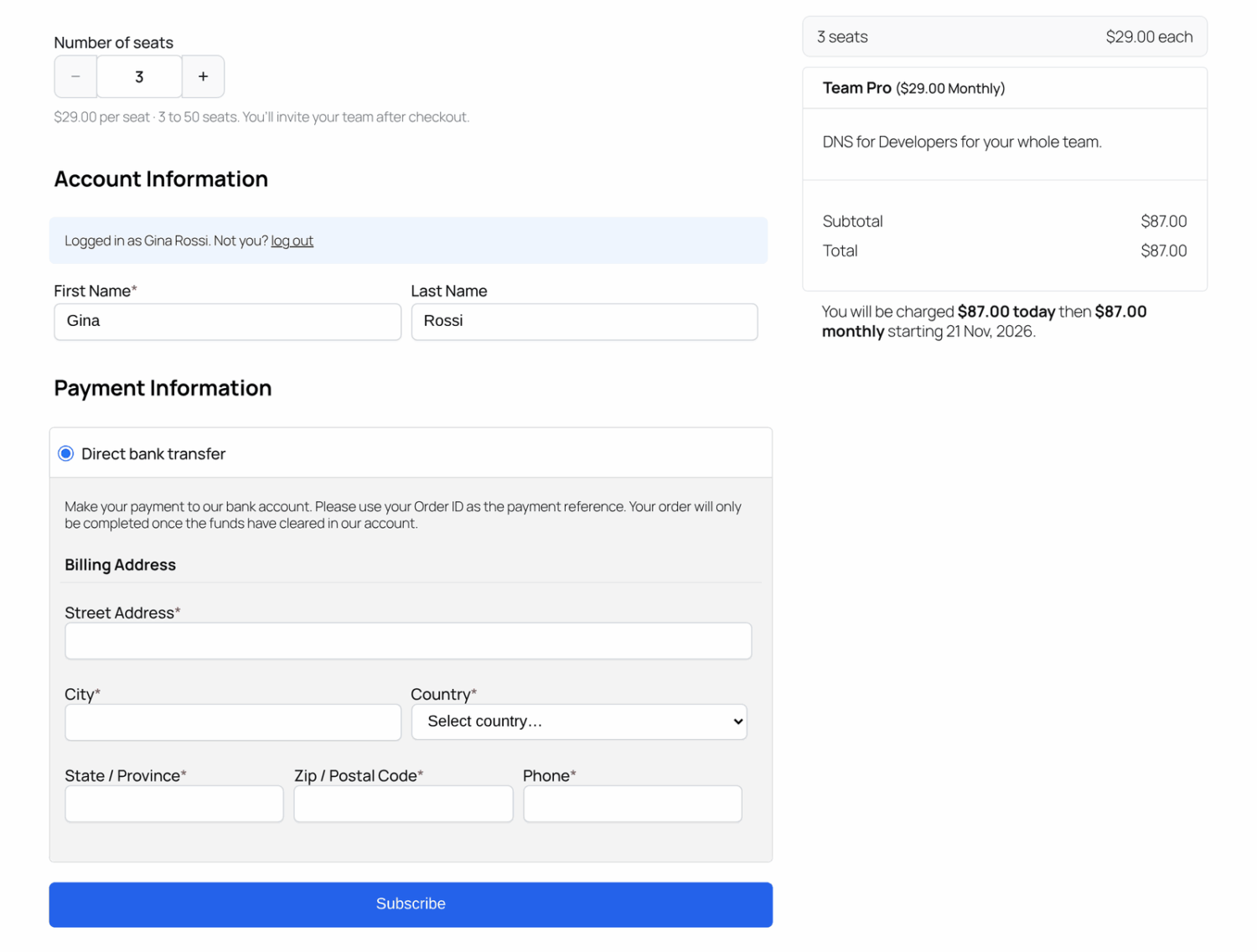
Buyers choose the team size with a Number of seats picker, between your minimum and maximum. A note shows the price per seat and the allowed range, and the order summary updates as they change it. To send a buyer to checkout with a team size already chosen, add seats=10 to the plan’s checkout link.
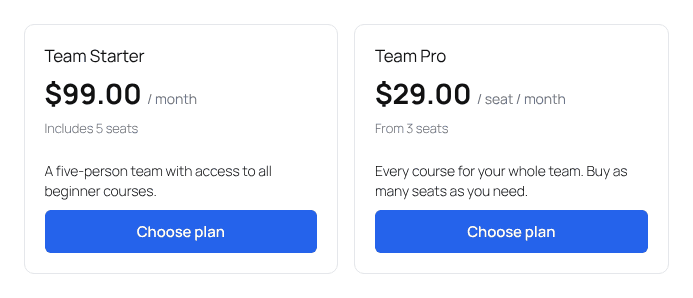
On the plan cards that ProfilePress shows on the checkout page and with the [profilepress-plans] shortcode, a per-seat plan reads like “$29.00 / seat / month” with its minimum, such as “From 3 seats”, and a fixed-seat plan shows how many seats it includes, such as “Includes 5 seats”.
If you build your own pricing table instead, label the plan clearly, such as “Team plan, $15 per seat per month”. See how to show membership plans on any page.
Renewals
The seat price is multiplied by the number of seats for the first payment and every renewal. The whole team renews in one payment from the owner.
Signup fees
A signup fee is charged once per team, not once per seat. That suits a one-off onboarding or setup fee.
Coupons and taxes
Coupons and taxes apply to the team’s total. A 10% coupon takes 10% off the whole order. A $50 coupon takes $50 off the order, not $50 per seat. As with any ProfilePress coupon, you choose whether it applies to the First Payment Only or is Recurring.
Adding and removing seats
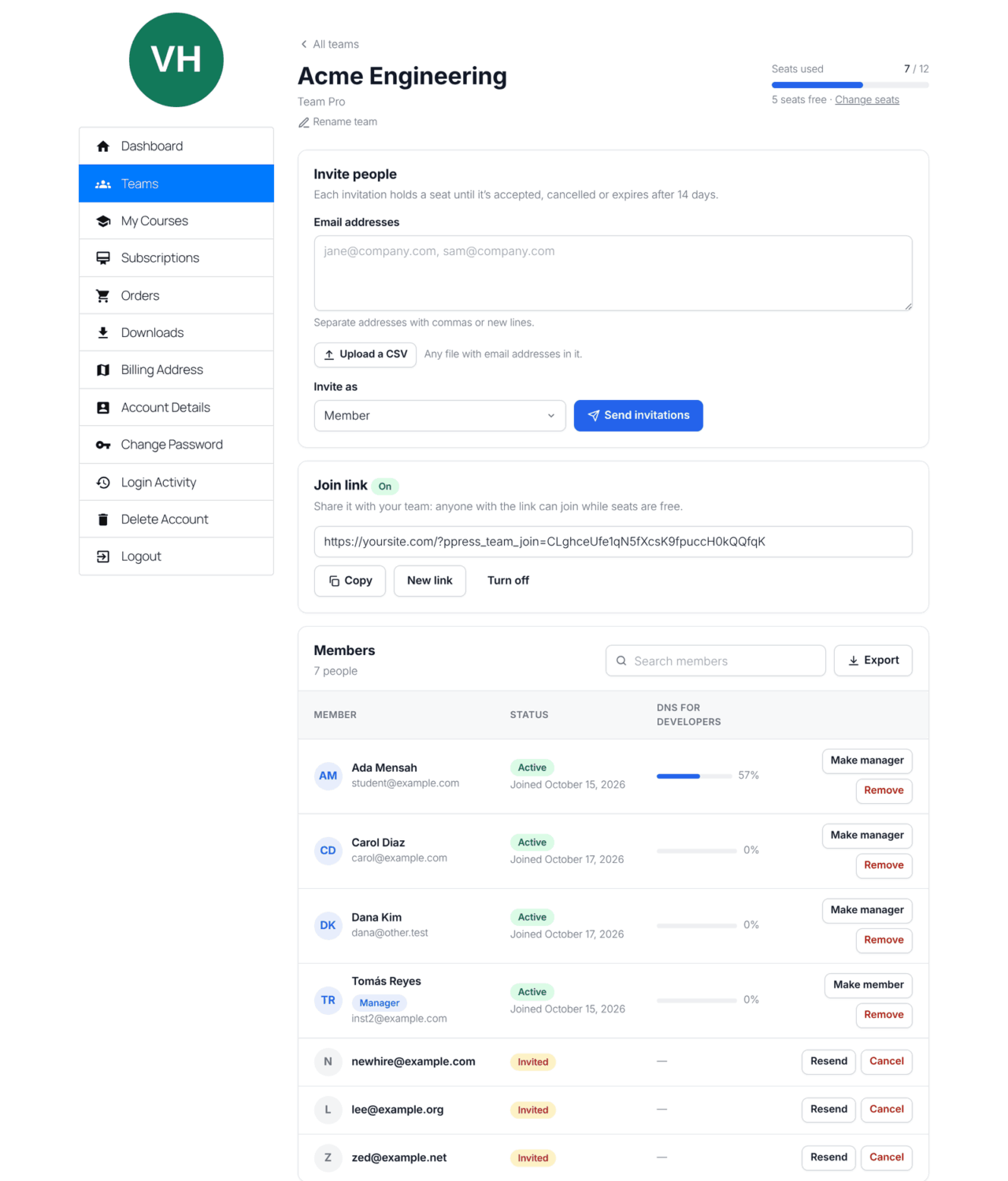
Owners change their seat count themselves, from Change seats on their team page or Change Seats under My Account » Subscriptions. Members keep their access throughout.
- Adding seats starts a new billing period today. The owner pays the new team price, less credit for the unused part of the current period.
- Removing seats keeps the renewal date. The lower price applies from the next renewal.
- The count can’t go below the seats in use (members plus open invitations), so nobody is dropped by a seat change.
A worked example
Say you sell a sales training membership. Individuals pay $150 a year. You create a yearly team plan at $120 per seat, with a minimum of 5 seats, a maximum of 50, and Owner Uses a Seat unchecked.
- Purchase. A sales manager buys 10 seats: 10 × $120 = $1,200 for the year. They invite 10 people and don’t use a seat themselves, but still have access as the owner.
- With a coupon. If they used a 10% first-payment coupon, they’d pay $1,080 today and $1,200 at renewal. Tax, if you charge it, is worked out on the team’s total.
- Adding seats. Six months in, the team grows, and the manager changes to 15 seats. The new price is 15 × $120 = $1,800 a year. Half of the current year is unused, so they get $600 credit and pay $1,200 today. A new year starts today, renewing at $1,800.
- Removing seats. Later, two people leave, and the manager drops to 13 seats. The renewal date stays the same, and the next renewal is 13 × $120 = $1,560.
Compare that with a fixed 25-seat package: the manager would have paid for 25 seats from day one, or had to switch packages when the team grew.
Fixed seats in ProfilePress
If you prefer packages, choose Fixed seat pricing instead. The plan price buys a set number of seats, and checkout says how many are included. To let teams move between sizes, create team plans of different sizes and put them in one plan group; owners change size by changing plan.
There’s no separate flat “unlimited users” option. The closest is a fixed plan with a generous number of seats.
How to set up per-seat pricing
- With ProfilePress Pro installed, activate Team Memberships under ProfilePress » Addons.
- Go to ProfilePress » Membership Plans and add a plan. Enter the price of one seat and the billing period.
- Set what the plan gives: protected content, a user role, courses, and so on.
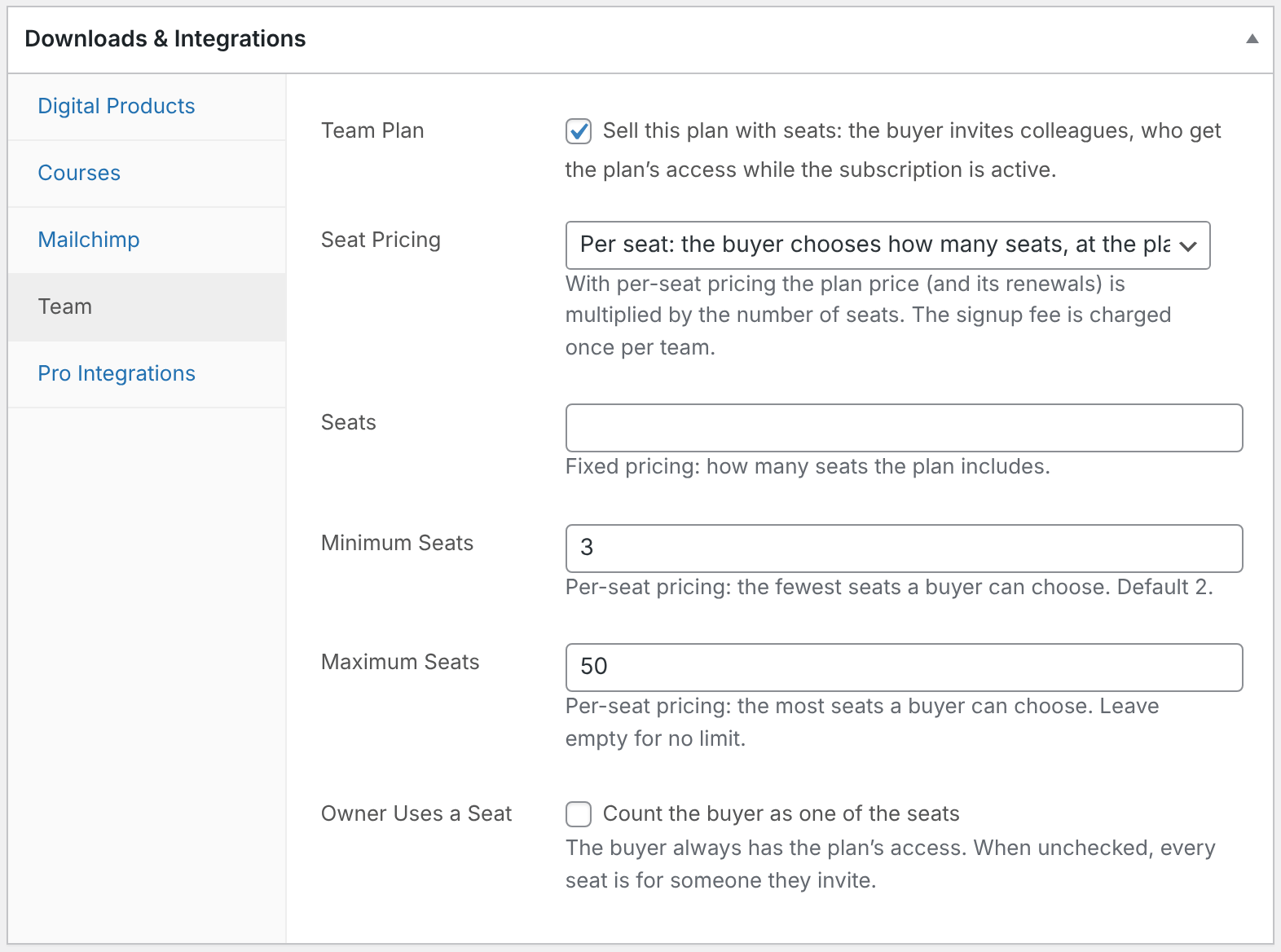
- In the Downloads & Integrations box, open the Team tab, check Team Plan, and choose Per seat.
- Set Minimum Seats (default 2), Maximum Seats (empty for no limit), and Owner Uses a Seat, then save.
For invitations, team management, and everything else after checkout, see how to sell group and team memberships. If your courses are in another LMS, see how to sell team access to LearnDash, LifterLMS or Tutor LMS courses.
Frequently asked questions
Can I give a team extra seats without charging them?
Yes. Open the owner’s subscription under ProfilePress » Subscriptions and change Seats in the Team box. This doesn’t change what the customer pays, so it’s handy for custom deals.
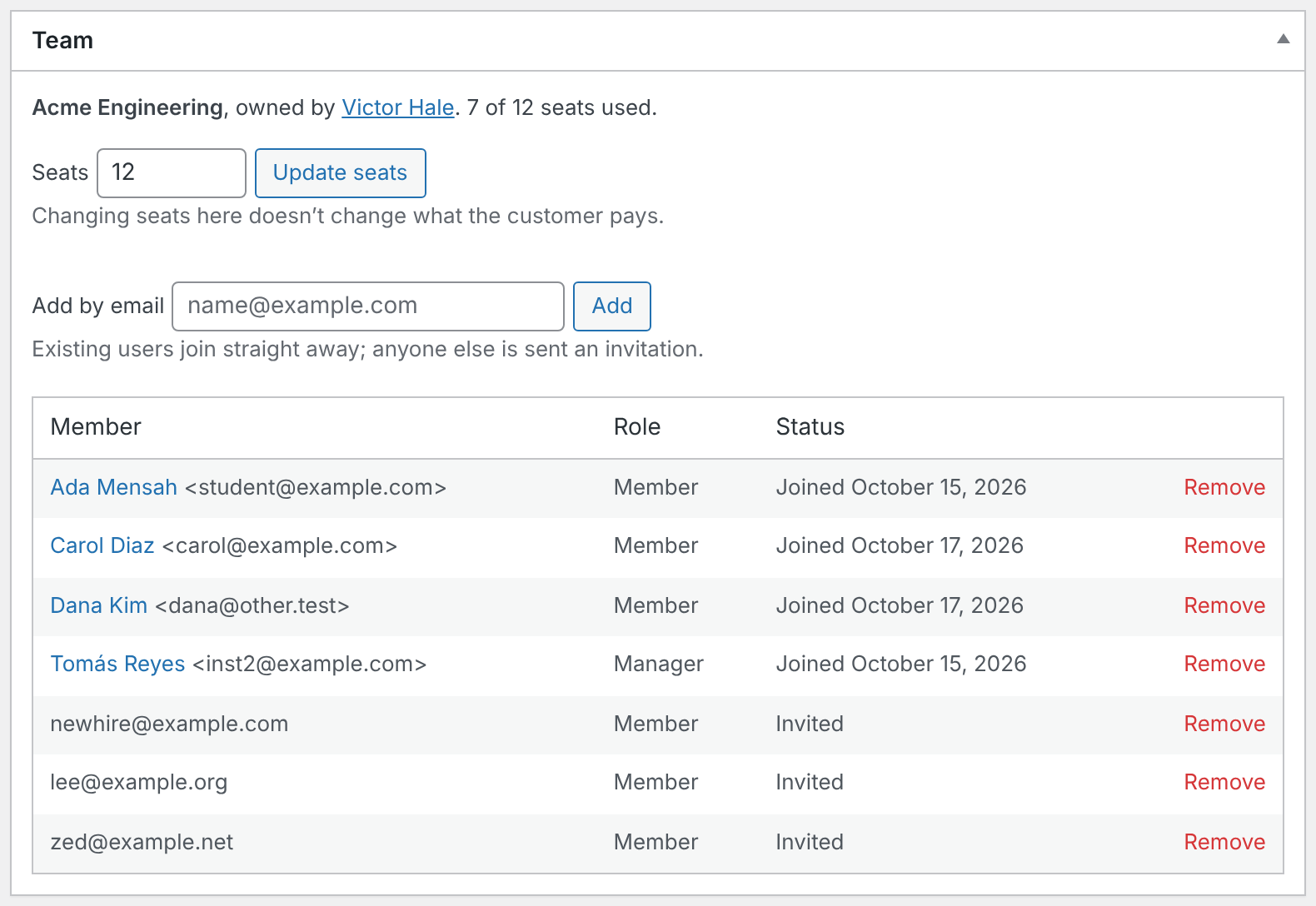
What happens if I set fewer seats than are in use?
Nobody is removed. The team can’t invite anyone new until enough seats are free.
Does per-seat pricing work with one-time payments?
Yes. The price is multiplied by the number of seats for that single payment. Subscriptions also multiply every renewal.
Do team members need their own subscription?
No. Only the owner has a subscription. Members’ access comes from it, so renewals, cancellations, and refunds apply to the whole team.
Can someone buy a second team?
Yes, by buying the plan again. Each subscription has one team.
Start charging per seat
Per-seat pricing lets one plan fit a team of 3 and a team of 50, and it grows your revenue as your customers grow. With ProfilePress Pro and Team Memberships, it’s one tab on a plan you already have.
Get ProfilePress Pro or read how to set up team memberships.