
Your team needs to learn a new process, a new tool or a compliance rule. You could run the same session again and again, or send a long document that nobody reads to the end.
Neither approach tells you who actually learned anything. And when an auditor or a client asks for proof of training, you have nothing to show.
An online training course fixes both problems. In this guide, we’ll show you how to create an online training course step by step, whether you’re training your own staff or selling training to other companies, and how to run it from your WordPress site with ProfilePress.
Quick Answer: To create an online training course, define measurable objectives, outline short lessons, and add quizzes with a passing score. Then issue certificates and track completion. In WordPress, the free ProfilePress course builder covers lessons, quizzes, certificates and reports, and its Team Memberships add-on lets you sell seats to companies.
What Is an Online Training Course?
An online training course teaches people the skills or rules they need for a job and proves they’ve learned them. It differs from a general online course in three ways: it has clear, measurable objectives, it checks understanding with assessments, and someone, usually a manager or a compliance officer, needs to see who has completed it.
Here’s how the two compare:
| General online course | Online training course | |
|---|---|---|
| Goal | Teach a topic or skill | Change how people do a job |
| Assessments | Optional | Required, with a passing score |
| Who checks progress | The student | A manager, HR or a compliance officer |
| Proof | Nice to have | A certificate and completion records |
Why Create an Online Training Course?
Moving training online saves time and gives you records you can trust.
- Consistent training: Everyone gets the same content, however many people you train.
- Training on their schedule: Learners fit short lessons around their work, on any device.
- Proof of completion: Certificates and reports show exactly who has finished and how they scored.
- Easier updates: Change one lesson, and everyone sees the new version.
- A new revenue stream: You can sell the same course to other companies by the seat.
Here’s what we’ll cover in this guide:
- How to Plan an Online Training Course
- How to Create an Online Training Course in WordPress
- How to Give Employees and Clients Access
- How to Track Completion and Improve Your Training
- Common Training Course Mistakes to Avoid
- Frequently Asked Questions About Online Training Courses
How to Plan an Online Training Course
Good training starts long before you record anything. These two steps shape everything that follows.
Step 1: Define What the Training Must Achieve
Start with the business problem, not the content. “New support agents resolve 80% of tickets without escalating within their first month” gives you something to design and measure against. “Customer service training” doesn’t.
Turn the goal into three to six learning objectives. Each one should start with a verb you can check:
- Identify a phishing email.
- Configure a client’s DNS records.
- Apply the refund policy.
Every lesson and quiz question should map to one of these objectives.
Step 2: Know Your Learners
Before you build, answer four questions about the people taking the course.
- What do they already know? Skip what experienced staff already do every day, or offer a quiz that lets them test out of it.
- When will they train? People fitting training around work need short lessons they can finish in a coffee break.
- On what device? Field staff and frontline workers often train on a phone.
- Is it mandatory? Compliance training needs completion records and often a yearly refresher.
How to Create an Online Training Course in WordPress
Now you can build the course. ProfilePress includes a free course builder, so your training lives on your own WordPress site.
Before You Start: You’ll need a WordPress site with ProfilePress installed. Lessons, quizzes, certificates and reports are free. Assignments and team seats need ProfilePress Pro add-ons, included in the Plus and Agency plans. Our getting started with courses guide covers the basics.
Step 3: Outline and Build the Course
Group your objectives into sections, and each section into short lessons of 5 to 10 minutes.
- Use video to demonstrate a task.
- Use text for policies and reference material.
- Use downloads for checklists and job aids people keep at their desk.
Real examples from the job, such as an actual support ticket or a screenshot of your own software, make training stick far better than generic scenarios.
In ProfilePress, go to ProfilePress » Courses and click Add New Course. Then add your sections and lessons on the Curriculum tab. Our guide on how to create a course in the course builder walks you through every option.
Step 4: Add Assessments
Assessments are what make it training rather than reading. End each section with a quiz tied to its objectives, and set a passing score.
ProfilePress quizzes support six question types: single and multiple choice, true/false, fill in the blank, matching and ordering. You can also add time limits, a limited number of attempts, and question banks that draw random questions, so colleagues can’t share answers. See course quizzes for every setting.
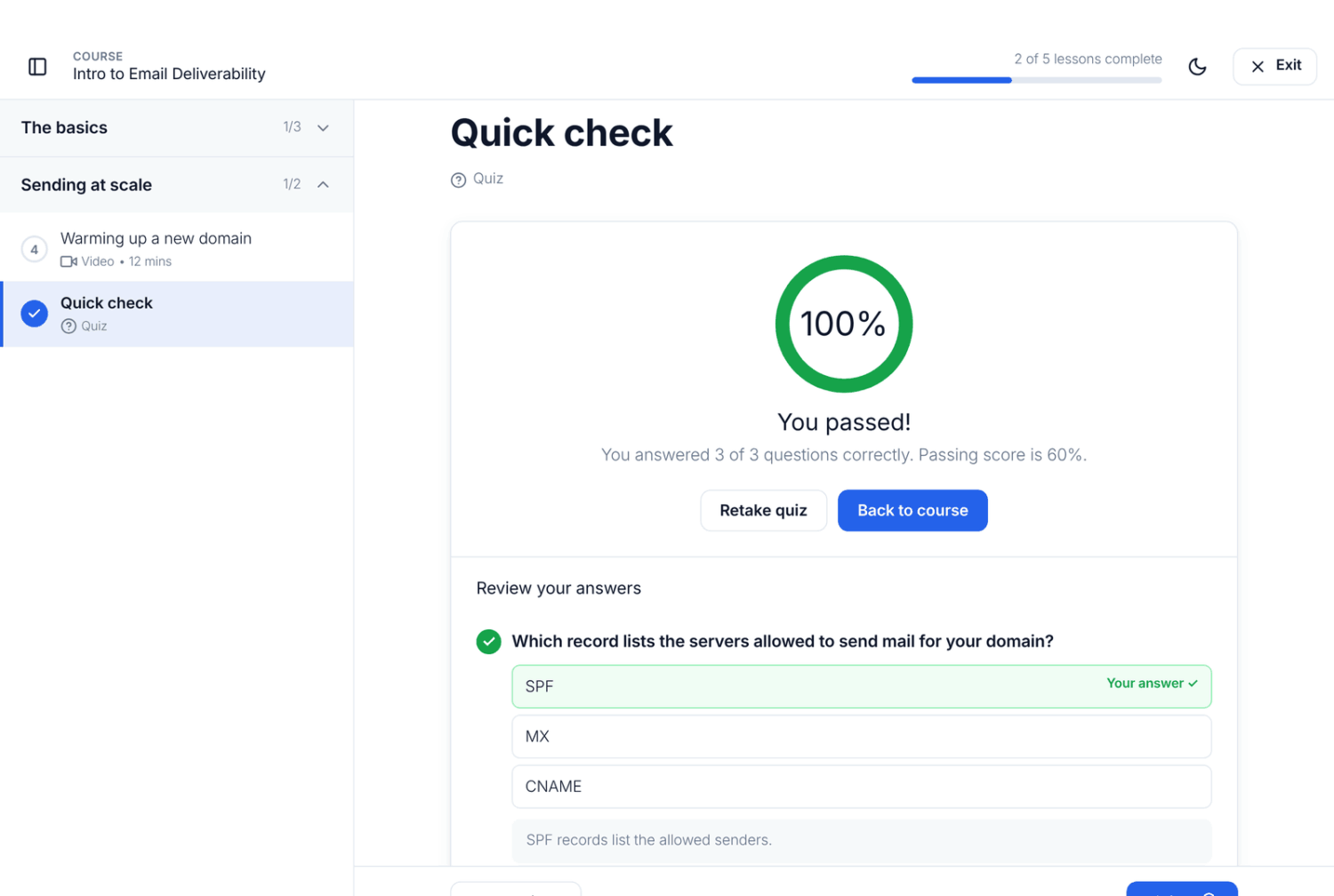
Next, turn on Require lessons to be completed in order, so learners can’t skip ahead without passing each quiz.
Pro Tip: For skills a multiple-choice question can’t check, the Advanced Courses add-on adds assignments and written-answer questions that a trainer grades by hand. It’s included in the ProfilePress Pro Plus and Agency plans.
Step 5: Issue Certificates
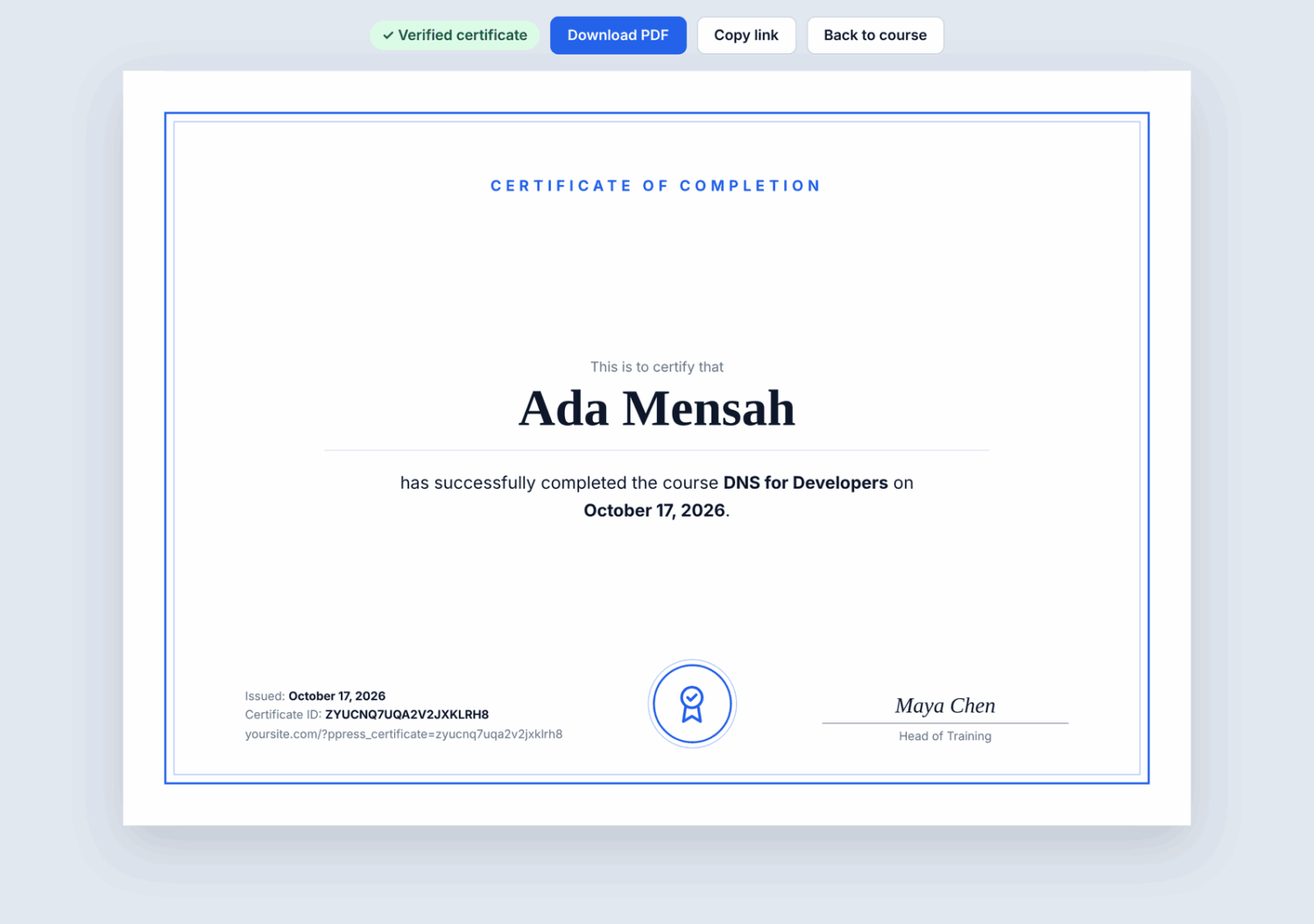
A certificate of completion gives learners proof of their training and gives managers a record. ProfilePress certificates include a verification link, so an employer or auditor can check that one is genuine. See course certificates.
For training that must be renewed, such as yearly compliance training, set an Access duration in days on the course’s Pricing & Access tab. When it runs out, access ends until the learner renews, so nobody keeps access to out-of-date training without signing up again.
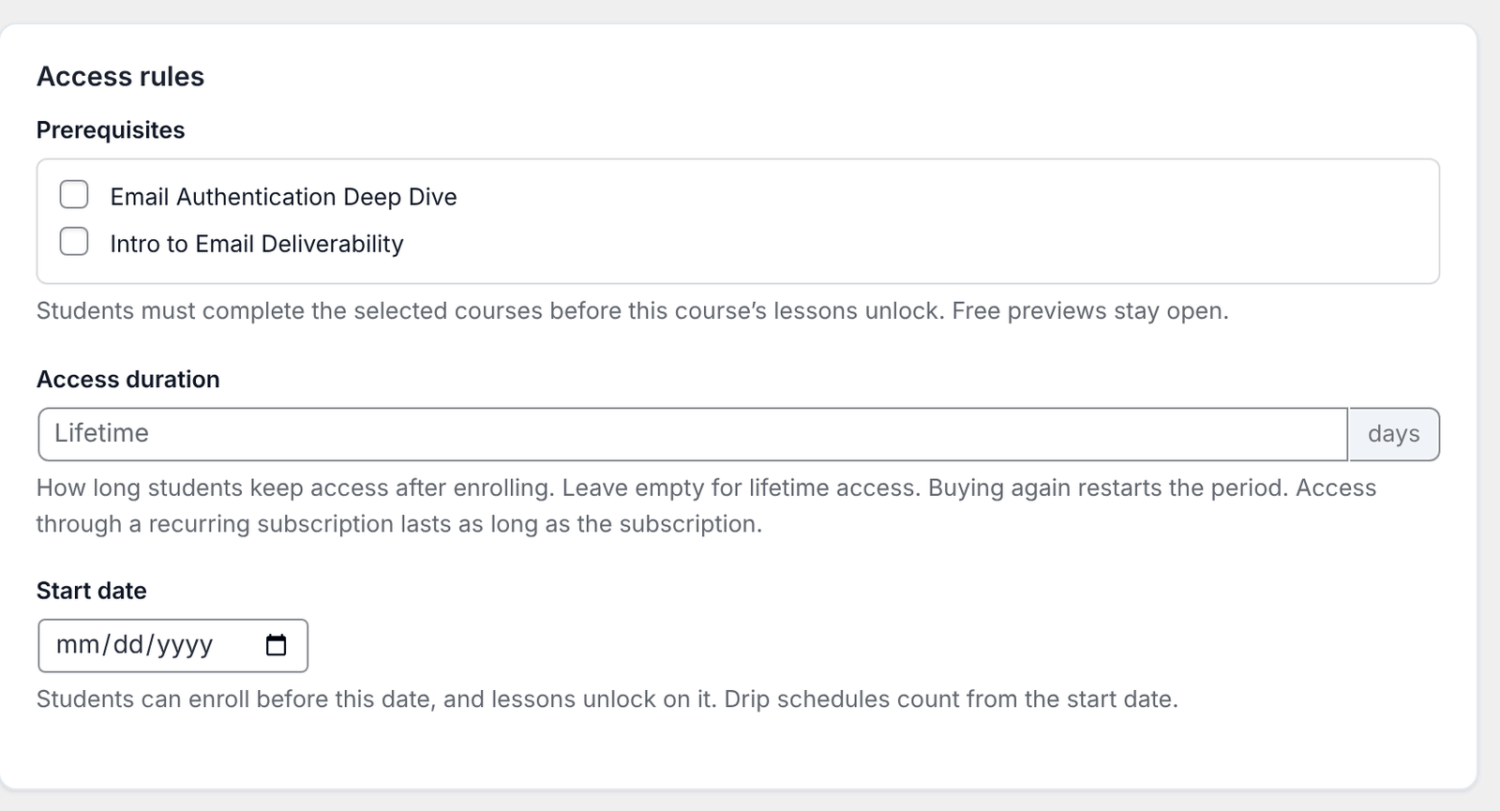
You can read more about prerequisites and start dates in course access rules.
How to Give Employees and Clients Access
How you deliver the course depends on who it’s for.
Step 6a: Training Your Own Staff
Set the course to Free for members on the Pricing & Access tab and turn off public registration, so only people you create accounts for can take it.
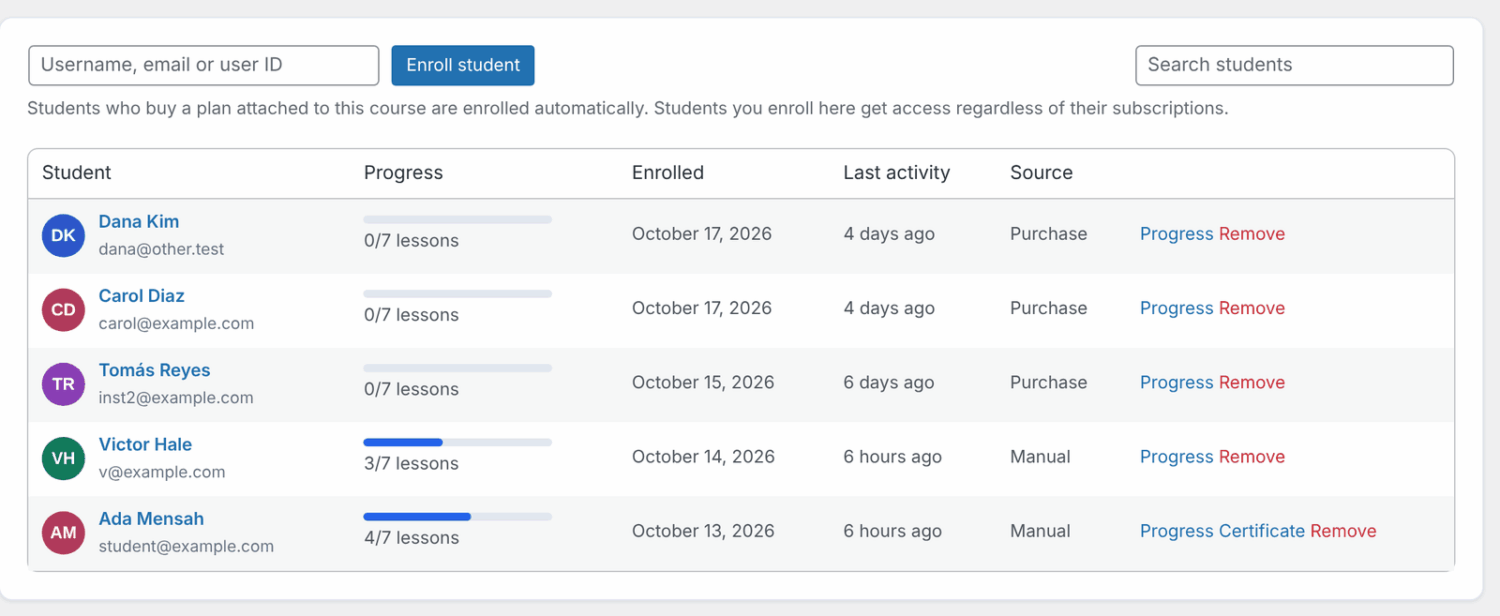
Or keep it Paid and enroll employees yourself on the course’s Students tab, by username or email address.
Step 6b: Selling Training to Other Companies
Companies want to buy for a whole team, not person by person. With the Team Memberships add-on, included in the ProfilePress Pro Plus and Agency plans, you sell a plan with seats.
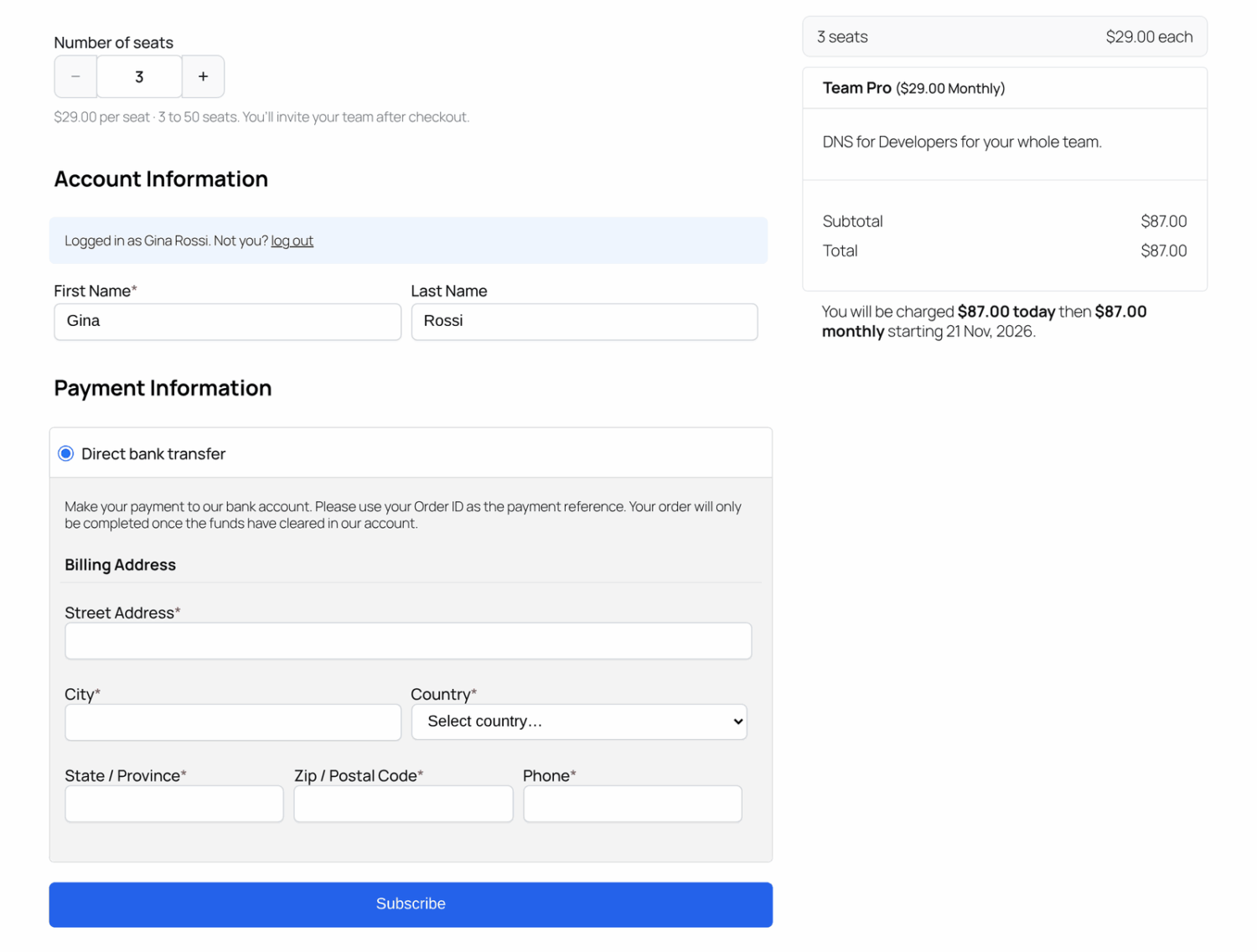
The buyer chooses how many seats at checkout and pays per seat. They then invite their staff by email, a pasted list, a CSV or a join link. Everyone they invite gets the course.
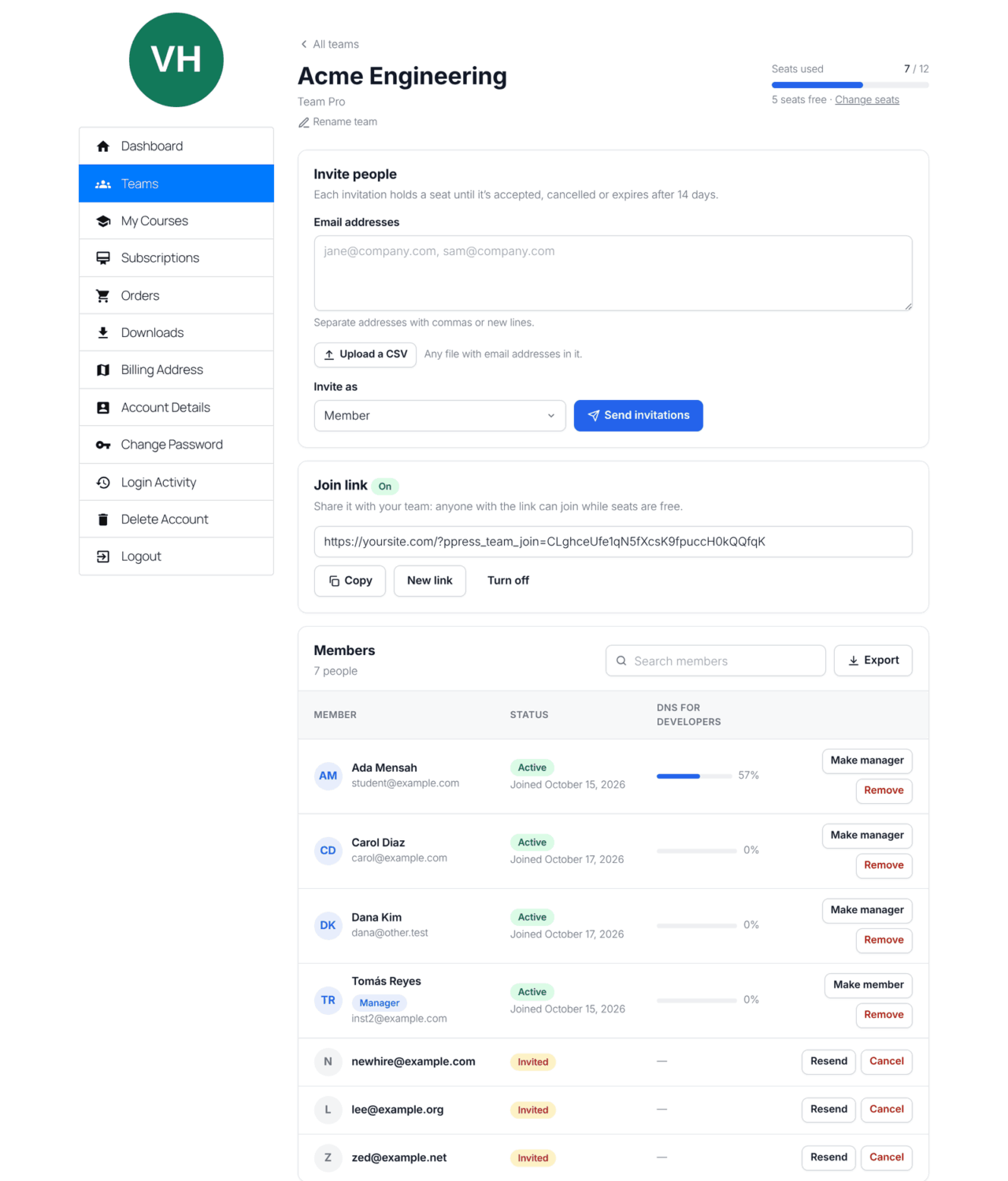
The buyer manages their team from their own account. They see each member’s progress in every course, with a CSV export for their records.
For pricing, see per-seat pricing for WordPress memberships, explained. For the full setup, read how to sell group and team memberships.
How to Track Completion and Improve Your Training
Step 7: Review Your Course Reports
Go to ProfilePress » Courses » Reports. You’ll see every course’s students, how many were active in the last 30 days, completion rates and average progress.
Open a course to see where learners drop off and how they score on each quiz. Open a learner to see exactly where they are. You can also export any course’s students to CSV for HR or an audit.
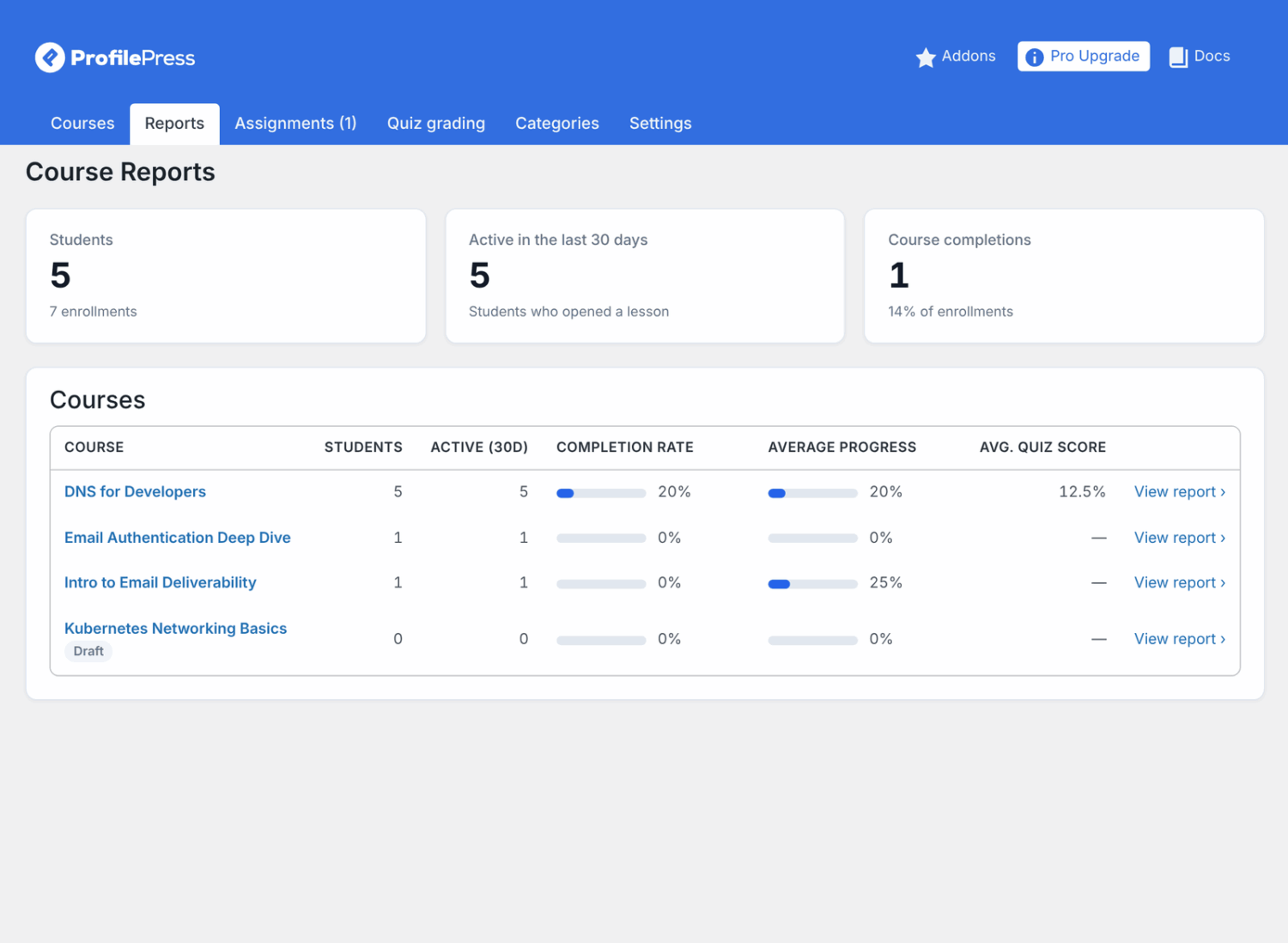
Use the numbers to improve the course. A lesson where many learners stop, or a quiz question most people get wrong, usually needs rewriting, not the learners. See course reports for every report.
Expert Tip: Review your reports a week after launch. Early drop-off points are much easier to fix before the whole company has taken the course.
Common Training Course Mistakes to Avoid
- Starting with content instead of goals: Without a measurable objective, you can’t tell whether the training worked.
- Long lessons: Hour-long videos are hard to fit around work. Keep lessons to 5 to 10 minutes.
- No passing score: A quiz without a passing mark doesn’t prove anyone learned anything.
- Generic examples: Use real tickets, screens and situations from the job.
- Forgetting refreshers: Mandatory training often needs to be repeated each year. Plan for it with an access duration.
Frequently Asked Questions About Online Training Courses
How long should an online training course be?
As short as the objectives allow. Most workplace training works best as one to two hours, split into lessons of 5 to 10 minutes that people can fit around their job.
Can I create an online training course for free?
Yes. The ProfilePress course builder, quizzes, certificates and reports are free on WordPress, so if you have a WordPress site, your only cost is hosting. Selling seats to companies needs the Team Memberships add-on, included in the ProfilePress Pro Plus and Agency plans.
How do I make sure employees actually complete it?
Make lessons short, require them in order, and set a passing score on each quiz. ProfilePress can email learners who haven’t opened the course for a while, and reports show managers who still has to finish.
Can training trigger something when someone finishes?
Yes, with the Advanced Courses add-on. Completion actions can assign a learner a user role, enroll them in the next course, add them to an email list, or send details to another system via a webhook.
What’s the difference between corporate training and an online course?
Corporate training has measurable job goals, required assessments and completion records for managers. A general online course teaches a topic and leaves progress up to the student.
Conclusion
We hope this article helped you learn how to create an online training course for employees or clients. Good training starts with a clear objective, keeps lessons short, checks understanding at every step, and proves who completed it.
With ProfilePress, you can build that on your own WordPress site, issue verifiable certificates, track every learner and, with Team Memberships, sell it to companies by the seat. Get ProfilePress to start building.
You may also want to see these guides:
- Introducing ProfilePress Courses — everything the free course builder includes.
- How to Sell Group and Team Memberships in WordPress — sell training to companies by the seat.
- How to Sell Team Access to LearnDash, LifterLMS or Tutor LMS — team seats for courses in another LMS.
- How Much Does It Cost to Create an Online Course? — budget your training course.